Type text, add images, blackout confidential details, add comments, highlights and more.
02. Sign it in a few clicks
Draw your signature, type it, upload its image, or use your mobile device as a signature pad.
03. Share your form with others
Send nomination of guardian form via email, link, or fax. You can also download it, export it or print it out.
How to use or fill out guardian nomination with our platform
Ease of Setup
DocHub User Ratings on G2
Ease of Use
DocHub User Ratings on G2
Click ‘Get Form’ to open the guardian nomination document in the editor.
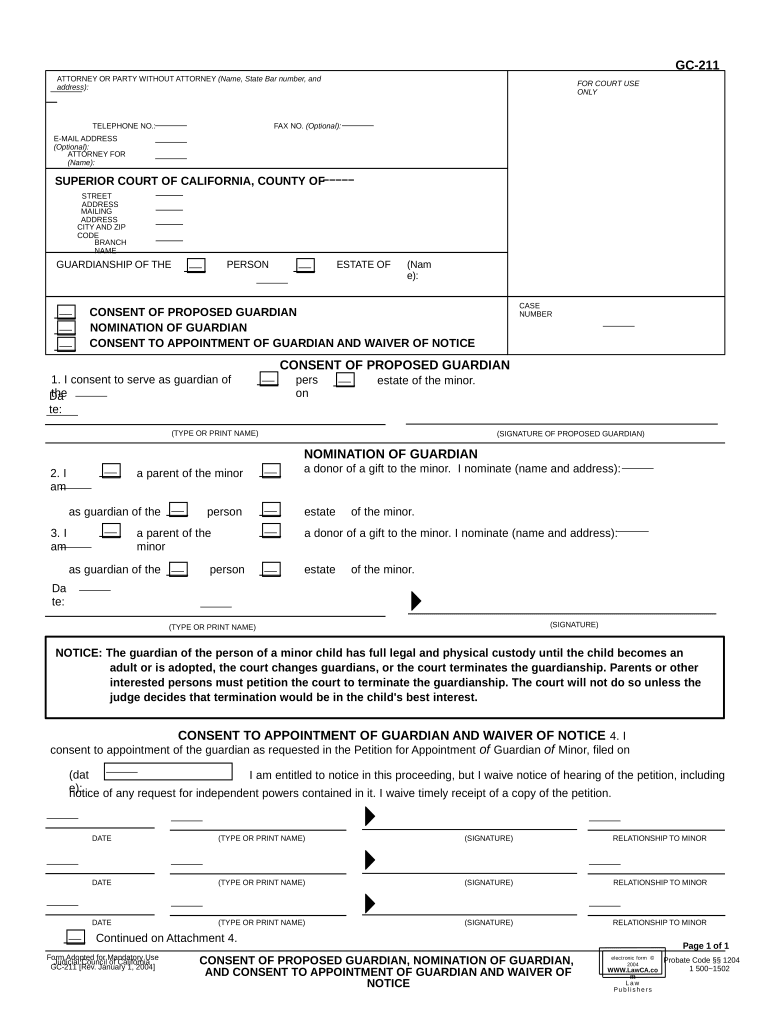
Begin by entering your information in the 'Attorney or Party Without Attorney' section, including your name, state bar number, address, telephone number, and email address if desired.
In the 'Guardianship of the Person' section, provide the name of the minor and case number. This identifies who you are nominating a guardian for.
Complete the 'Consent of Proposed Guardian' section by typing or printing your name and signing to confirm your willingness to serve as guardian.
Fill out the 'Nomination of Guardian' section. Indicate your relationship to the minor and nominate a guardian by providing their name and address.
Finally, complete the 'Consent to Appointment of Guardian and Waiver of Notice' section. Sign and date it to finalize your consent.
Start using our platform today for free to streamline your guardian nomination process!
Nomination of Guardian form CaliforniaConsent to appointment of guardian and Waiver of NOTICEGuardianship nomination formGuardian petitionGC220GC210Guardian dutiesGC020
Security and compliance
At DocHub, your data security is our priority. We follow HIPAA, SOC2, GDPR, and other standards, so you can work on your documents with confidence.
This chapter summarizes the substantive law governing the appointment of an individual, corporation, agency, or official as the general guardian, guardianRead more
Tell the court about a person you want to nominate to act as guardian, or tell the court that you have been nominated and that you agree to act as guardian.Read more
Cookie consent notice
This site uses cookies to enhance site navigation and personalize your experience.
By using this site you agree to our use of cookies as described in our Privacy Notice.
You can modify your selections by visiting our Cookie and Advertising Notice.