Type text, add images, blackout confidential details, add comments, highlights and more.
02. Sign it in a few clicks
Draw your signature, type it, upload its image, or use your mobile device as a signature pad.
03. Share your form with others
Send it via email, link, or fax. You can also download it, export it or print it out.
How to use or fill out custody modification with our platform
Ease of Setup
DocHub User Ratings on G2
Ease of Use
DocHub User Ratings on G2
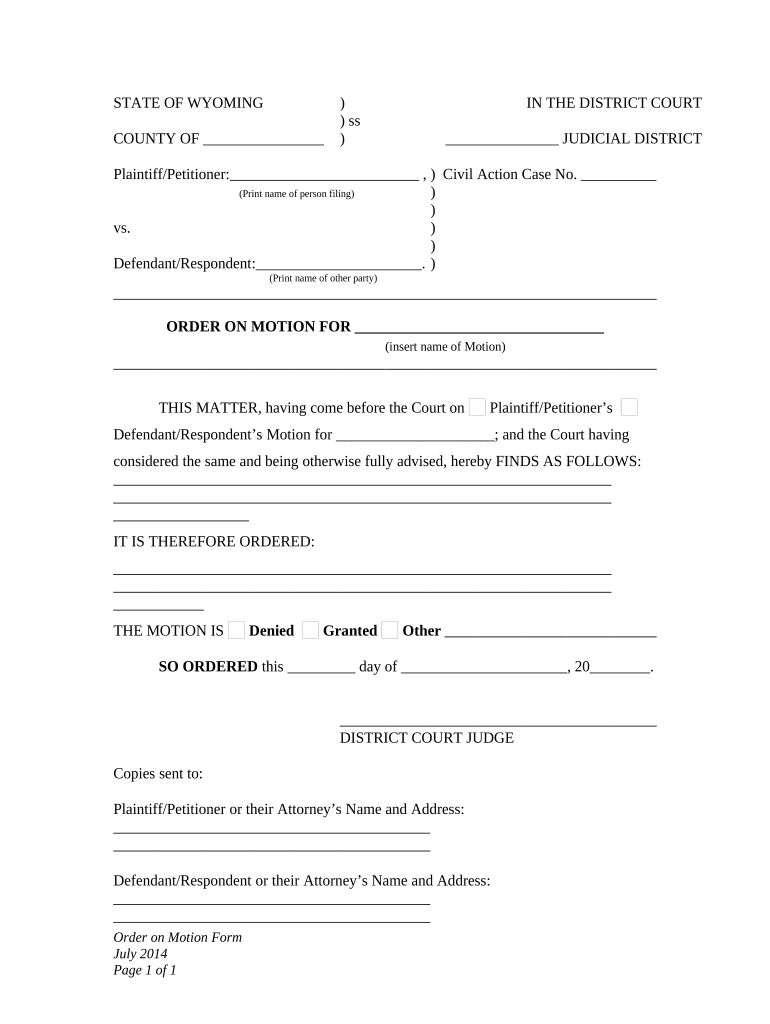
Click ‘Get Form’ to open the custody modification document in the editor.
Begin by filling in the 'Plaintiff/Petitioner' section with your name. This identifies you as the person filing for the modification.
In the 'Defendant/Respondent' field, enter the name of the other party involved in the custody case.
Specify the type of motion you are filing by inserting it into the designated area. This could be a request for change in custody arrangements or visitation rights.
Review and select whether your motion is 'Granted', 'Denied', or 'Other'. This is crucial as it reflects your request's outcome.
Finally, date and sign at the bottom where indicated, ensuring all parties receive copies of this order.
Start using our platform today to streamline your custody modification process for free!
Custody modification formCustody Modification DelawarePetition to modify custody UtahOregon custody modification formsHow to change a court order for child custodyChild custody modification forms CaliforniaDelaware Custody Modification formsStipulation to Modify
Security and compliance
At DocHub, your data security is our priority. We follow HIPAA, SOC2, GDPR, and other standards, so you can work on your documents with confidence.
May 1, 2026 If you would like to change a child support or custody order that resulted from a SAPCR, you will need to file with the court for a modification.Read more
Dec 13, 2018 An order of a court of this State for custody of a minor child may be modified or vacated at any time, upon motion in the cause and a showingRead more
Passive Samplers for Investigations of Air Quality
A chain of custody should be completed to document the transfer of samples from the field to the laboratory. 5.2.1 Recording Field Conditions. Monitoring ofRead more
Cookie consent notice
This site uses cookies to enhance site navigation and personalize your experience.
By using this site you agree to our use of cookies as described in our Privacy Notice.
You can modify your selections by visiting our Cookie and Advertising Notice.