Type text, add images, blackout confidential details, add comments, highlights and more.
02. Sign it in a few clicks
Draw your signature, type it, upload its image, or use your mobile device as a signature pad.
03. Share your form with others
Send it via email, link, or fax. You can also download it, export it or print it out.
How to use or fill out parent release form with our platform
Ease of Setup
DocHub User Ratings on G2
Ease of Use
DocHub User Ratings on G2
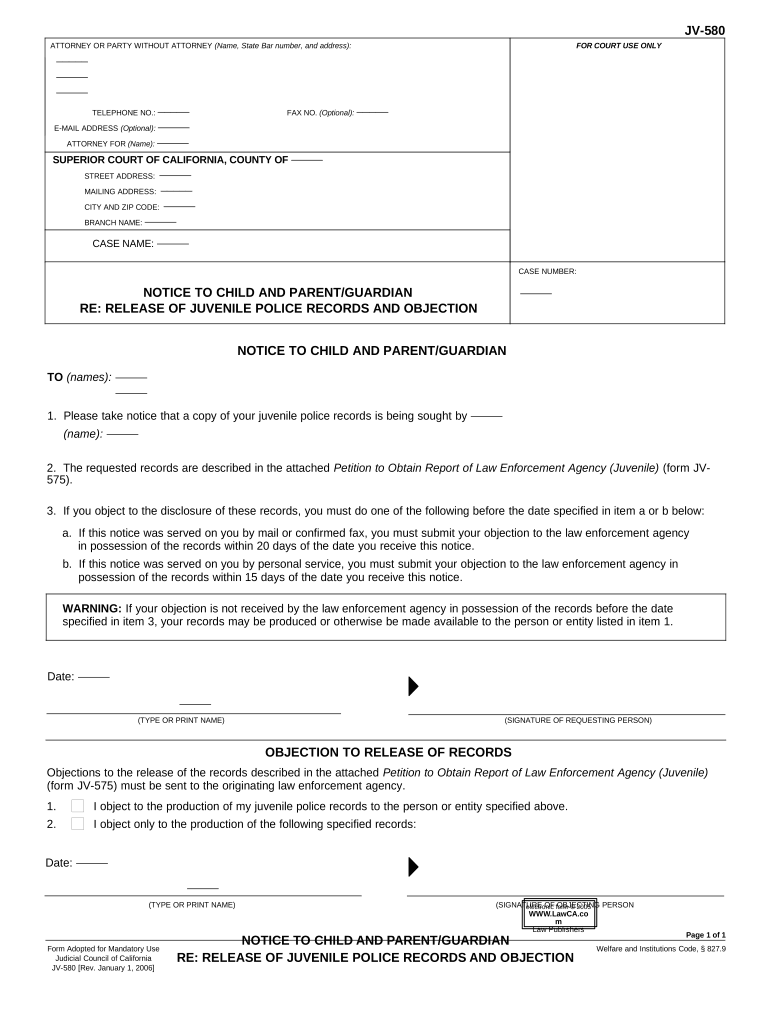
Click ‘Get Form’ to open the parent release form in the editor.
Begin by filling in your name, address, and contact information at the top of the form. This ensures that all parties can reach you regarding the records.
In the 'NOTICE TO CHILD AND PARENT/GUARDIAN' section, identify who is seeking access to the juvenile police records by entering their name.
Review the instructions carefully regarding objections. If you wish to object, note whether you received this notice by mail or personal service, as this affects your response time.
Complete the 'OBJECTION TO RELEASE OF RECORDS' section by clearly stating your objection and specifying any particular records you wish to protect.
Finally, sign and date the form at the bottom before submitting it to ensure your objection is officially recorded.
Start using our platform today for free to easily fill out and manage your documents!
Parent release form templatePrintable parent release formParent release form pdfFree printable parent release formParent release form for childParent release form onlineParental consent form for under 18Parental consent form for participation
Security and compliance
At DocHub, your data security is our priority. We follow HIPAA, SOC2, GDPR, and other standards, so you can work on your documents with confidence.
The Parental Permission form is the consent document that is used when the research participant is a child and the consent is being provided by the parent/Read more
Parental Consent for a Driver Application of a Minor
INSTRUCTIONS: 1. One parent or legal guardian must sign this form. 2. All signatures must be DocHubd or witnessed by an examiner. 3. Present this form, aRead more
I confirm that I am the parent/legal guardian of , and allow photos/videos to be published in our website, Instagram account @mspigem and Facebook.Read more
Cookie consent notice
This site uses cookies to enhance site navigation and personalize your experience.
By using this site you agree to our use of cookies as described in our Privacy Notice.
You can modify your selections by visiting our Cookie and Advertising Notice.