Type text, add images, blackout confidential details, add comments, highlights and more.
02. Sign it in a few clicks
Draw your signature, type it, upload its image, or use your mobile device as a signature pad.
03. Share your form with others
Send it via email, link, or fax. You can also download it, export it or print it out.
How to use or fill out request set aside with our platform
Ease of Setup
DocHub User Ratings on G2
Ease of Use
DocHub User Ratings on G2
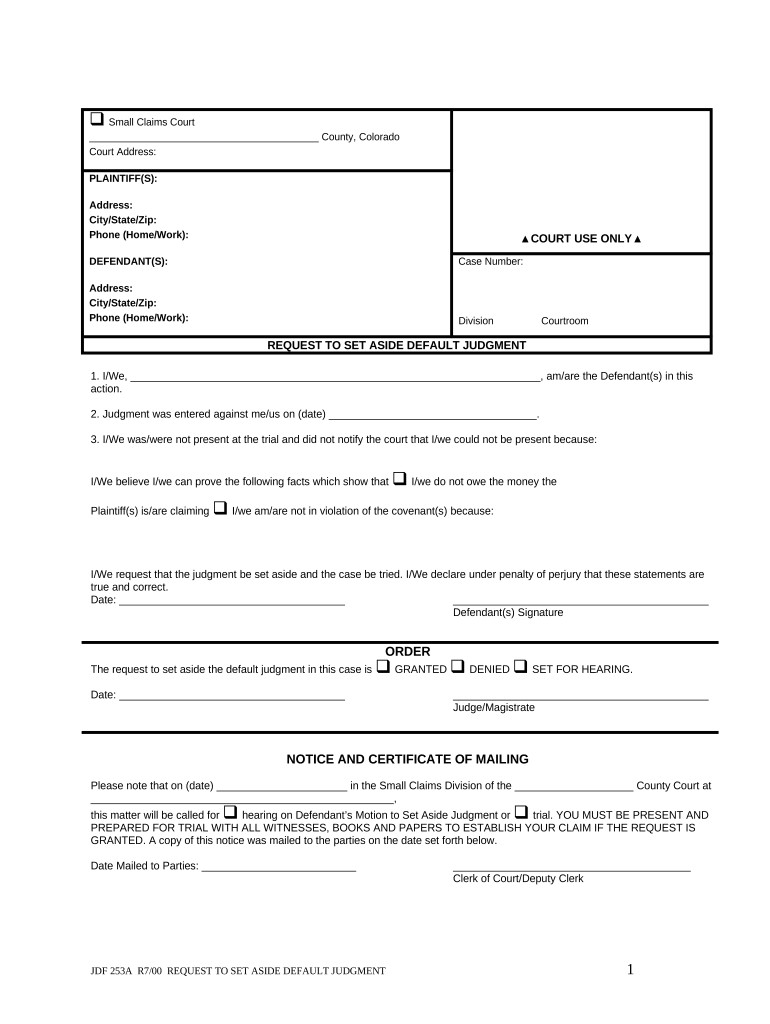
Click ‘Get Form’ to open the request set aside document in the editor.
Begin by filling in your name as the Defendant(s) in the first section. Ensure that you provide accurate information to avoid any delays.
Next, enter the date when the judgment was entered against you. This is crucial for establishing the timeline of your case.
In the section regarding your absence at trial, clearly state why you were not present. This helps support your request to set aside the judgment.
Indicate whether you believe you do not owe the money or are not in violation of any covenants by checking the appropriate boxes and providing supporting facts.
Finally, sign and date the form at the bottom to affirm that all statements are true and correct before submitting it through our platform.
Start using our platform today for free to easily complete your request set aside form!
Set aside convictionSet aside conviction background checkSet aside formMotion to set asideSet aside meaningSet aside conviction meaningMotion to set aside judgment ArizonaMotion to set aside judgment example
Security and compliance
At DocHub, your data security is our priority. We follow HIPAA, SOC2, GDPR, and other standards, so you can work on your documents with confidence.
I am requesting one or more serious misdemeanor(s) to be set aside. At least five years have passed since sentence was imposed or discharge from imprisonment,Read more
Several statutory tools are available to attack a fraudulent transfer, including setting aside the transfer and levying upon the assets transferred or otherRead more
chapter 20 using article 440 of the new york criminal
Under certain circumstances (explained below), you may ask the trial court to either vacate (cancel) the judgment or set aside your sentence. You can makeRead more
Cookie consent notice
This site uses cookies to enhance site navigation and personalize your experience.
By using this site you agree to our use of cookies as described in our Privacy Notice.
You can modify your selections by visiting our Cookie and Advertising Notice.