Publication hearing 2026

Get Form
publication hearing Preview on Page 1

Here's how it works

01. Edit your form online
Type text, add images, blackout confidential details, add comments, highlights and more.
02. Sign it in a few clicks
Draw your signature, type it, upload its image, or use your mobile device as a signature pad.
03. Share your form with others
Send it via email, link, or fax. You can also download it, export it or print it out.

How to use or fill out publication hearing with our platform

Form edit decoration
9.5
Ease of Setup
DocHub User Ratings on G2
9.0
Ease of Use
DocHub User Ratings on G2
  1. Click ‘Get Form’ to open the publication hearing document in the editor.
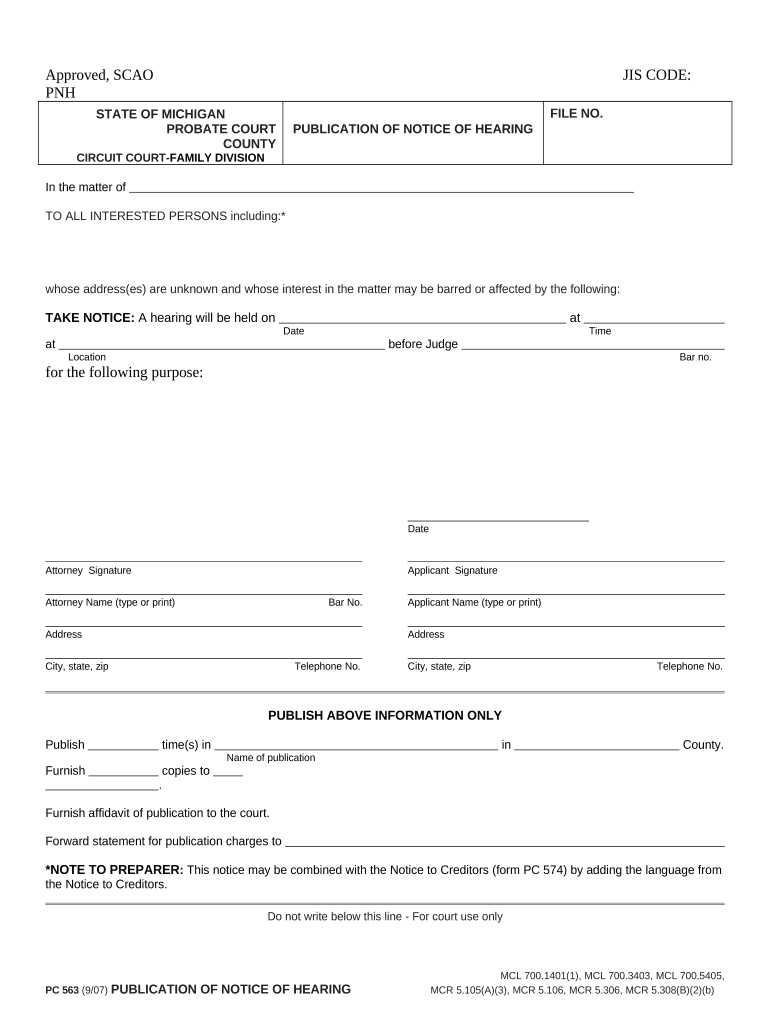
  2. Begin by entering the JIS CODE and FILE NO. at the top of the form, ensuring these identifiers are accurate for proper processing.
  3. Fill in the STATE OF MICHIGAN and PROBATE COURT details, followed by the COUNTY where the hearing will take place.
  4. In the section labeled 'In the matter of', provide a brief description of the case or matter being addressed.
  5. List all INTERESTED PERSONS, including those whose addresses are unknown, as this is crucial for legal notifications.
  6. Specify the DATE and TIME of the hearing, along with the LOCATION and JUDGE's name to ensure clarity.
  7. Complete both attorney and applicant signature sections, including names, addresses, and telephone numbers for contact purposes.
  8. Indicate how many times you wish to publish this notice and in which publication it should appear before finalizing your document.

Start using our platform today to streamline your document editing process for free!

be ready to get more

Complete this form in 5 minutes or less

Get form

Got questions?

We have answers to the most popular questions from our customers. If you can't find an answer to your question, please contact us.
Contact us

If you regularly deal with documents stored in your Google Drive, DocHub is a superb option for you to easily and quickly fill out, edit, and sign them. This editor integrates well with Google services, so you can export your publication hearing from your Google Drive to the editor without downloading and re-uploading it. Right-click on your document, select Open With → DocHub PDF Sign and Edit. In our editor, add and assign Signature Fields for all people involved, then click on the Menu option above → Send → decide on how you want to share your paperwork.

In case your go-to electronic mail service is Gmail, it is simple to integrate your DocHub editor into your work. Modify your publication hearing with DocHub instruments and connect it to your drafts in Gmail. See how effortless it is to exchange files and collaborate with a swift PDF editing solution at hand.

The noun publication comes from the Latin word publicare, meaning make public. Publication usually means something is written and made available publicly, but a company or government can submit publications of things like earnings or unemployment indexes that are communicated differently.
Serve by publication means you must pay a newspaper to publish your court papers. You publish the court papers in a newspaper of general circulation in the area where the person you have to serve is likely to be. Ask the court in that area to find out if they have a list of newspapers you can use.
In the Universal Copyright Convention, publication is defined in Article VI as the reproduction in tangible form and the general distribution to the public of copies of a work from which it can be read or otherwise visually perceived.

Security and compliance

At DocHub, your data security is our priority. We follow HIPAA, SOC2, GDPR, and other standards, so you can work on your documents with confidence.

Learn more
ccpa2
pci-dss
gdpr-compliance
hipaa
soc-compliance

People also ask

Work consisting of publicly distributed notices, usually as paid announcements in mass media such as newspapers, magazines, or on billboards. They include those in motion picture, television advertising, radio, or electronic media.
Probate proceedings are public matters. Publishing a notice in a newspaper creates an official record that the estate is being settled.
In the context of copyright law, publication is an important concept and has a very technical meaning. According to 17 U.S.C. 101, Publication is the distribution of copies or phonorecords of a work to the public by sale or other transfer of ownership (i.e., a rental, lease, or lending).
Public notices are official announcements, often required by law, to inform the public about docHub legal, property, or business matters. They are typically published in newspapers to ensure transparency and broad access.

Related links