Wisconsin annual statement 2026

Get Form
wisconsin annual report form Preview on Page 1

Here's how it works

01. Edit your wisconsin annual report form online
Type text, add images, blackout confidential details, add comments, highlights and more.
02. Sign it in a few clicks
Draw your signature, type it, upload its image, or use your mobile device as a signature pad.
03. Share your form with others
Send wisconsin llc annual report instructions via email, link, or fax. You can also download it, export it or print it out.

How to use or fill out Wisconsin Annual Statement with our platform

Form edit decoration
9.5
Ease of Setup
DocHub User Ratings on G2
9.0
Ease of Use
DocHub User Ratings on G2
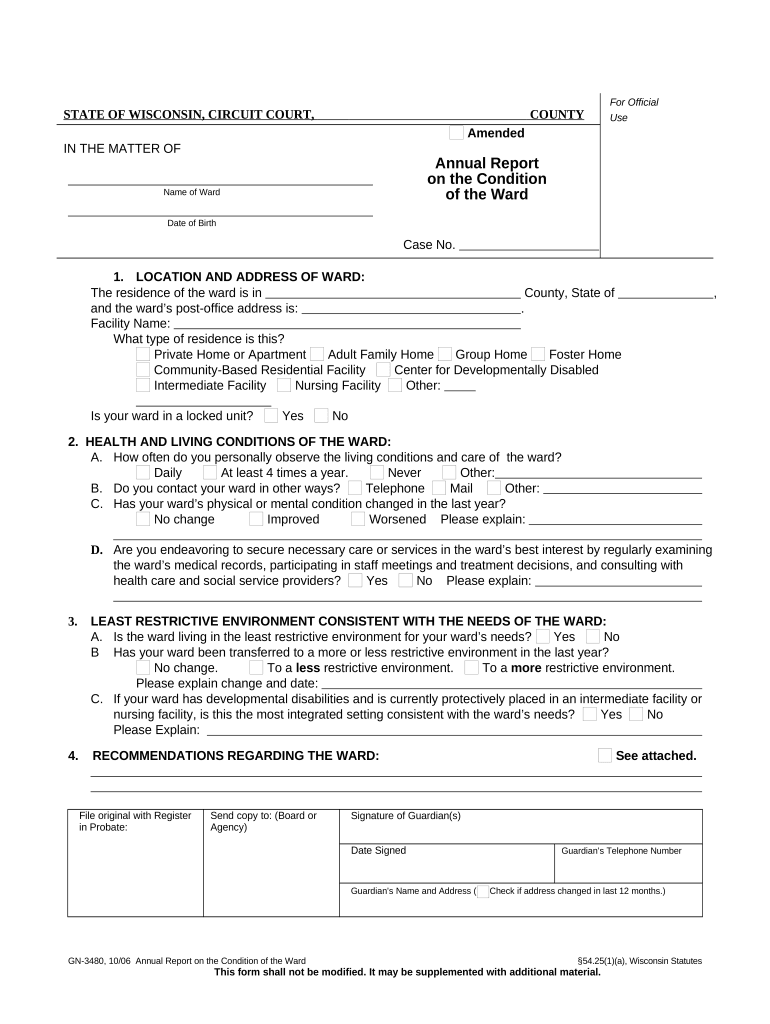
  1. Click ‘Get Form’ to open the Wisconsin Annual Statement in the editor.
  2. Begin by entering the 'Name of Ward' and 'Date of Birth' at the top of the form. Ensure accuracy as this information is crucial for identification.
  3. In section 1, provide the 'Location and Address of Ward.' Fill in the county, state, and post-office address. Select the type of residence from options like Private Home or Group Home.
  4. For section 2, assess and document the health and living conditions. Indicate how often you observe these conditions and whether there have been any changes in your ward's physical or mental health.
  5. In section 3, evaluate if your ward is in a least restrictive environment. Answer questions regarding any transfers that may have occurred within the last year.
  6. Finally, complete section 4 with recommendations regarding your ward. Sign and date at the bottom before submitting.

Start using our platform today to easily fill out your Wisconsin Annual Statement for free!

be ready to get more

Complete this form in 5 minutes or less

Get form

Got questions?

We have answers to the most popular questions from our customers. If you can't find an answer to your question, please contact us.
Contact us
Retirees of the Wisconsin Retirement System (WRS) will receive an increase in their pension benefits this year.
To file your Wisconsin Annual Report, follow these easy steps: Find your due date and filing fee. Complete your report online OR print a paper form. Submit your report to the Wisconsin Department of Financial Institutions.
File Online, In Person or Via Mail and Pay Fees Go to the BizFileOnline Portal and click on File Online option. Search for your business by its official name. Click on the name and follow the filing prompts to complete the form. Pay the associated fees using a credit card.
Domestic Wisconsin Corporation Annual Report Requirements: Filing Method: Mail or online. Agency Fee: $25 online or $40 by mail.
File your Wisconsin LLCs Annual Report on the last day of the quarter the LLC was approved. You need to file it with the state every year.

Security and compliance

At DocHub, your data security is our priority. We follow HIPAA, SOC2, GDPR, and other standards, so you can work on your documents with confidence.

Learn more
ccpa2
pci-dss
gdpr-compliance
hipaa
soc-compliance

People also ask

Missing your annual report filing deadline can have serious consequences for your LLC. Administrative dissolution means that you lose the protections of being an LLC and put your business at risk if youre sued. However, with the help of a business law attorney, you can reinstate your LLC and get back on track.
How to fill out a Financial Disclosure Statement in Wisconsin Gather Proof of Income. Gather documents listed for each type of income applicable to you. Gather Proof of Assets. Gather documents and statements to determine asset valuation. Gather Proof of Debts. Gather documents and statements to determine debt valuation.

wisconsin llc annual report