Washington for change 2026

Get Form
washington for change Preview on Page 1

Here's how it works

01. Edit your form online
Type text, add images, blackout confidential details, add comments, highlights and more.
02. Sign it in a few clicks
Draw your signature, type it, upload its image, or use your mobile device as a signature pad.
03. Share your form with others
Send it via email, link, or fax. You can also download it, export it or print it out.

How to use or fill out washington for change with our platform

Form edit decoration
9.5
Ease of Setup
DocHub User Ratings on G2
9.0
Ease of Use
DocHub User Ratings on G2
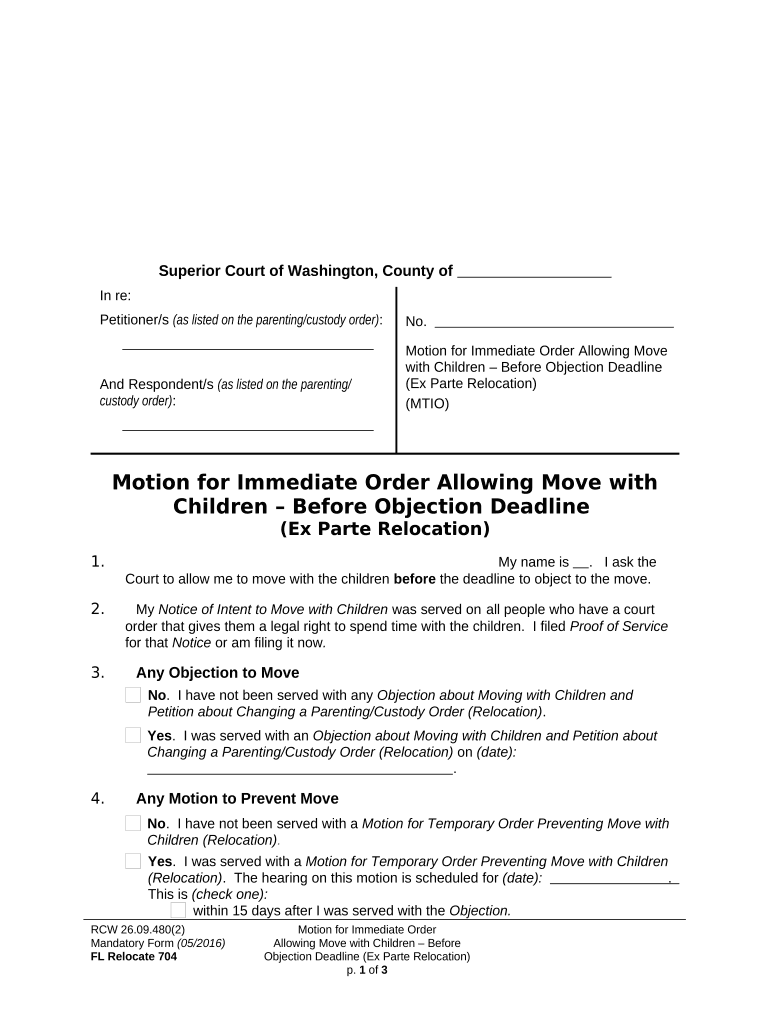
  1. Click ‘Get Form’ to open the Washington for Change document in the editor.
  2. Begin by entering your name in the designated field, indicating that you are requesting permission to move with the children.
  3. Provide details regarding the Notice of Intent to Move. Confirm whether it has been served and ensure you file Proof of Service if not already done.
  4. Indicate if you have received any objections regarding the move. Select 'Yes' or 'No' and provide relevant dates as necessary.
  5. Address any motions preventing the move by selecting 'Yes' or 'No', and include hearing dates if applicable.
  6. Notify other parties involved about your motion. Describe how you provided notice or explain why notice was not given.
  7. State your reasons for moving before the objection deadline, citing any special circumstances that apply.
  8. Complete the section regarding active duty military status, confirming if any parties are covered under relevant acts.
  9. Finally, sign and date the form at the bottom, ensuring all information is accurate and complete before submission.

Start using our platform today to easily fill out your Washington for Change form online for free!

be ready to get more

Complete this form in 5 minutes or less

Get form

Got questions?

We have answers to the most popular questions from our customers. If you can't find an answer to your question, please contact us.
Contact us

Microsoft Word doesn’t have signing tools to generate valid eSignatures and enforceable documents. Fortunately, DocHub is an online eSignature-compliant editor that supports various file formats, such as .doc files. Sign in to your account and add the Word version of your washington for change from your device and cloud, or URL - our editor will automatically turn it into an editable PDF. Make all required alterations in your document and click Sign to generate your own legally-binding electronic signature. There are four signing methods from which to choose.

As a comprehensive document editing platform, DocHub is accessible on mobile phones. Open DocHub in your choice of mobile browser and use our intelligent mobile-friendly toolset to complete your washington for change.

ChangeWA is a non-partisan 501(c)(4) organization focused on advancing common sense governance built around smart growth, public safety, government accountability and good governance throughout Washington state.
That report also found a continued but slowed increase in homelessness in Washington over the last year. The report counted 158,791 people in emergency shelters or unhoused in January 2025, a 2.2% increase from 155,356 in January 2024 and an 8.9% increase from 145,736 in January 2022.
Most Registered Agent information can be updated using a Statement of Change, applicable to both Commercial and Non-Commercial Registered Agents. This service is free of charge. You may also update your Registered Agent information when you file the Annual Report.

Security and compliance

At DocHub, your data security is our priority. We follow HIPAA, SOC2, GDPR, and other standards, so you can work on your documents with confidence.

Learn more
ccpa2
pci-dss
gdpr-compliance
hipaa
soc-compliance