Wisconsin income expense statement 2026

Get Form
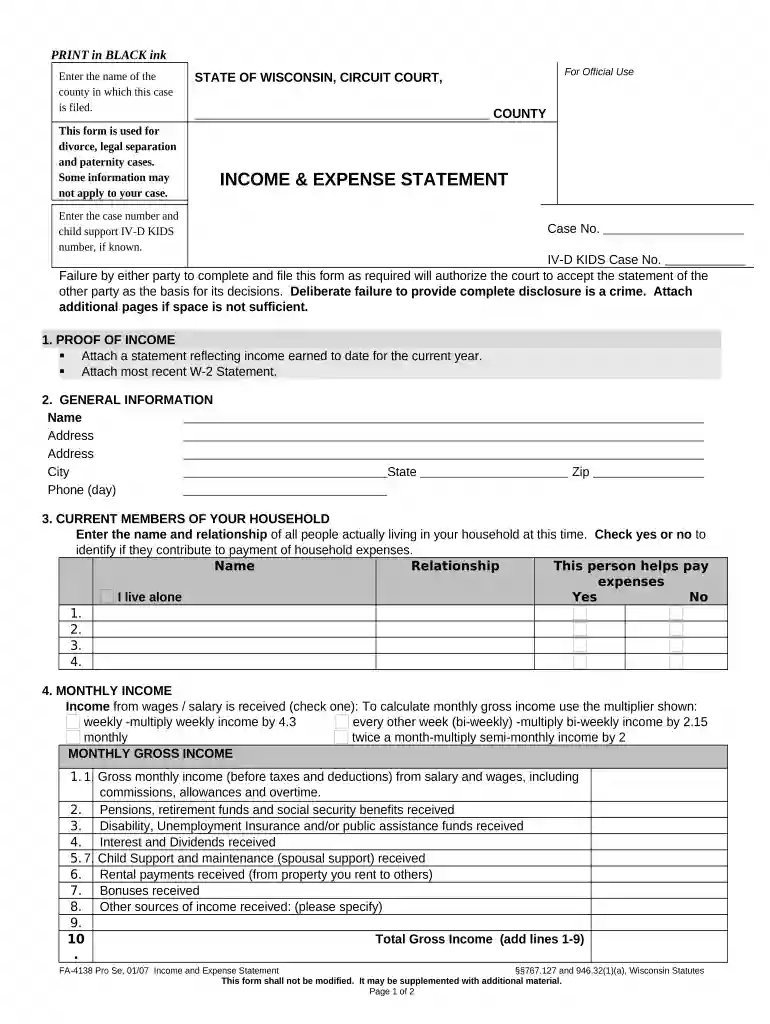
income and expense statement wisconsin Preview on Page 1

Here's how it works

01. Edit your income and expense statement wisconsin online
Type text, add images, blackout confidential details, add comments, highlights and more.

02. Sign it in a few clicks
Draw your signature, type it, upload its image, or use your mobile device as a signature pad.

03. Share your form with others
Send income and expense statement family court via email, link, or fax. You can also download it, export it or print it out.

How to use or fill out Wisconsin Income Expense Statement with our platform

Form edit decoration
9.5
Ease of Setup
DocHub User Ratings on G2
9.0
Ease of Use
DocHub User Ratings on G2
  1. Click ‘Get Form’ to open the Wisconsin Income Expense Statement in the editor.
  2. Begin by entering the name of the county where your case is filed, along with your case number and IV-D KIDS number if applicable.
  3. In the 'Proof of Income' section, attach a statement reflecting your income earned to date for the current year and include your most recent W-2 statement.
  4. Fill out your general information, including your name, address, city, state, zip code, and phone number.
  5. List all current members of your household. Indicate their relationship to you and whether they contribute to household expenses.
  6. Calculate and enter your monthly gross income from various sources such as wages, pensions, and other income. Use the provided multipliers for accurate calculations.
  7. Detail your monthly deductions including taxes and insurance payments. Sum these deductions to find your total monthly deductions.
  8. List all current monthly household expenses in detail. Ensure you account for all necessary categories like rent, utilities, food, etc.
  9. Finally, declare any assets you may have and sign the document. Enter the date of signing before submitting it.

Start using our platform today for free to streamline filling out your Wisconsin Income Expense Statement!

be ready to get more

Complete this form in 5 minutes or less

Get form

Got questions?

We have answers to the most popular questions from our customers. If you can't find an answer to your question, please contact us.
Contact us

With DocHub, you can easily approve your wisconsin income and expense statement or any other document on iOS, even without installing additional programs. You can access your DocHub account from any web-connected browser and fill out and sign your document in any way you like with just a few clicks.

You can find the latest and most relevant version of the wisconsin income expense statement in our DocHub forms collection. Search it by categories or use the search field to get the exact template that suits your case. You can open this form for editing after you find it.

An income and expenditure form is also called a common or standard financial statement. It lists all your monthly income, spending and debts. It is used to understand your financial situation and show what you can afford to pay.
(1) Required disclosure. In an action affecting the family, except an action to affirm marriage under s. 767.001 (1) (a), the court shall require each party to furnish, on standard forms required by the court, full disclosure of all assets owned in full or in part by either party separately or by the parties jointly.
How to fill out a Financial Disclosure Statement in Wisconsin Gather Proof of Income. Gather documents listed for each type of income applicable to you. Gather Proof of Assets. Gather documents and statements to determine asset valuation. Gather Proof of Debts. Gather documents and statements to determine debt valuation.

Security and compliance

At DocHub, your data security is our priority. We follow HIPAA, SOC2, GDPR, and other standards, so you can work on your documents with confidence.
Learn more
ccpa2
pci-dss
gdpr-compliance
hipaa
soc-compliance

People also ask

List your assets: Identify and value all your assets using current market values for investments and real estate. List your liabilities: Include all your debts, noting the remaining balances and interest rates. Calculate your net worth: Subtract your total liabilities from your assets to determine your net worth.
Order for Financial Disclosure State Law provides that if a person obtains a judgment for money, he or she is entitled to receive information regarding the financial status of the unsuccessful party within 15 days after entry of the judgment.
Generally speaking, disclosure statements should identify the following: The individual with the financial interest; The financial interest and/or entity creating the actual or potential conflict; and. The relationship between the financial interest and the research being presented.
Your income statement (sometimes called a statement of revenue and expense) shows the revenue your practice earned and the costs associated with running your business. Although an income statement can be prepared for any interval, it is usually prepared annually.
The easiest way to complete this form is by properly organizing your information before starting the process. Gather Proof of Income. Gather documents listed for each type of income applicable to you. Gather Proof of Assets. Gather documents and statements to determine asset valuation. Gather Proof of Debts.

Related links