Type text, add images, blackout confidential details, add comments, highlights and more.
02. Sign it in a few clicks
Draw your signature, type it, upload its image, or use your mobile device as a signature pad.
03. Share your form with others
Send forfeiture u via email, link, or fax. You can also download it, export it or print it out.
How to use or fill out wi forfeiture with our platform
Ease of Setup
DocHub User Ratings on G2
Ease of Use
DocHub User Ratings on G2
Click ‘Get Form’ to open the wi forfeiture document in the editor.
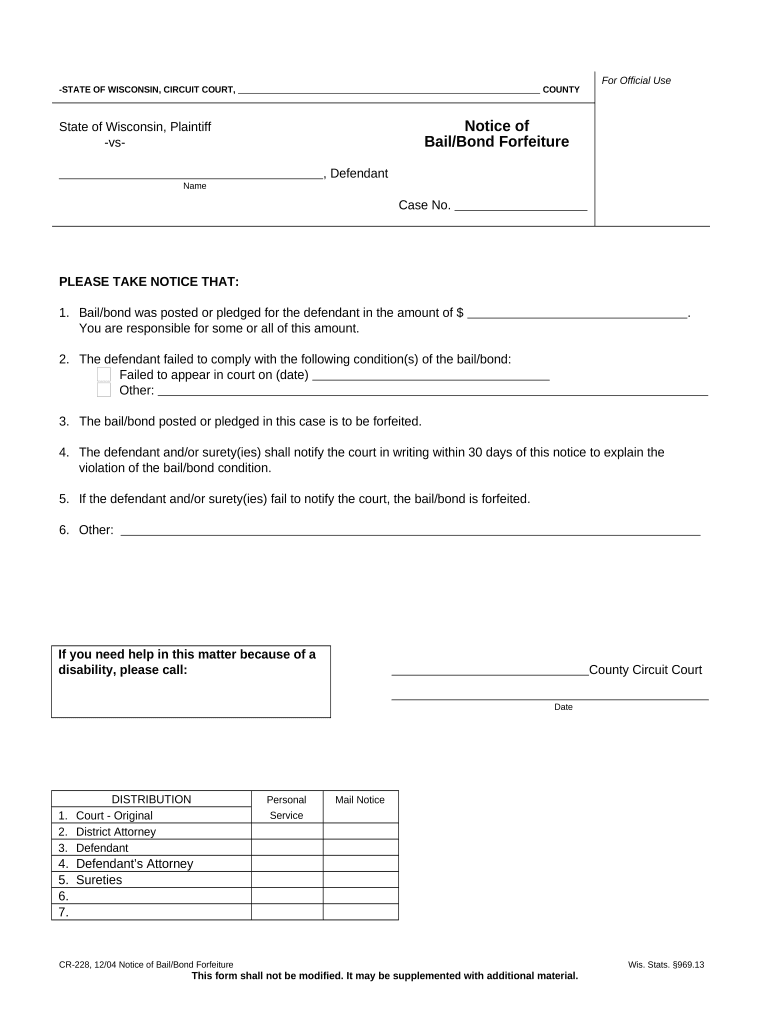
Begin by entering the case number in the designated field. This is crucial for identifying your specific case.
In the section regarding bail/bond amount, input the total amount that was posted or pledged for the defendant.
Specify the conditions of the bail/bond that were not complied with. For instance, indicate if the defendant failed to appear in court and provide the relevant date.
If applicable, include any additional information regarding other violations in the provided space.
Ensure you complete the notification requirement by stating how and when you will notify the court about any explanations for violations within 30 days.
Finally, review all entries for accuracy before saving or exporting your completed form for submission.
Start using our platform today to fill out your wi forfeiture form easily and for free!
CCAP WITraffic forfeitureCivil forfeitureTraffic forfeiture meaningForfeiture UHow long does a forfeiture stay on your recordSeverity forf uNon traffic ordinance violation Wisconsin
Security and compliance
At DocHub, your data security is our priority. We follow HIPAA, SOC2, GDPR, and other standards, so you can work on your documents with confidence.
939.52(3)(a)(a) For a Class A forfeiture, a forfeiture not to exceed $10,000. 939.52(3)(b)(b) For a Class B forfeiture, a forfeiture not to exceed $1,000.Read more
Stategraft in Ontario: Attorney General of Ontario v. $10000
Apr 16, 2024 Civil forfeiture allows law enforcement to seize and retain real or personal property and to use this property to fund government activities.Read more
Jun 7, 2013 If any Shares subject to an Award granted hereunder are forfeited or an. Award or any portion thereof otherwise terminates or is settled without.Read more
Cookie consent notice
This site uses cookies to enhance site navigation and personalize your experience.
By using this site you agree to our use of cookies as described in our Privacy Notice.
You can modify your selections by visiting our Cookie and Advertising Notice.