Colorado motion form 2026

Get Form
blank motion form colorado Preview on Page 1

Here's how it works

01. Edit your blank motion form colorado online
Type text, add images, blackout confidential details, add comments, highlights and more.
02. Sign it in a few clicks
Draw your signature, type it, upload its image, or use your mobile device as a signature pad.
03. Share your form with others
Send general motion form colorado via email, link, or fax. You can also download it, export it or print it out.

How to use or fill out Colorado Motion Form with DocHub

Form edit decoration
9.5
Ease of Setup
DocHub User Ratings on G2
9.0
Ease of Use
DocHub User Ratings on G2
  1. Click ‘Get Form’ to open the Colorado Motion Form in our editor.
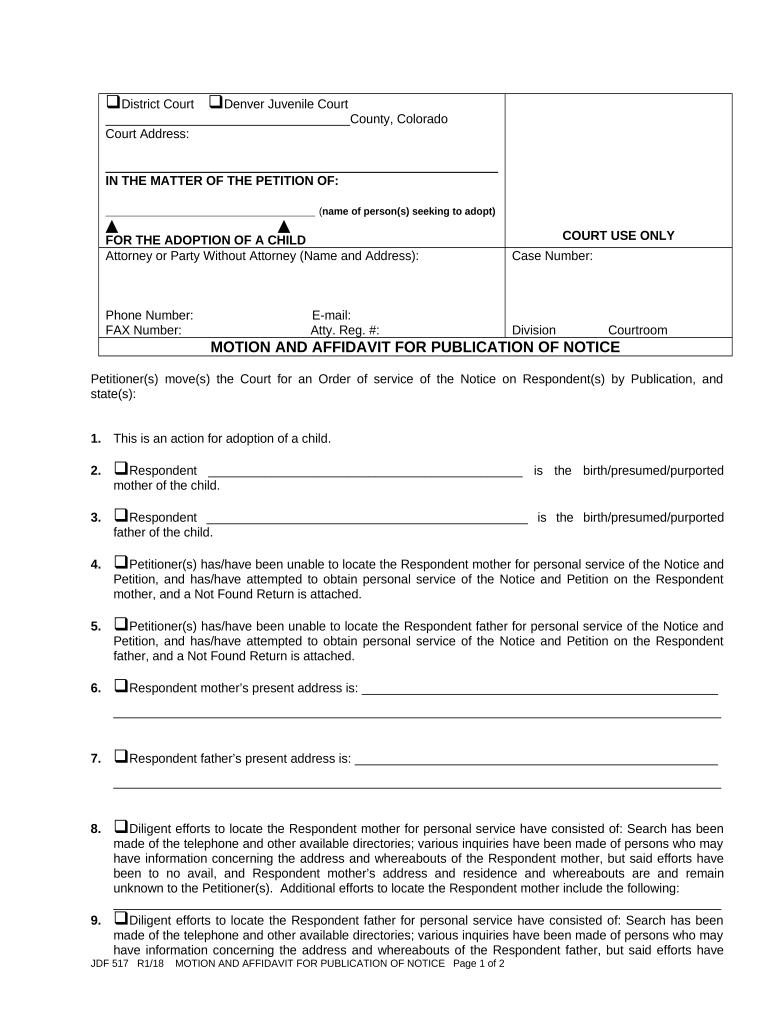
  2. Begin by filling in the court information at the top, including the county and court address. This sets the context for your motion.
  3. In the section labeled 'IN THE MATTER OF THE PETITION OF', enter the name(s) of the person(s) seeking to adopt. This identifies who is making the request.
  4. Complete the attorney or party information, including name, address, phone number, and email. This ensures that all parties can be contacted regarding this motion.
  5. Proceed to detail your attempts to locate both Respondent mother and father. Use checkboxes and text fields to provide necessary information about their whereabouts.
  6. Fill in any additional efforts made to locate each Respondent in the designated sections. Be thorough as this supports your case for publication.
  7. Finally, complete the verification section by signing and dating where indicated. This confirms that all provided information is accurate.

Start using our platform today for free to streamline your document editing and form completion!

be ready to get more

Complete this form in 5 minutes or less

Get form

Got questions?

We have answers to the most popular questions from our customers. If you can't find an answer to your question, please contact us.
Contact us
Begin by filling out your personal information and contact details. Provide the details of the case including case number and parties involved. Indicate whether other parties agree with your request. Clearly state your request to the Court in the designated section.
Seek to lay out a summary of your position, which should include (1) what your argument is and (2) what you want the court to do. The more concise and simple you can make the introduction, the more the readerthe judge or their clerkwill be responsive to the more detailed arguments coming in the body of the motion.
Rule 70 Governs Judgments for Specific Acts With respect to real or personal property within the district, the court can issue remedial orders and direct the clerk to issue a writ of attachment against the property of the judgment debtor to compel obedience to the judgment.
For example, a rule of 70 would allow for favorable vesting where the sum of an employees age and service is at least 70. So, that could be age 65 with 5 years of service or age 60 with 10 years of service. Normally, there is a minimum retirement age of at least age 55.
If the real or personal property is within the district, the courtinstead of ordering a conveyancemay enter a judgment divesting any partys title and vesting it in others. That judgment has the effect of a legally executed conveyance.

Security and compliance

At DocHub, your data security is our priority. We follow HIPAA, SOC2, GDPR, and other standards, so you can work on your documents with confidence.

Learn more
ccpa2
pci-dss
gdpr-compliance
hipaa
soc-compliance

People also ask

Learn how to file a motion (a written request for some type of relief) to get your case or part of your case - in front of the judge for a decision. You can use motions to try to resolve the case completely. Or you can use them to resolve some specific issue before trial.
A Rule 70 motion and court order authorizes the Clerk of the Court to sign the QDRO in place of the uncooperative Party.

colorado motion