Type text, add images, blackout confidential details, add comments, highlights and more.
02. Sign it in a few clicks
Draw your signature, type it, upload its image, or use your mobile device as a signature pad.
03. Share your form with others
Send court answer form via email, link, or fax. You can also download it, export it or print it out.
How to use or fill out Answer - Idaho with our platform
Ease of Setup
DocHub User Ratings on G2
Ease of Use
DocHub User Ratings on G2
Click ‘Get Form’ to open the Answer - Idaho document in the editor.
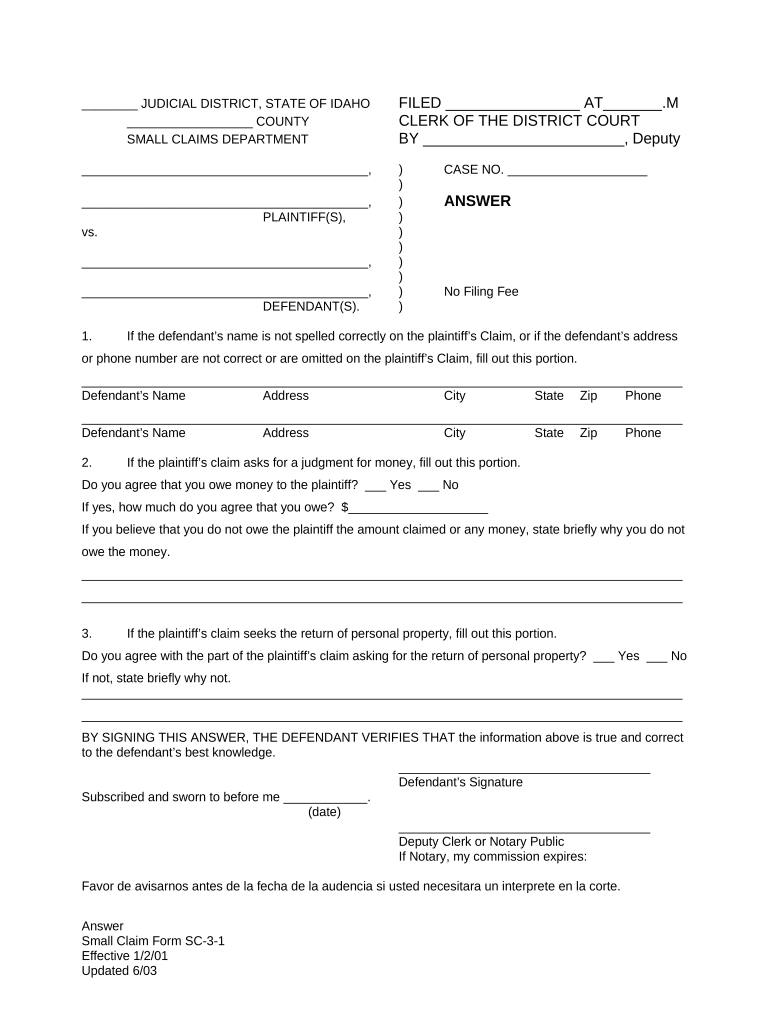
Begin by filling in the defendant's name, address, city, state, zip code, and phone number if there are any discrepancies with the plaintiff’s claim.
Next, indicate whether you agree that you owe money to the plaintiff by selecting 'Yes' or 'No'. If you select 'Yes', enter the amount you agree to owe.
If you believe you do not owe any money, provide a brief explanation in the space provided.
For claims regarding personal property, indicate your agreement with this part of the claim. If you disagree, briefly explain why.
Finally, sign the document to verify that all information is true and correct. Ensure to include the date and have it notarized if required.
Start using our platform today for free to streamline your form completion process!
BY SIGNING THIS ANSWER, THE DEFENDANT VERIFIES THAT the information above is true and correct to the Defendants best knowledge. CERTIFICATION UNDER PENALTYRead more
An answer to a pleading initiating a contested case must be filed and served on all parties of record within twenty-one (21) days after service of the pleading.Read more
Cookie consent notice
This site uses cookies to enhance site navigation and personalize your experience.
By using this site you agree to our use of cookies as described in our Privacy Notice.
You can modify your selections by visiting our Cookie and Advertising Notice.