Confidentiality agreement with 2026

Get Form
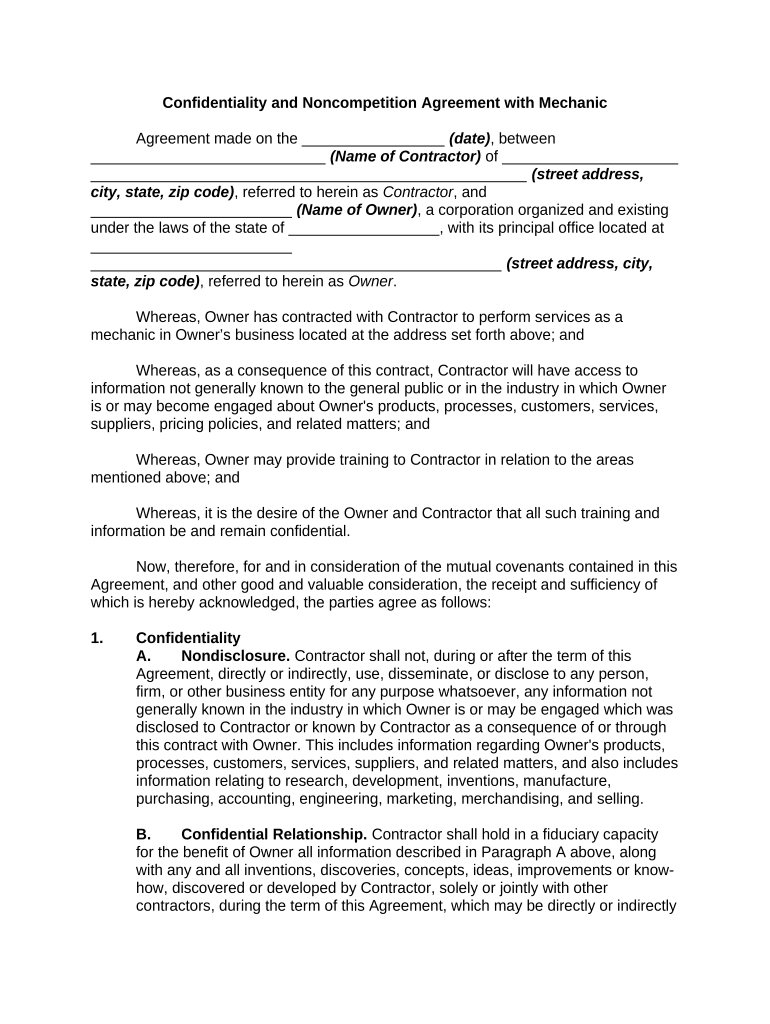
confidentiality agreement with Preview on Page 1

Here's how it works

01. Edit your form online
Type text, add images, blackout confidential details, add comments, highlights and more.
02. Sign it in a few clicks
Draw your signature, type it, upload its image, or use your mobile device as a signature pad.
03. Share your form with others
Send it via email, link, or fax. You can also download it, export it or print it out.

How to Use or Fill Out Confidentiality Agreement with Our Platform

Form edit decoration
9.5
Ease of Setup
DocHub User Ratings on G2
9.0
Ease of Use
DocHub User Ratings on G2
  1. Click ‘Get Form’ to open the confidentiality agreement in the editor.
  2. Begin by entering the date of the agreement in the designated field at the top of the document.
  3. Fill in the name and address of the Contractor and Owner in their respective fields, ensuring accuracy for legal purposes.
  4. Review Section 1 on Confidentiality. Ensure you understand that any disclosed information must remain confidential. You may need to check boxes or sign where indicated.
  5. In Section 3, specify the duration for noncompetition by filling in the number of years as required.
  6. Complete any additional sections as necessary, such as Notices and Governing Law, ensuring all fields are filled out correctly.
  7. Once all sections are completed, review your entries for accuracy before signing. Use our platform’s signature feature to add your signature electronically.

Start using our platform today to easily fill out your confidentiality agreement online for free!

be ready to get more

Complete this form in 5 minutes or less

Get form

Got questions?

We have answers to the most popular questions from our customers. If you can't find an answer to your question, please contact us.
Contact us
I agree that: a) I shall not share this information, material or documents (information) with persons within or outside of the who are not authorized to have this information. b) I shall not publish such information. c) I shall not communicate such information without authority.
Other examples of confidential information include medical records, personal history, personal goals, and private correspondence between people. While confidential information needs to remain private, there are situations where breaking confidentiality is permissible; If the disclosing party is subpoenaed.
Typically, a legal professional writing the NDA will complete these steps: Step 1 - Describe the scope. Which information is considered confidential? Step 2 - Detail party obligations. Step 3 - Note potential exclusions. Step 4 - Set the term. Step 5 - Spell out consequences. How to Write a Non-Disclosure Agreement - LexCheck Blog lexcheck.com how-to-write-a-non-disclosu lexcheck.com how-to-write-a-non-disclosu
Enforcement Challenges: While NDAs provide a clear legal framework, enforcing them can be costly and time-consuming. The aggrieved party often must prove that a bdocHub occurred and that the disclosed information was confidential and covered under the NDA. Pros and Cons of Non-Disclosure Agreements in Pennsylvania jgcg.com pros-and-cons-of-non-disclosure-agre jgcg.com pros-and-cons-of-non-disclosure-agre
All confidential information provided by a party hereto shall be used by any other party hereto solely for the purpose of rendering or obtaining services pursuant to this Agreement and, except as may be required in carrying out this Agreement, shall not be disclosed to any third party without the prior consent of such

Security and compliance

At DocHub, your data security is our priority. We follow HIPAA, SOC2, GDPR, and other standards, so you can work on your documents with confidence.

Learn more
ccpa2
pci-dss
gdpr-compliance
hipaa
soc-compliance
be ready to get more

Complete this form in 5 minutes or less

Get form