Type text, add images, blackout confidential details, add comments, highlights and more.
02. Sign it in a few clicks
Draw your signature, type it, upload its image, or use your mobile device as a signature pad.
03. Share your form with others
Send it via email, link, or fax. You can also download it, export it or print it out.
How to use or fill out hearing adjudication with our platform
Ease of Setup
DocHub User Ratings on G2
Ease of Use
DocHub User Ratings on G2
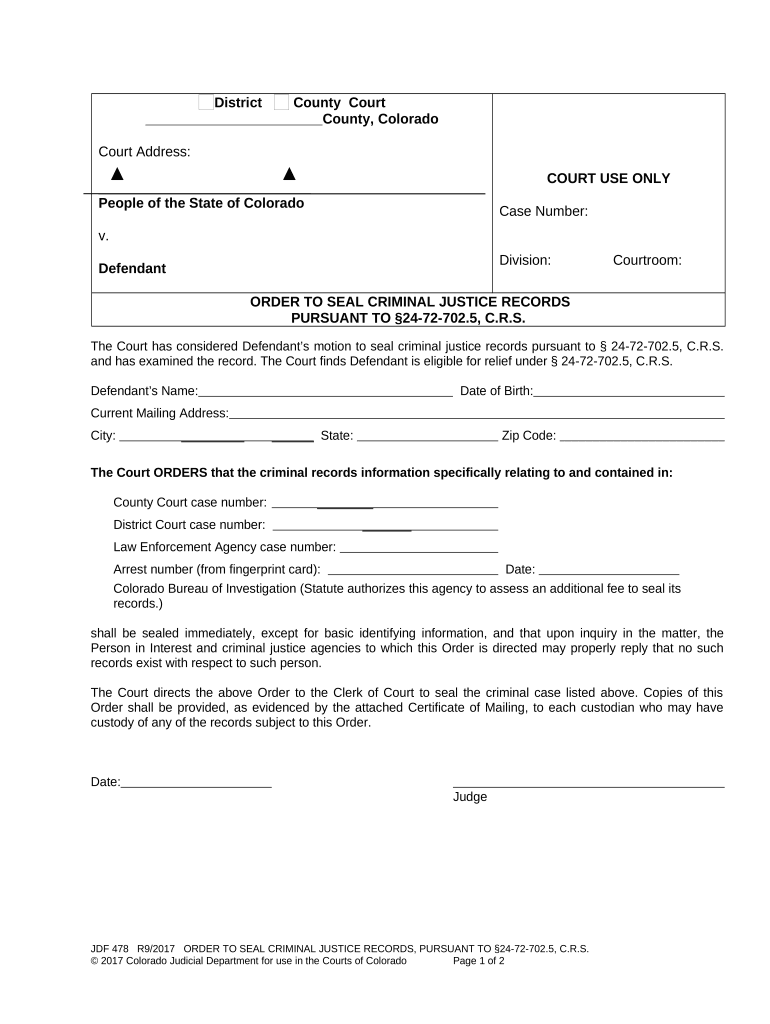
Click ‘Get Form’ to open the hearing adjudication document in the editor.
Begin by entering the Defendant’s Name and Date of Birth in the designated fields. Ensure accuracy as this information is crucial for identification.
Fill in the Current Mailing Address, including City, State, and Zip Code. This ensures that all correspondence regarding the sealing of records reaches you promptly.
Locate the sections for County Court case number, District Court case number, and Law Enforcement Agency case number. Input these numbers accurately to specify which records are to be sealed.
In the Arrest number field, enter the relevant arrest number from your fingerprint card. This is essential for processing your request.
Finally, review all entered information for completeness and accuracy before saving or submitting your form through our platform.
Start using our platform today to streamline your hearing adjudication process for free!
Adjudication hearing CPSWhat is an adjudication hearing in family courtWhat happens after adjudication hearingWhat is an adjudication hearing in juvenile courtAdjudicatory hearing for adultsAdjudication hearing foster careAdjudication hearing for custodyAdjudicatory hearing vs dispositional hearing
Security and compliance
At DocHub, your data security is our priority. We follow HIPAA, SOC2, GDPR, and other standards, so you can work on your documents with confidence.
A letter from the prosecuting attorney DocHubing that: (1) No accusatory pleading has been filed;. (2) The qualifying charges have been dismissed beforeRead more
The adjudicatory hearing, or trial, is the proceeding where the court determines whether factual grounds exist to take legal authority (wardship) of a child.Read more
Cookie consent notice
This site uses cookies to enhance site navigation and personalize your experience.
By using this site you agree to our use of cookies as described in our Privacy Notice.
You can modify your selections by visiting our Cookie and Advertising Notice.