Type text, add images, blackout confidential details, add comments, highlights and more.
02. Sign it in a few clicks
Draw your signature, type it, upload its image, or use your mobile device as a signature pad.
03. Share your form with others
Send it via email, link, or fax. You can also download it, export it or print it out.
How to use or fill out small estate form with our platform
Ease of Setup
DocHub User Ratings on G2
Ease of Use
DocHub User Ratings on G2
Click ‘Get Form’ to open the small estate form in the editor.
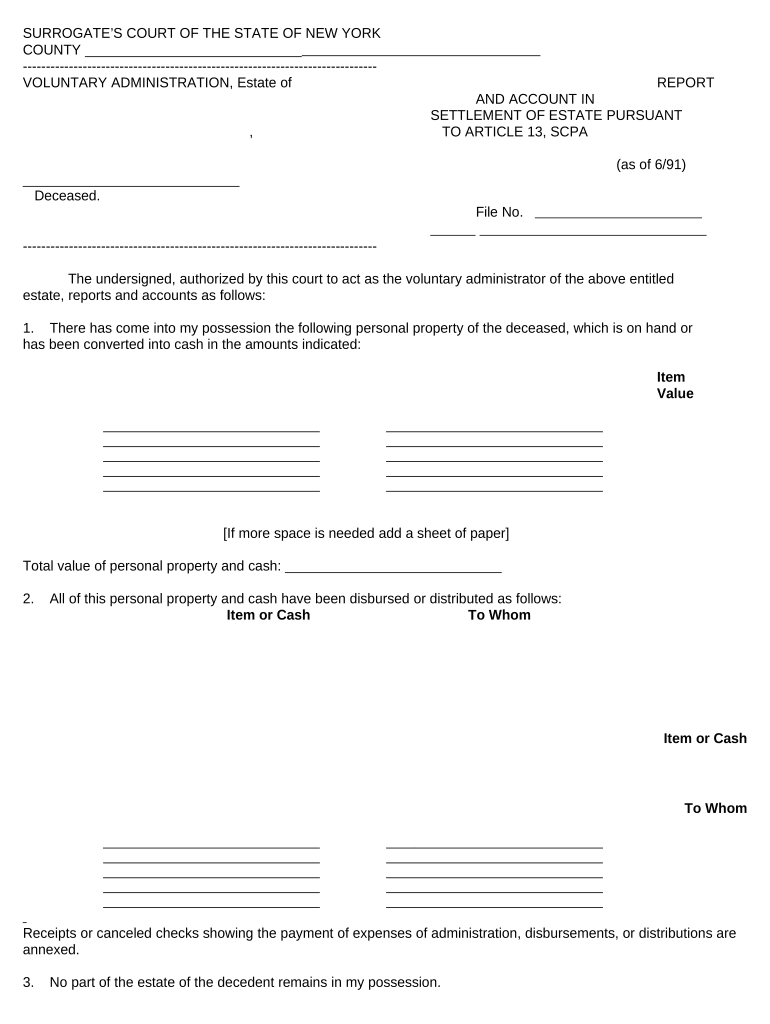
Begin by entering the name of the deceased and the file number at the top of the form. This information is crucial for identifying the estate.
In Section 1, list all personal property that has come into your possession. For each item, provide a brief description and its corresponding value. If you need more space, feel free to add an additional sheet.
Proceed to Section 2, where you will detail how all personal property and cash have been disbursed. Clearly indicate each item or cash amount along with the recipient's name.
In Section 3, confirm that no part of the estate remains in your possession by checking the appropriate box.
Finally, sign and print your name as the voluntary administrator. Ensure that you have a notary public witness your signature for validation.
Start using our platform today to easily complete your small estate form online for free!
Small estate form pdfSmall estate form templatePrintable small estate formSmall estate form californiaSmall estate affidavit formSmall estate Affidavit California form 13101Small estate affidavit Illinois instructionsSmall estate Affidavit to transfer personal property
Security and compliance
At DocHub, your data security is our priority. We follow HIPAA, SOC2, GDPR, and other standards, so you can work on your documents with confidence.
Small estate affidavit to transfer personal property
You may be able to use a Small Estate Affidavit to have the property transferred to you. You give this Affidavit to the person, company, or financialRead more
Affidavit for Collection of Personal Property of the Decedent
The value of the decedents entire estate, wherever located, less liens and encumbrances, does not exceed. $100,000. 3. Thirty (30) days have elapsed sinceRead more
Feb 12, 2005 The BMP manual serves as guidance for the greater range community on how to address or mitigate any identified areas of concern on small armsRead more
Cookie consent notice
This site uses cookies to enhance site navigation and personalize your experience.
By using this site you agree to our use of cookies as described in our Privacy Notice.
You can modify your selections by visiting our Cookie and Advertising Notice.