Type text, add images, blackout confidential details, add comments, highlights and more.
02. Sign it in a few clicks
Draw your signature, type it, upload its image, or use your mobile device as a signature pad.
03. Share your form with others
Send it via email, link, or fax. You can also download it, export it or print it out.
How to use or fill out chapter 13 with our platform
Ease of Setup
DocHub User Ratings on G2
Ease of Use
DocHub User Ratings on G2
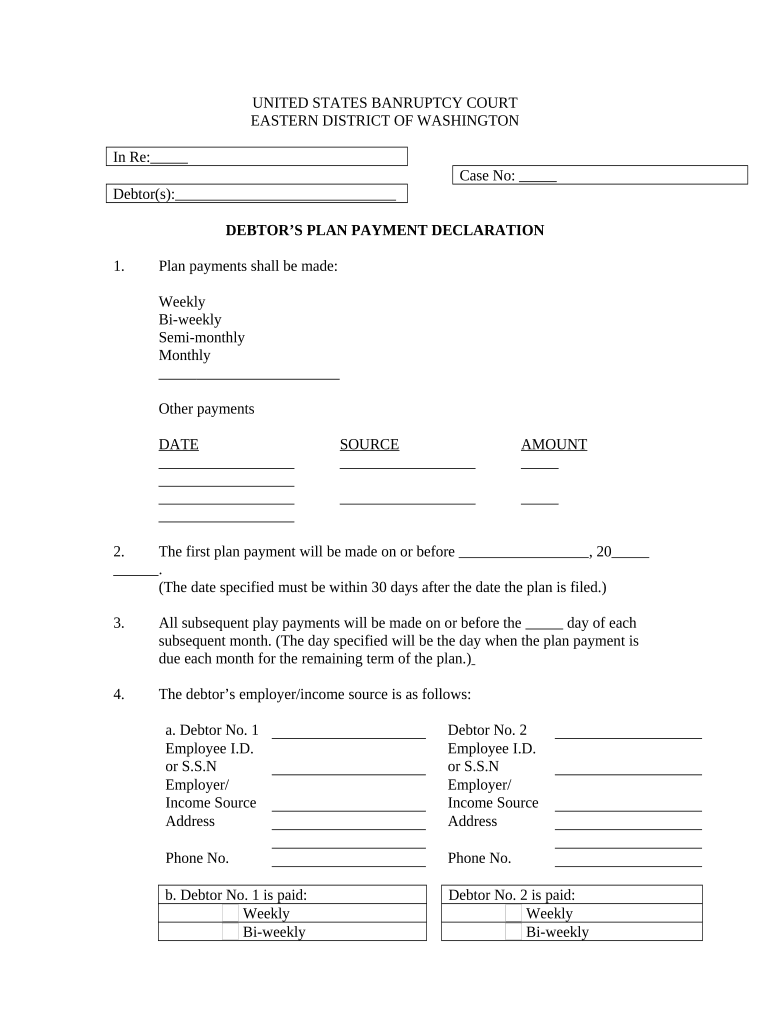
Click ‘Get Form’ to open the Chapter 13 Plan Payment Declaration in the editor.
Begin by selecting the frequency of your plan payments: Weekly, Bi-weekly, Semi-monthly, Monthly, or Other. Fill in the date for your first payment, ensuring it is within 30 days of filing.
Specify the due date for subsequent payments each month. This will be consistent throughout the term of your plan.
Provide details about your employer or income source for both debtors. Include Employee ID or Social Security Number and address.
Indicate how often each debtor is paid and how payments should be deducted from wages. Choose options such as evenly from each check or all from one check.
Acknowledge the trustee's authority regarding payment directions and ensure you understand the requirements for direct payments if applicable.
Start filling out your Chapter 13 form online for free today!
Chapter 13 ruined my lifeChapter 13 vs Chapter 11How to file Chapter 13 with no moneyIs Chapter 13 worth itFile Chapter 13 onlineChapter 13 tips and tricksCan I file Chapter 13 myselfChapter 13 Trustee
Security and compliance
At DocHub, your data security is our priority. We follow HIPAA, SOC2, GDPR, and other standards, so you can work on your documents with confidence.
A chapter 13 bankruptcy is also called a wage earners plan. It enables individuals with regular income to develop a plan to repay all or part of their debts.Read more
Chapter 13: Choking and Beating Patients - The Observatory
Miss Tillie Mayard suffered greatly from cold. One morning she sat on the bench next to me and was livid with the cold. Her limbs shook and her teethRead more
Cookie consent notice
This site uses cookies to enhance site navigation and personalize your experience.
By using this site you agree to our use of cookies as described in our Privacy Notice.
You can modify your selections by visiting our Cookie and Advertising Notice.