Sc addendum 2026

Get Form
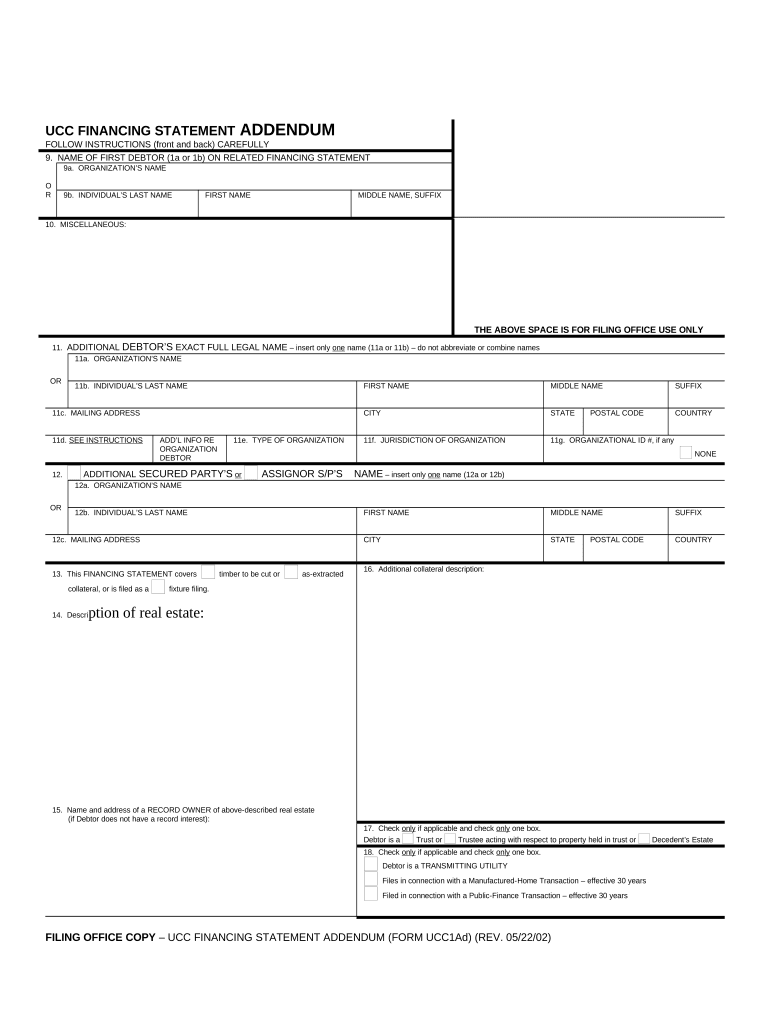
sc addendum Preview on Page 1

Here's how it works

01. Edit your form online
Type text, add images, blackout confidential details, add comments, highlights and more.
02. Sign it in a few clicks
Draw your signature, type it, upload its image, or use your mobile device as a signature pad.
03. Share your form with others
Send it via email, link, or fax. You can also download it, export it or print it out.

How to use or fill out sc addendum with our platform

Form edit decoration
9.5
Ease of Setup
DocHub User Ratings on G2
9.0
Ease of Use
DocHub User Ratings on G2
  1. Click ‘Get Form’ to open the sc addendum in the editor.
  2. Begin by entering the name of the first debtor in section 9. You can choose between an organization’s name or an individual’s last name, along with their first and middle names if applicable.
  3. In section 11, provide the additional debtor's full legal name. Ensure you do not abbreviate or combine names. Fill in their mailing address and type of organization if applicable.
  4. For any additional secured parties, complete section 12 similarly, ensuring all details are accurate and complete.
  5. If your financing statement covers collateral like timber or real estate, make sure to check the appropriate boxes in sections 13 and 14, providing detailed descriptions as needed.
  6. Finally, review all entries for accuracy before saving your document. Utilize our platform's features to sign and distribute your completed form seamlessly.

Start using our platform today for free to streamline your document editing and signing process!

be ready to get more

Complete this form in 5 minutes or less

Get form

Got questions?

We have answers to the most popular questions from our customers. If you can't find an answer to your question, please contact us.
Contact us
addendum substantivo (plural: addenda m, addendums m) The addendum provides further details about the report. O adendo fornece mais detalhes sobre o relatrio.
Yes, an addendum can be canceled if both parties agree.
Determine the additional information or provisions that need to be included in the contract and confirm that they can be included without altering the existing terms. Draft the addendum. Clearly state the new information to be added. Ensure that the language is clear, concise, and consistent with the original contract.
How to Add an Addendum (3 steps) Speak with the Tenant. Tenant Reviews the Addendum. Sign and Attach.

Security and compliance

At DocHub, your data security is our priority. We follow HIPAA, SOC2, GDPR, and other standards, so you can work on your documents with confidence.

Learn more
ccpa2
pci-dss
gdpr-compliance
hipaa
soc-compliance