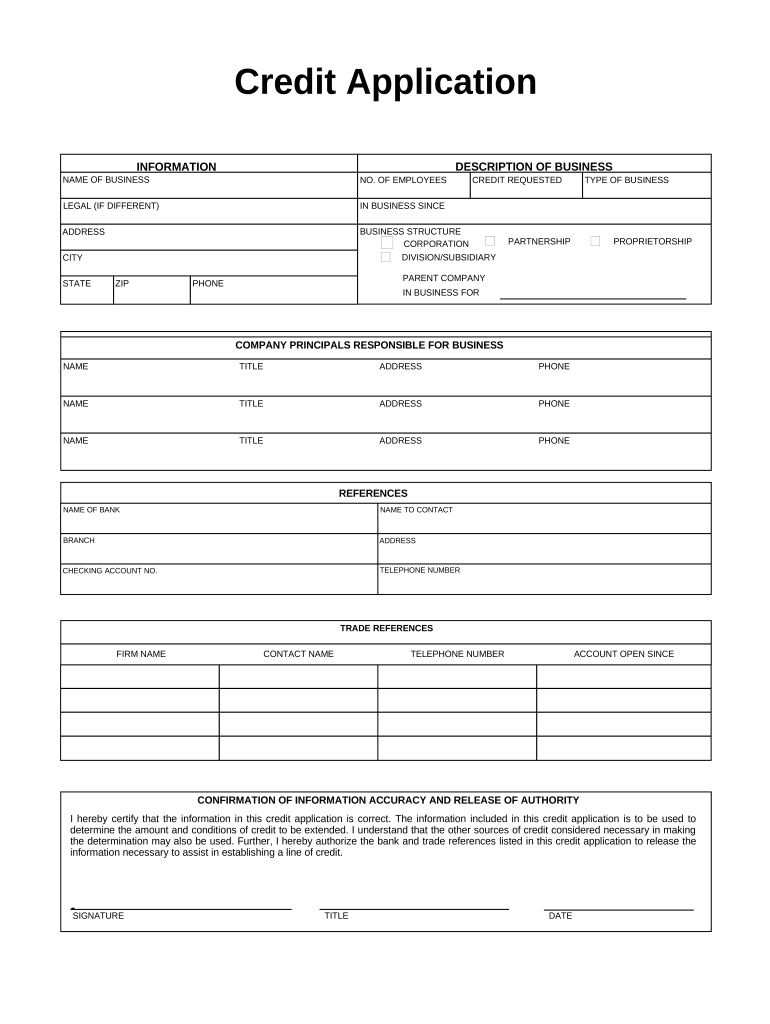
Credit Application 2026

Get Form
Credit Application Preview on Page 1

Here's how it works

01. Edit your form online
Type text, add images, blackout confidential details, add comments, highlights and more.
02. Sign it in a few clicks
Draw your signature, type it, upload its image, or use your mobile device as a signature pad.
03. Share your form with others
Send it via email, link, or fax. You can also download it, export it or print it out.

How to use or fill out Credit Application with our platform

Form edit decoration
9.5
Ease of Setup
DocHub User Ratings on G2
9.0
Ease of Use
DocHub User Ratings on G2
  1. Click ‘Get Form’ to open the Credit Application in the editor.
  2. Begin by filling out the 'Description of Business' section. Enter the name of your business, number of employees, and legal name if different. Include the address, city, state, and ZIP code.
  3. In the 'Business Structure' section, select your business type from options like Corporation, Proprietorship, or Partnership. Provide details about any parent company if applicable.
  4. Next, specify the credit requested and provide a contact phone number for your business.
  5. List the company principals responsible for business transactions. For each principal, include their name, title, address, and phone number.
  6. Fill in the 'References' section with your bank's information including name, contact person, branch address, checking account number, and telephone number.
  7. Provide trade references by listing firm names along with contact names and telephone numbers. Indicate how long each account has been open.
  8. Finally, review the certification statement regarding information accuracy. Sign and date the application to complete it.

Start using our platform today to fill out your Credit Application easily and for free!

be ready to get more

Complete this form in 5 minutes or less

Get form

Got questions?

We have answers to the most popular questions from our customers. If you can't find an answer to your question, please contact us.
Contact us

Yes, you can utilize DocHub for signing any business and private paperwork, including your Credit Application. All eSignatures you generate with our service are legally binding and court-admissible, as DocHub complies with standards required by ESIGN and UETA. Save your accomplished paperwork with a detailed Audit Trail if necessary.

You can find the latest and most relevant version of the Credit Application in our DocHub forms collection. Search it by categories or use the search field to locate the exact template that fits your case. You may open this form for editing once you find it.

Common reasons for credit card denial despite good credit They want to ensure that, at the very least, you can afford to make your minimum monthly payment. It is therefore possible for you to have a 700+ credit score but be denied a new credit card because your current credit is already high relative to your income.

Security and compliance

At DocHub, your data security is our priority. We follow HIPAA, SOC2, GDPR, and other standards, so you can work on your documents with confidence.

Learn more
ccpa2
pci-dss
gdpr-compliance
hipaa
soc-compliance