Type text, add images, blackout confidential details, add comments, highlights and more.
02. Sign it in a few clicks
Draw your signature, type it, upload its image, or use your mobile device as a signature pad.
03. Share your form with others
Send it via email, link, or fax. You can also download it, export it or print it out.
How to Use or Fill Out Lawsuit Court with Our Platform
Ease of Setup
DocHub User Ratings on G2
Ease of Use
DocHub User Ratings on G2
Click ‘Get Form’ to open the lawsuit court document in the editor.
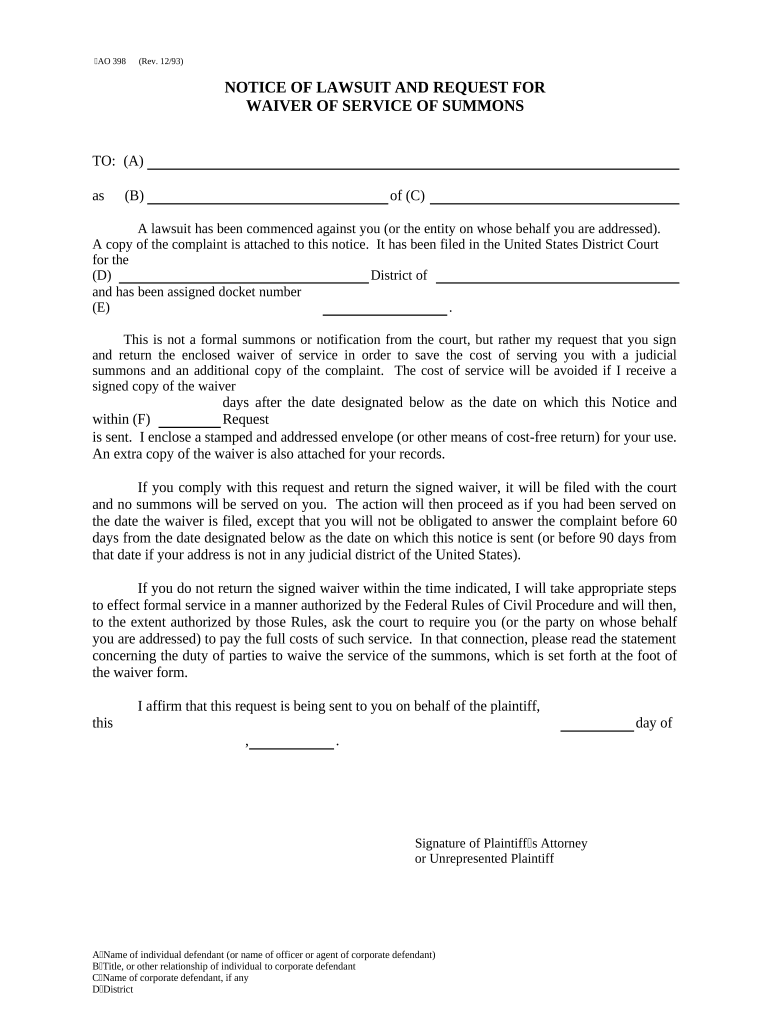
Begin by filling in section (A) with the name of the individual defendant or the officer/agent of a corporate defendant. This identifies who is being addressed.
In section (B), specify the title or relationship of the individual to the corporate defendant, if applicable. This provides context for their role.
Enter the name of the corporate defendant in section (C) if there is one. This ensures clarity on which entity is involved in the lawsuit.
Fill out section (D) with the district where the lawsuit has been filed, ensuring accurate jurisdiction information.
Input the docket number in section (E). This unique identifier helps track your case within court records.
Finally, ensure you provide at least 30 days for returning the waiver as indicated in section (F).
Start using our platform today to streamline your legal document processes for free!
Civil lawsuitThings you can sue for in civil courtCivil lawsuit examplesLawsuit againstCivil lawsuit timelineLawsuit caseCriminal lawsuitHow to file a lawsuit with no money
Security and compliance
At DocHub, your data security is our priority. We follow HIPAA, SOC2, GDPR, and other standards, so you can work on your documents with confidence.
The Process. To begin a civil lawsuit in federal court, the plaintiff files a complaint with the court and serves a copy of the complaint on the defendant.Read more
Recent district court cases regarding failure to state a claim. Recent district court cases regarding this topic from TRACs FOIA Project. Visit their issueRead more
Cookie consent notice
This site uses cookies to enhance site navigation and personalize your experience.
By using this site you agree to our use of cookies as described in our Privacy Notice.
You can modify your selections by visiting our Cookie and Advertising Notice.