




Here's how it works

01. Edit your septic inspection ct online
Type text, add images, blackout confidential details, add comments, highlights and more.

02. Sign it in a few clicks
Draw your signature, type it, upload its image, or use your mobile device as a signature pad.

03. Share your form with others
Send ct septic inspection via email, link, or fax. You can also download it, export it or print it out.
How to use or fill out Connecticut Septic with our platform

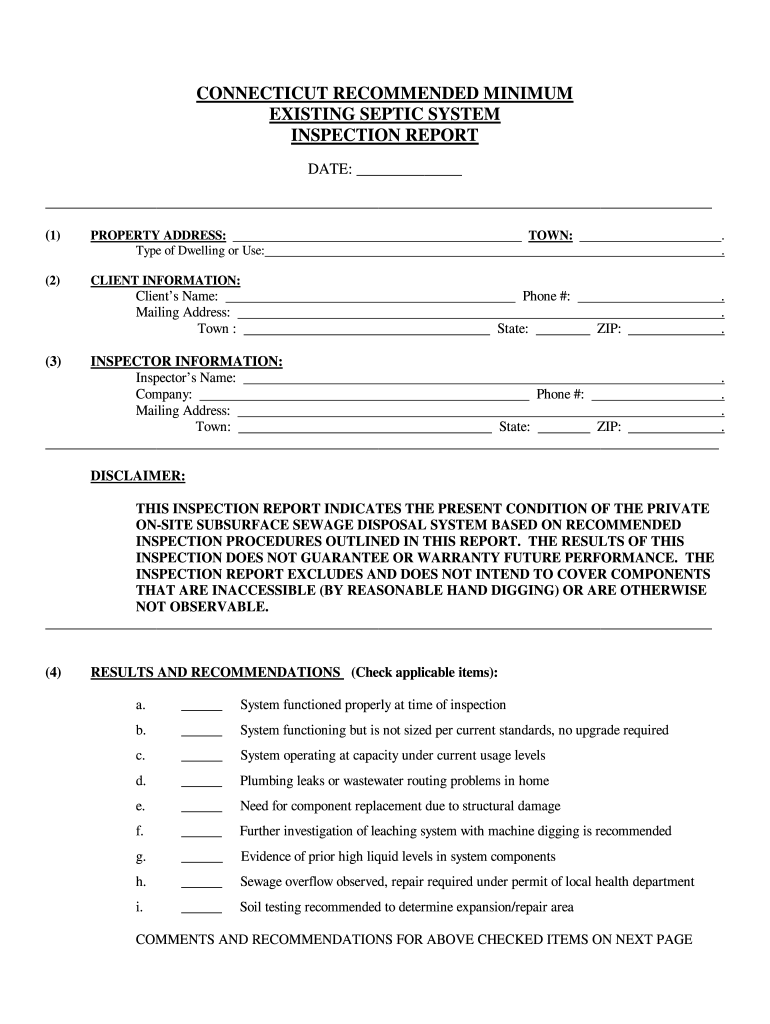
- Click ‘Get Form’ to open the Connecticut Septic Inspection Report in the editor.
- Begin by entering the date at the top of the form. Next, fill in the property address and type of dwelling or use in the designated fields.
- In the client information section, provide the client's name, mailing address, town, phone number, state, and ZIP code.
- Complete the inspector information section by entering your name, company details, phone number, mailing address, state, ZIP code, and town.
- Review and check applicable items under 'Results and Recommendations' based on your inspection findings. Provide comments and recommendations on the next page as needed.
- Fill out records and data regarding permits and maintenance records. Ensure all necessary documentation is attached.
- Complete general information about the system's age, occupancy details, water supply type, wastewater routing specifics, septic tank evaluation details, leaching system evaluation findings, and any additional observations.
Start using our platform today for free to streamline your Connecticut Septic form completion!
Fill out connecticut septic online
It's free
It's free
Security and compliance
At DocHub, your data security is our priority. We follow HIPAA, SOC2, GDPR, and other standards, so you can work on your documents with confidence.
Learn more


Related forms

Pastoral-Christian-Counseling-Agreement
The document outlines the Pastoral Christian Counseling Agreement for Habakkuk Center Ministries, Inc. (HCM), detailing ...

LEAVE REQUEST FORM - Hickman Mills
The document is a Leave Request Form used by employees to formally request various types of leave, including jury duty, ...

Bsu entrance exam reviewer
The document is an application form for the admission test at Bulacan State University for the academic year 2020-2021. ...

High Holy Day Child Care 2022 - Form
The document is an Annual Child Information Form for Beth Meyer Preschool, which collects essential details about a chil ...

FACT SHEET FOR NPDES GENERAL PERMIT
The document is a fact sheet for the National Pollutant Discharge Elimination System (NPDES) General Permit concerning w ...