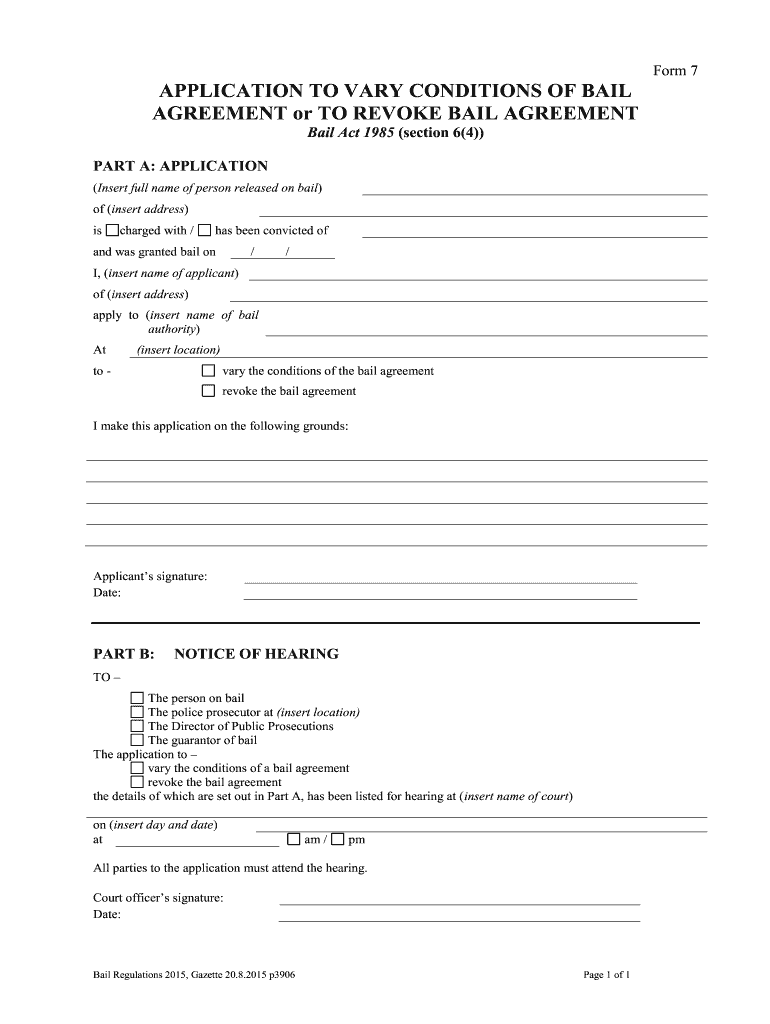
Bail Form 07 - Application to Vary Revoke Bail 2026

Get Form
application to revoke bail Preview on Page 1

Here's how it works

01. Edit your application to revoke bail online
Type text, add images, blackout confidential details, add comments, highlights and more.
02. Sign it in a few clicks
Draw your signature, type it, upload its image, or use your mobile device as a signature pad.
03. Share your form with others
Send application to vary bail via email, link, or fax. You can also download it, export it or print it out.

How to use or fill out Bail Form 07 - Application to Vary Revoke Bail with DocHub

Form edit decoration
9.5
Ease of Setup
DocHub User Ratings on G2
9.0
Ease of Use
DocHub User Ratings on G2
  1. Click ‘Get Form’ to open it in the editor.
  2. In Part A, enter the full name and address of the person released on bail. Specify whether they are charged with an offense or have been convicted.
  3. Fill in the date when bail was granted and provide your name and address as the applicant.
  4. Indicate whether you are applying to vary or revoke the bail agreement by selecting the appropriate option.
  5. State your grounds for making this application clearly in the designated area.
  6. Sign and date the application at the bottom of Part A.
  7. In Part B, complete the notice of hearing section by filling in all required details, including court information and time of hearing.

Start using our platform today to fill out your Bail Form 07 quickly and efficiently for free!

be ready to get more

Complete this form in 5 minutes or less

Get form

Got questions?

We have answers to the most popular questions from our customers. If you can't find an answer to your question, please contact us.
Contact us

If you often work with documents kept in your Google Drive, DocHub is an excellent option for you to easily and quickly fill out, adjust, and approve them. This editor integrates well with Google services, so you can export your form of bail from your Google Drive to the editor without downloading and re-uploading it. Right-click on your file, select Open With → DocHub PDF Sign and Edit. In our editor, add and assign Signature Fields for all parties involved, then click on the Menu button above → Send → select how you want to share your paperwork.

You can complete and eSign your Bail Form 07 - Application to Vary Revoke Bail online, even on a tight deadline. All you need to access high quality editing tools on any device is a DocHub account, that you can register in just a few moments. After you sign up, upload your file or find what you are looking for in our catalog, complete it using the editing tools you need, and put your electronic signature on it at the end.

To revoke a bail bond in California, you will need to contact the bail bond agency and inform them of your decision.
Factors Considered During the Formal Bail Application Process The Seriousness of the Offence. If the accused is facing serious charges, such as or robbery, the court is less likely to grant bail. Flight Risk. Past Criminal Record. Community Ties and Employment. Risk of Reoffending or Interfering with Evidence.
Under Section 439(1)(b), the High Court or the Court of Sessions can exercise modification and deletion in bail conditions imposed by magistrates when releasing an accused on bail. This provision establishes a hierarchical system of judicial review and ensures that bail conditions remain reasonable and proportionate.

Security and compliance

At DocHub, your data security is our priority. We follow HIPAA, SOC2, GDPR, and other standards, so you can work on your documents with confidence.

Learn more
ccpa2
pci-dss
gdpr-compliance
hipaa
soc-compliance
be ready to get more

Complete this form in 5 minutes or less

Get form

People also ask

Generally this means that if a person was granted/posted bail or released on a detainer and bail/release has been revoked they may be going back to jail. There is an argument that re-incarceration should not occur without a hearing to determine if there are grounds to revoke bail/release (due process).

Related links