Q230 centrelink form 2026

Get Form
q230 financial hardship letter Preview on Page 1

Here's how it works

01. Edit your q230 financial hardship letter online
Type text, add images, blackout confidential details, add comments, highlights and more.

02. Sign it in a few clicks
Draw your signature, type it, upload its image, or use your mobile device as a signature pad.

03. Share your form with others
Send how to get a q230 letter online via email, link, or fax. You can also download it, export it or print it out.

How to use or fill out q230 centrelink form with our platform

Form edit decoration
9.5
Ease of Setup
DocHub User Ratings on G2
9.0
Ease of Use
DocHub User Ratings on G2
  1. Click ‘Get Form’ to open the q230 Centrelink form in the editor.
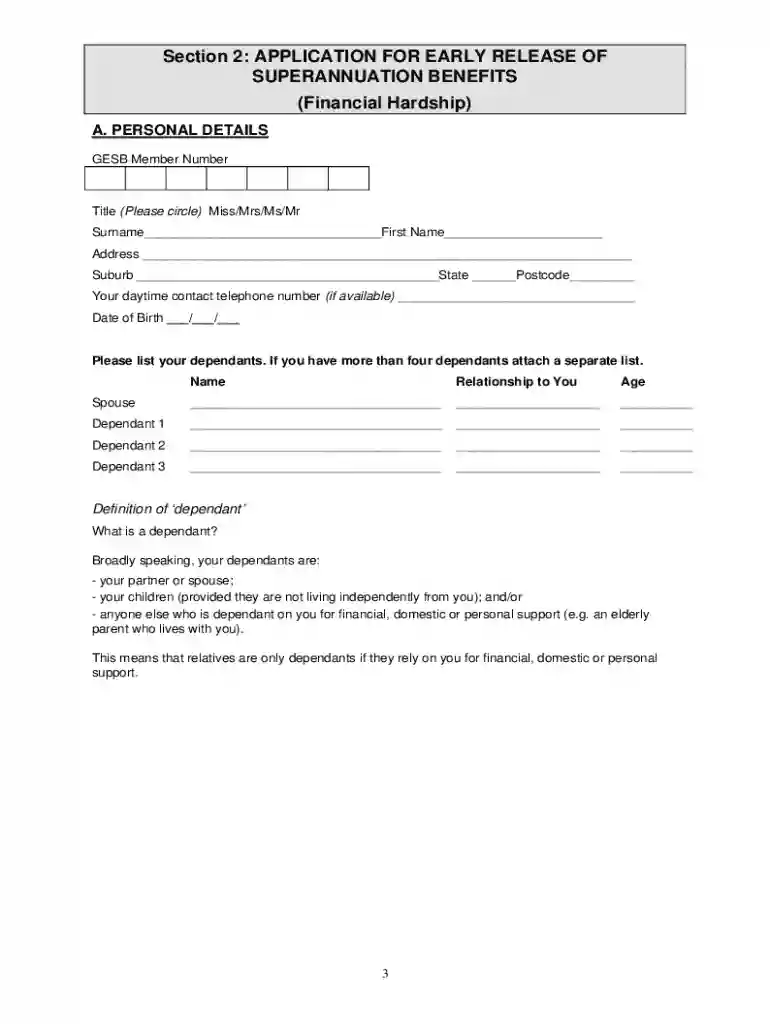
  2. Begin by filling out Section A: Personal Details. Enter your GESB Member Number, title, surname, first name, address, and contact number.
  3. List your dependants in the provided fields. If you have more than four dependants, attach a separate list.
  4. Complete Section B: Financial Statement. Accurately provide details of your fortnightly income and assets, ensuring to include evidence such as pay slips or bank statements.
  5. In Section C: Release Request, explain your reasons for applying for early release and indicate the amount you wish to withdraw.
  6. Fill out Section D: Statutory Declaration. Ensure that all information is true and correct before signing.
  7. Finally, review your application against the checklist provided in the document to ensure all required documents are included before submission.

Start using our platform today to easily fill out your q230 Centrelink form online for free!

be ready to get more

Complete this form in 5 minutes or less

Get form

Got questions?

We have answers to the most popular questions from our customers. If you can't find an answer to your question, please contact us.
Contact us
Step 1: get started. Sign in to myGov or the myGov app and select Centrelink. Step 2: request a document. Select Begin to request a document. Step 3: view requested document. To view the document, select the Income statement link. Step 4: sign out.
Information that is relevant would include: Details of your income. Details of your expenses. The cause of your financial hardship (and evidence of the cause if available, for example, a medical certificate)
provide a letter from DHS or Centrelink showing you have been receiving eligible income support payments. This is called a Q230 or Q251 Financial Hardship letter. You can get this by calling your usual payment line number.
provide a letter from Centrelink or DVA confirming you have received eligible income support payments continuously for 26 weeks or more (39 weeks if you have docHubed your preservation age). This letter is called a Q230 Financial Hardship letter.
Severe financial hardship You are unable to meet reasonable and immediate family living expenses. You can withdraw a minimum of $1,000 and a maximum of $10,000.

Security and compliance

At DocHub, your data security is our priority. We follow HIPAA, SOC2, GDPR, and other standards, so you can work on your documents with confidence.

Learn more
ccpa2
pci-dss
gdpr-compliance
hipaa
soc-compliance

People also ask

If you have a self-managed super fund, you will need to contact your superannuation government agency online or by phone to issue a compliance letter.

q230 form