Psr authorization form 2026

Get Form
psr form Preview on Page 1

Here's how it works

01. Edit your psr form online
Type text, add images, blackout confidential details, add comments, highlights and more.

02. Sign it in a few clicks
Draw your signature, type it, upload its image, or use your mobile device as a signature pad.

03. Share your form with others
Send psr document via email, link, or fax. You can also download it, export it or print it out.

How to use or fill out psr authorization form with our platform

Form edit decoration
9.5
Ease of Setup
DocHub User Ratings on G2
9.0
Ease of Use
DocHub User Ratings on G2
  1. Click ‘Get Form’ to open the psr authorization form in the editor.
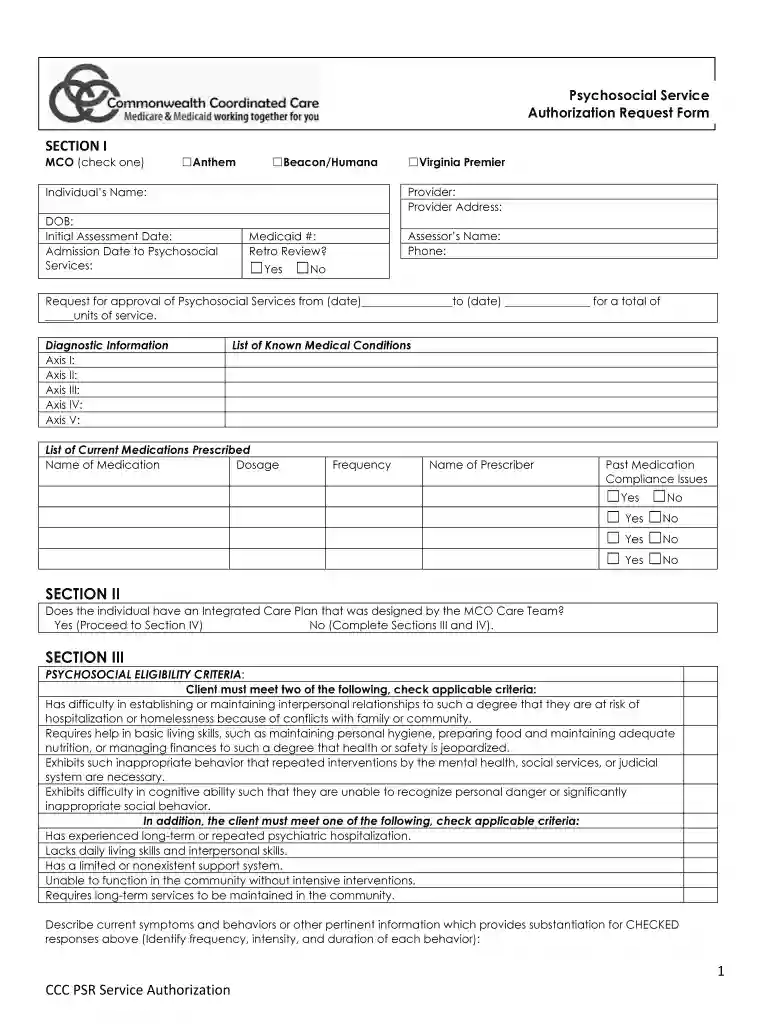
  2. Begin by filling out Section I. Select the MCO by checking one of the options: Anthem, Beacon/Humana, or Virginia Premier. Enter the individual's name, provider details, date of birth, and relevant dates for assessment and admission.
  3. Complete the diagnostic information fields (Axis I-V) and list any known medical conditions along with current medications prescribed. Ensure to include dosage, frequency, and prescriber details.
  4. In Section II, indicate whether there is an Integrated Care Plan. If 'No', proceed to complete Sections III and IV.
  5. For Section III, check applicable psychosocial eligibility criteria that apply to the client. Provide detailed descriptions of current symptoms and behaviors that support your selections.
  6. Outline treatment goals in the designated area, noting progress and lack of progress for each goal.
  7. Finally, ensure signatures are obtained from both QMHP and LMHP in Section IV before submitting the completed form via fax to the appropriate MCO.

Start using our platform today for free to streamline your psr authorization form completion!

be ready to get more

Complete this form in 5 minutes or less

Get form

Got questions?

We have answers to the most popular questions from our customers. If you can't find an answer to your question, please contact us.
Contact us
0:43 1:58 A description of the protected. Health information to be used and disclosed. The person authorizedMoreA description of the protected. Health information to be used and disclosed. The person authorized to make the use or disclosure. The person to whom the covered entity may make the disclosure.
I hereby authorize use or disclosure of protected health information about me as described below. 4. ​ I understand that the information used or disclosed may be subject to re-disclosure by the person or class of persons or facility receiving it, and would then no longer be protected by federal privacy regulations.
Prior authorization requires your doctor or provider to obtain approval from your health plan before providing health care services or prescribing prescription drugs. Without prior authorization, your health plan may not pay for your treatment or medication. (Emergency care doesnt need prior authorization.)
To receive coverage for a medication requiring prior authorization, you can: Ask your healthcare provider to submit the request. Your healthcare provider can submit the request online, by fax or phone by accessing our providers prior authorization information. Submit your own prior authorization request.
I understand that I have the right to inspect or have a copy of the confidential information I have authorized to be used or disclosed by this authorization form. I understand that if I agree to sign this authorization, which I am not required to do, I must be provided with a signed copy of the form.

Security and compliance

At DocHub, your data security is our priority. We follow HIPAA, SOC2, GDPR, and other standards, so you can work on your documents with confidence.

Learn more
ccpa2
pci-dss
gdpr-compliance
hipaa
soc-compliance

People also ask

Generally, an authorization provides the authority for a doctors release of PHI for specified purposes, which are generally other than treatment, payment, or healthcare operations, or, to disclose protected health information to a third party specified by the individual.
Begin by specifying your name, the entity authorized to disclose information, and the individuals or entities you authorize to receive it. Indicate the specific information and purpose for which it will be disclosed, add an expiration date or event, and sign and date the form to confirm your consent.

Related links