Type text, add images, blackout confidential details, add comments, highlights and more.
02. Sign it in a few clicks
Draw your signature, type it, upload its image, or use your mobile device as a signature pad.
03. Share your form with others
Send move in checklist pdf via email, link, or fax. You can also download it, export it or print it out.
How to use or fill out move in checklist with our platform
Ease of Setup
DocHub User Ratings on G2
Ease of Use
DocHub User Ratings on G2
Click ‘Get Form’ to open the move-in checklist in the editor.
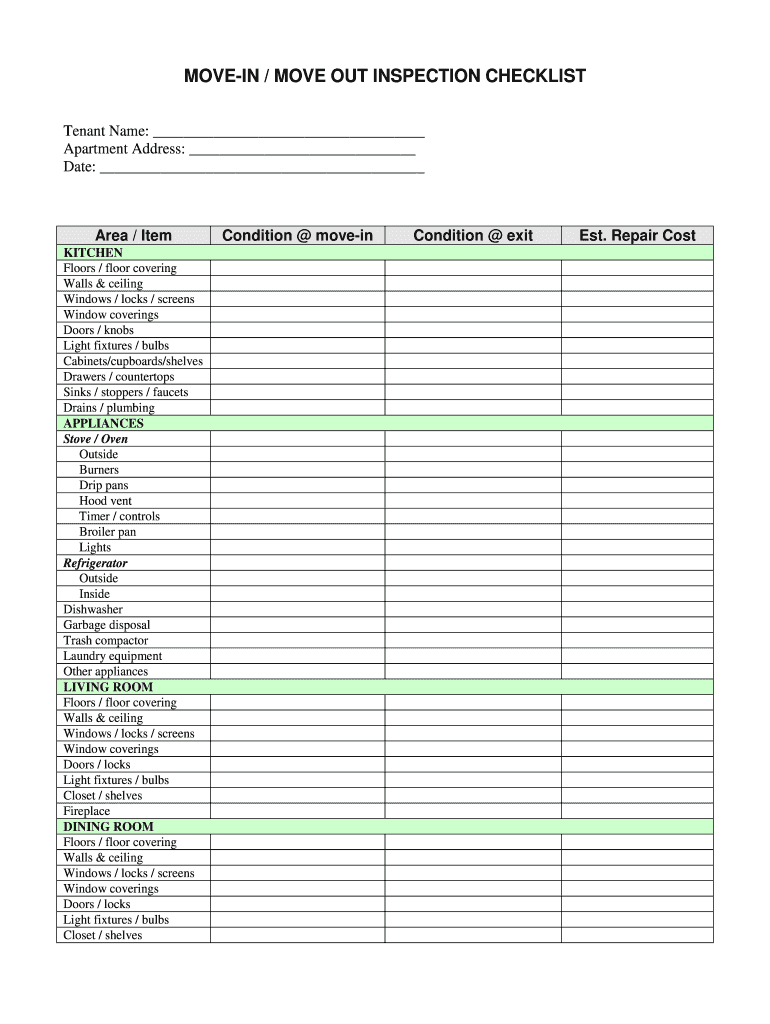
Begin by entering your name, apartment address, and the date at the top of the form. This information is essential for record-keeping.
Proceed to each section, starting with the kitchen. For every item listed, assess its condition and mark it accordingly. Use checkboxes or text fields as needed.
Continue through each room—living room, dining room, bedrooms, and bathrooms—ensuring you evaluate all specified areas such as floors, walls, windows, and appliances.
For any damages or repairs needed, note down the estimated repair costs in the designated fields to keep track of potential expenses.
Finally, sign and date the checklist at the bottom once completed. Ensure both tenant and owner/manager signatures are included for validation.
Start using our platform today to streamline your move-in process for free!
Printable move in checklistMove in checklist templateMove in checklist pdfTenant move-in checklist pdfHow to fill out move-in checklistMove-in checklist apartmentMove in checklist template wordFree move-in checklist for rental property
Security and compliance
At DocHub, your data security is our priority. We follow HIPAA, SOC2, GDPR, and other standards, so you can work on your documents with confidence.
We know moving can be stressful and you might be worried you forgot something. Heres a list to help you pack before you move into Lynx Crossing!Read more
Cookie consent notice
This site uses cookies to enhance site navigation and personalize your experience.
By using this site you agree to our use of cookies as described in our Privacy Notice.
You can modify your selections by visiting our Cookie and Advertising Notice.