Piggyback insurance 2026

Get Form
ccpoa provider login Preview on Page 1

Here's how it works

01. Edit your ccpoa provider login online
Type text, add images, blackout confidential details, add comments, highlights and more.
02. Sign it in a few clicks
Draw your signature, type it, upload its image, or use your mobile device as a signature pad.
03. Share your form with others
Send ccpoa benefit trust fund provider portal via email, link, or fax. You can also download it, export it or print it out.

How to use or fill out piggyback insurance with our platform

Form edit decoration
9.5
Ease of Setup
DocHub User Ratings on G2
9.0
Ease of Use
DocHub User Ratings on G2
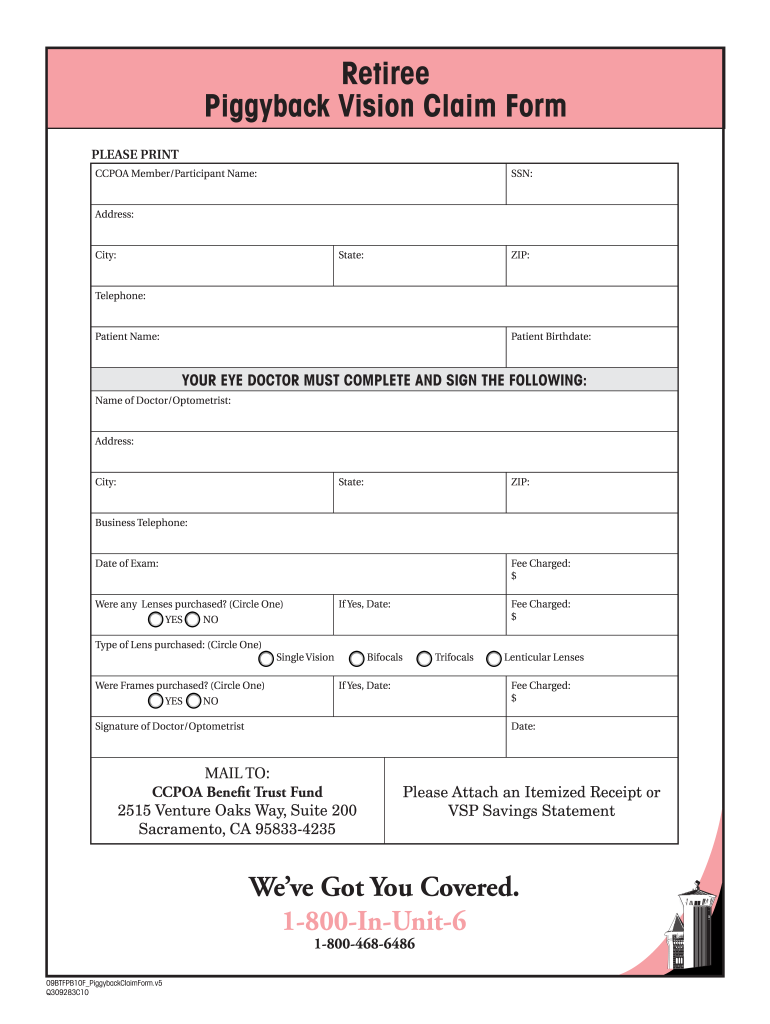
  1. Click ‘Get Form’ to open the Piggyback Vision Claim Form in the editor.
  2. Begin by entering your personal information. Fill in your name, Social Security Number (SSN), address, city, state, ZIP code, and telephone number.
  3. Next, provide the patient's details including their name and birthdate.
  4. In the section for your eye doctor, input their name, address, city, state, ZIP code, business telephone number, and date of exam.
  5. Indicate the fees charged for the exam and whether any lenses were purchased. Circle 'YES' or 'NO' as applicable.
  6. If lenses were purchased, specify the type (Single Vision, Bifocals, Trifocals, Lenticular Lenses) and enter the corresponding fee charged.
  7. If frames were purchased, repeat the process by circling 'YES' or 'NO', and if applicable, enter the fee charged.
  8. Ensure that your eye doctor completes their signature and date at the bottom of the form.
  9. Finally, attach an itemized receipt or VSP savings statement before mailing it to CCPOA Benefit Trust Fund at the provided address.

Start filling out your Piggyback Vision Claim Form online for free today!

See more piggyback insurance versions

We've got more versions of the piggyback insurance form. Select the right piggyback insurance version from the list and start editing it straight away!
Versions Form popularity Fillable & printable
2009 3.9 Satisfied (56 Votes)
be ready to get more

Complete this form in 5 minutes or less

Get form

Got questions?

We have answers to the most popular questions from our customers. If you can't find an answer to your question, please contact us.
Contact us
Piggyback pays a portion of the fees your dentist charges, after benefits have been paid by your main dental insurance. The charges submitted for reimbursement must be for services specified in the Summary Program Description (SPD). Dental deductibles are not eligible for reimbursement.
Dentists who do not accept insurance can streamline their operations and focus more on patient care. Lower Reimbursements: Insurance companies often reimburse at lower rates than what a dentist might charge for their services. By not accepting insurance, dentists can set their own fees and potentially earn more.
Piggybacking is when a public agency uses an existing public contract as a template to form their own contract directly with the vendor to purchase on the same or similar terms.
A piggyback second mortgage is a home equity loan or home equity line of credit (HELOC) that is made at the same time as your main mortgage. Its purpose is to allow borrowers with low down payment savings to borrow additional money in order to qualify for a main mortgage without paying for private mortgage insurance.
Combining two mortgage loans in a piggyback fashion In this scenario, neither of the two loans would have an LTV above 80%. So mortgage insurance would not be required.

Security and compliance

At DocHub, your data security is our priority. We follow HIPAA, SOC2, GDPR, and other standards, so you can work on your documents with confidence.

Learn more
ccpa2
pci-dss
gdpr-compliance
hipaa
soc-compliance
be ready to get more

Complete this form in 5 minutes or less

Get form

People also ask

Insurers bundle many health care services under a more comprehensive health plan, but vision and dental insurance are typically sold separately.

ccpoa piggyback vision form