Type text, add images, blackout confidential details, add comments, highlights and more.
02. Sign it in a few clicks
Draw your signature, type it, upload its image, or use your mobile device as a signature pad.
03. Share your form with others
Send 1011 form via email, link, or fax. You can also download it, export it or print it out.
How to use or fill out ccp 1011 with our platform
Ease of Setup
DocHub User Ratings on G2
Ease of Use
DocHub User Ratings on G2
Click ‘Get Form’ to open the ccp 1011 in the editor.
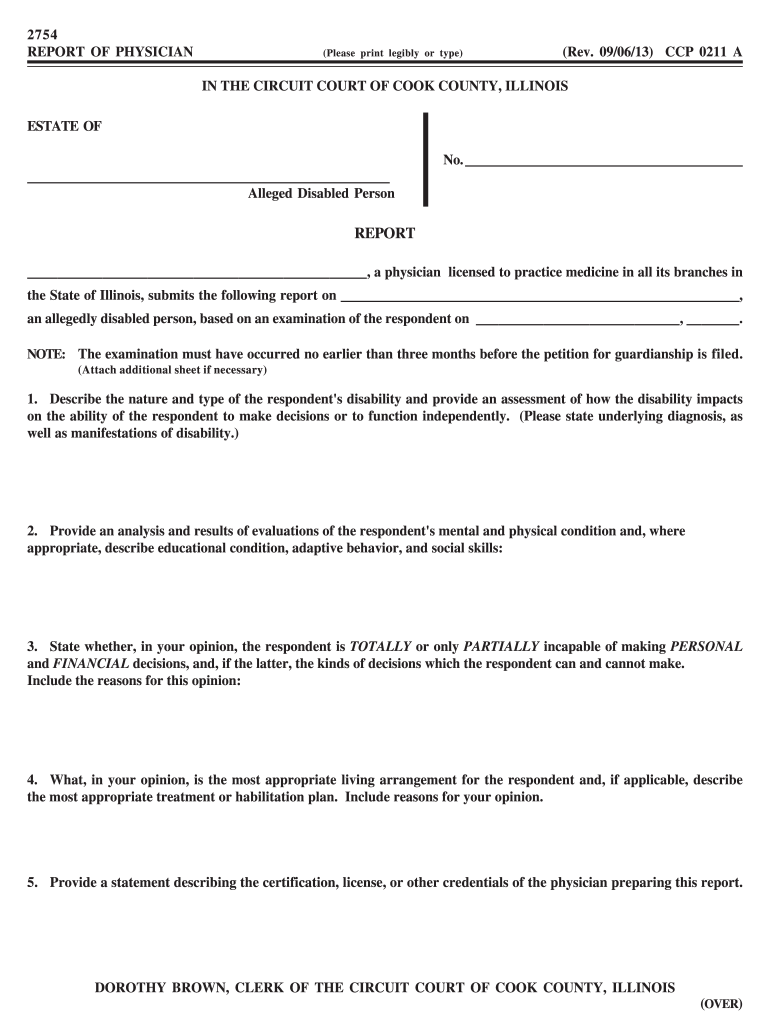
Begin by entering the name of the alleged disabled person and their case number at the top of the form. Ensure that this information is accurate as it is crucial for identification.
In Section 1, describe the nature and type of the respondent's disability. Provide a detailed assessment of how this impacts their decision-making abilities. Use clear language to convey your observations.
For Section 2, analyze and summarize evaluations regarding the respondent's mental and physical condition. Include any relevant educational conditions, adaptive behaviors, and social skills that may affect their independence.
In Section 3, state whether the respondent is TOTALLY or PARTIALLY incapable of making personal and financial decisions. Clearly outline which decisions they can make independently.
Section 4 requires you to suggest an appropriate living arrangement for the respondent along with a treatment or habilitation plan if necessary. Justify your recommendations based on your professional opinion.
Finally, complete Section 5 by providing your credentials as a physician. Ensure all required signatures are included before submitting.
Start using our platform today to fill out ccp 1011 easily and efficiently!
Cookie consent notice
This site uses cookies to enhance site navigation and personalize your experience.
By using this site you agree to our use of cookies as described in our Privacy Notice.
You can modify your selections by visiting our Cookie and Advertising Notice.