




Here's how it works

01. Edit your dispute form online
Type text, add images, blackout confidential details, add comments, highlights and more.

02. Sign it in a few clicks
Draw your signature, type it, upload its image, or use your mobile device as a signature pad.

03. Share your form with others
Send charge dispute form pnb via email, link, or fax. You can also download it, export it or print it out.
How to use or fill out charge dispute form pnb with our platform

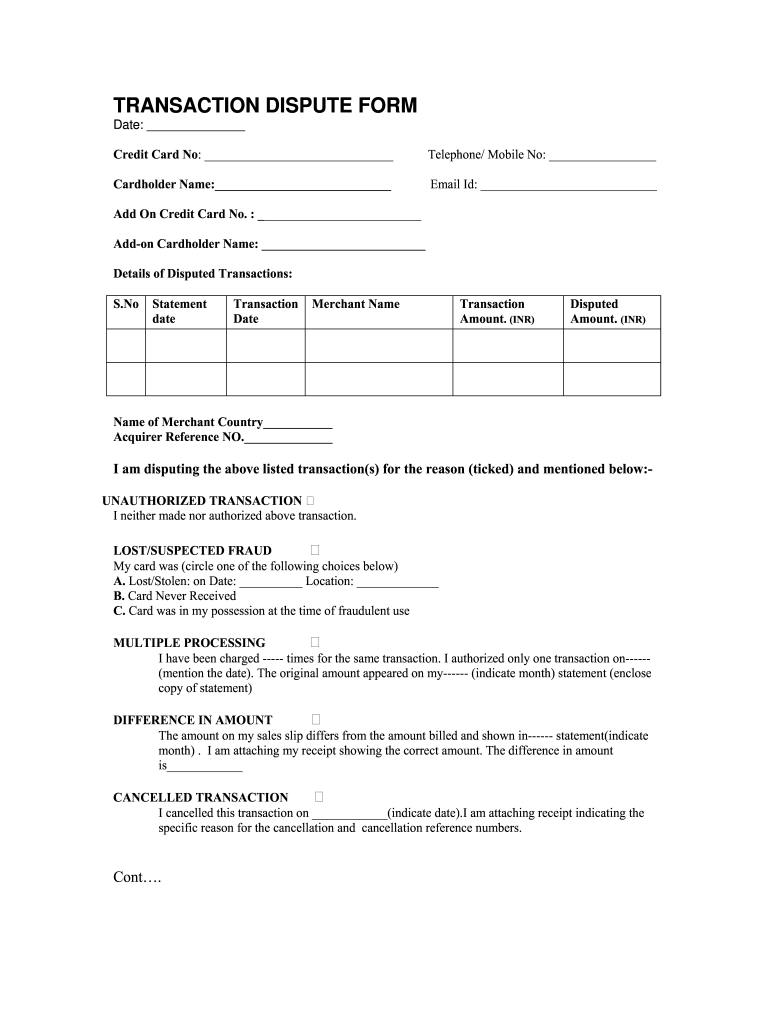
- Click ‘Get Form’ to open the charge dispute form in the editor.
- Begin by entering the date and your credit card number at the top of the form. Ensure accuracy as this information is crucial for processing your dispute.
- Fill in your contact details, including your telephone/mobile number, cardholder name, and email address. This allows for effective communication regarding your dispute.
- For each disputed transaction, list the statement date, transaction date, merchant name, transaction amount, and disputed amount in the provided fields. Be thorough to avoid delays.
- Select the reason for your dispute by ticking the appropriate box. If necessary, provide additional details in the space provided to clarify your situation.
- Attach any required documents such as receipts or statements that support your claim. This will strengthen your case and expedite resolution.
- Finally, sign the form as both primary and add-on cardholders if applicable. Review all entries before submission to ensure completeness.
Start using our platform today to fill out your charge dispute form easily and for free!
Fill out charge dispute form pnb online
It's free
See more charge dispute form pnb versions
We've got more versions of the charge dispute form pnb form. Select the right charge dispute form pnb version from the list and start editing it straight away!
| Versions | Form popularity | Fillable & printable |
|---|---|---|
| 2008 | 3.8 Satisfied (72 Votes) |
Security and compliance
At DocHub, your data security is our priority. We follow HIPAA, SOC2, GDPR, and other standards, so you can work on your documents with confidence.
Learn more


Related forms

How to check pardon status in delaware: Fill out and sign online
The document provides detailed instructions for completing the Delaware Board of Pardons Application, including necessar ...

UNITED STATES COURT OF APPEALS FOR THE FOURTH CIRCUIT
The document provides guidelines for preparing and submitting an Informal Brief to the United States Court of Appeals fo ...

Cemis login
The document is a registration form for new learners in the Western Cape Education Department's CEMIS system. It outline ...

Estate (probate) intake questionnaire - Studenberg Law
The document is an Estate (Probate) Intake Questionnaire designed to collect essential information about a decedent for ...
Tdcj marriage forms
The document titled 'Common Law Marriage Form For Tdcj.pdf' provides information and forms related to common-law marriag ...