




Here's how it works

01. Edit your aliso viejo building department online
Type text, add images, blackout confidential details, add comments, highlights and more.

02. Sign it in a few clicks
Draw your signature, type it, upload its image, or use your mobile device as a signature pad.

03. Share your form with others
Send it via email, link, or fax. You can also download it, export it or print it out.
How to use or fill out aliso viejo plan with our platform

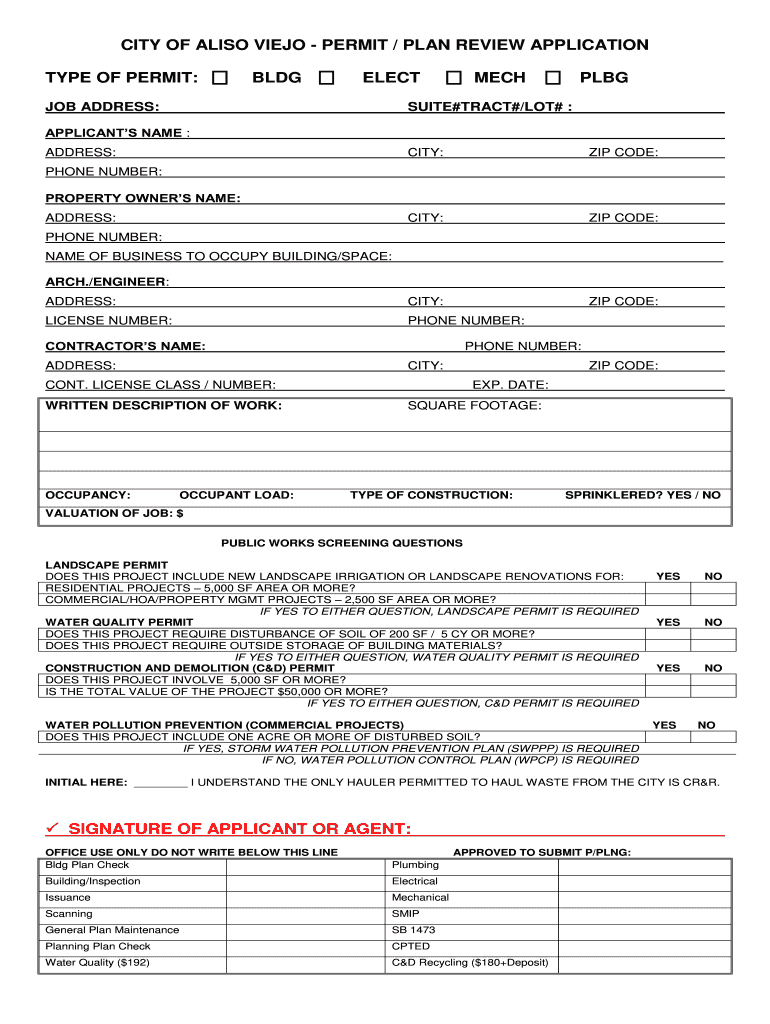
- Click ‘Get Form’ to open the aliso viejo plan in the editor.
- Begin by filling out the 'Type of Permit' section. Select the appropriate permit type (Building, Electrical, Mechanical, Plumbing) based on your project needs.
- Enter the job address along with suite number and tract/lot number if applicable. This information is crucial for identifying the location of your project.
- Complete the applicant’s name and address fields. Ensure that all contact details are accurate for any follow-up communications.
- Provide information about the property owner, including their name and contact details. This is important for verification purposes.
- Fill in the business name that will occupy the building or space, along with details of the architect/engineer and contractor involved in your project.
- Detail the written description of work, occupancy type, occupant load, square footage, and construction type. Be thorough to avoid delays in processing.
- Answer any public works screening questions regarding landscape permits and water quality permits as applicable to your project.
- Finally, review all entered information for accuracy before signing off as the applicant or agent at the bottom of the form.
Start using our platform today to streamline your aliso viejo plan submission process for free!
Fill out aliso viejo plan online
It's free
It's free
Security and compliance
At DocHub, your data security is our priority. We follow HIPAA, SOC2, GDPR, and other standards, so you can work on your documents with confidence.
Learn more




