Type text, add images, blackout confidential details, add comments, highlights and more.
02. Sign it in a few clicks
Draw your signature, type it, upload its image, or use your mobile device as a signature pad.
03. Share your form with others
Send dea form certificate application printable via email, link, or fax. You can also download it, export it or print it out.
How to use or fill out application form DEA with our platform
Ease of Setup
DocHub User Ratings on G2
Ease of Use
DocHub User Ratings on G2
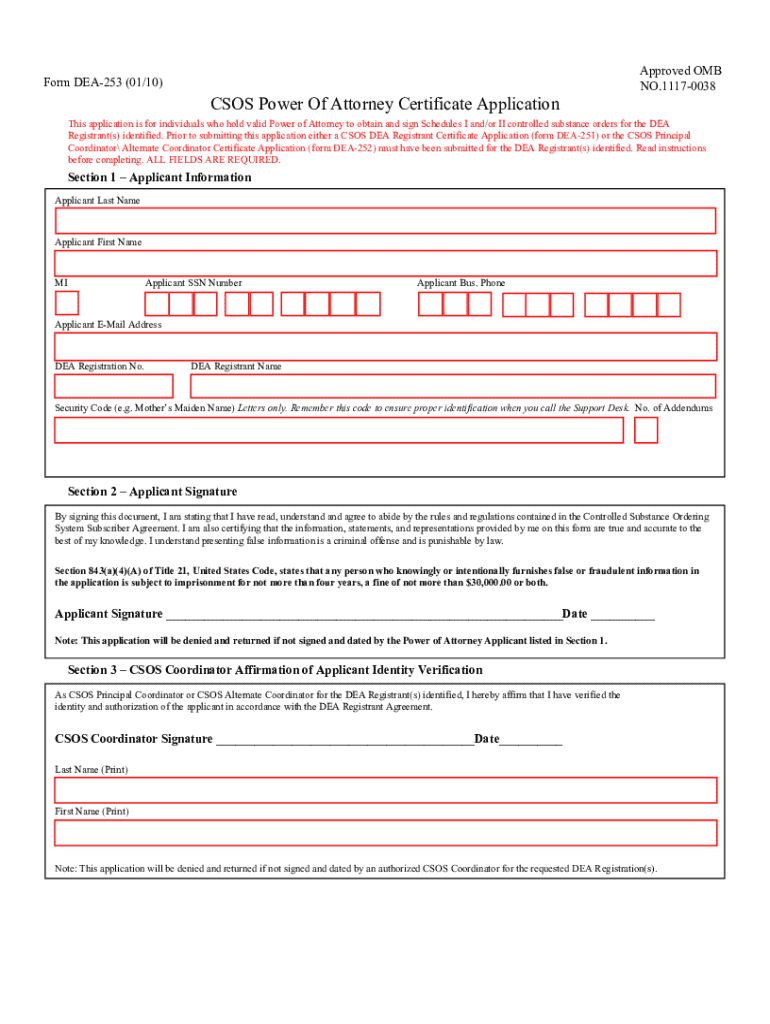
Click ‘Get Form’ to open the application form DEA-253 in the editor.
In Section 1, enter your last name, first name, and middle initial. If you do not have a middle initial, enter 'X'.
Provide your Social Security Number and business phone number. Ensure that the phone number is valid for correspondence regarding your application.
Input your email address, ensuring it is unique and not shared with other applicants. Enter your DEA Registration Number exactly as it appears on your certificate.
Complete the security code field using letters only. Indicate the number of addendums if applicable.
In Section 2, sign and date the application in blue or black ink in front of a certified notary public.
Section 3 requires a signature from the Principal or Alternate Coordinator verifying your identity. Ensure this is completed before submission.
Start filling out your application form DEA today for free using our platform!
Printable application form deaHow to fill out application form deaApplication form dea pdfDEA Form 222DEA Form 224aDEA Form 224 PDFDEA Form 106DEA Form 41
Security and compliance
At DocHub, your data security is our priority. We follow HIPAA, SOC2, GDPR, and other standards, so you can work on your documents with confidence.
INSTRUCTIONS. 1. To apply by mail complete this application. Keep a copy for your records. 2. Mail this form to the address provided in Section 7 or useRead more
Cookie consent notice
This site uses cookies to enhance site navigation and personalize your experience.
By using this site you agree to our use of cookies as described in our Privacy Notice.
You can modify your selections by visiting our Cookie and Advertising Notice.