

decoration

Rasterize PDF pages in Dropbox for Financial Services via DocHub

Connect your Dropbox account with DocHub and easily handle Financial Services documents. Rasterize PDF pages, set up workflows, and facilitate better collaboration with your team.
Try for free

Easily Rasterize PDF pages in Dropbox for Financial Services with DocHub Integration

Form edit decoration

A fast-paced business setting calls for innovative solutions to improve daily document workflows. DocHub offers various Integration alternatives, including Dropbox for Financial Services, to increase your productivity and effectiveness without limiting your file quality. Rasterize PDF pages, eSign, and safely export and import your files with no missing data along the way.

The best way to quickly Rasterize PDF pages in Dropbox for Financial Services on the web by using DocHub

  1. Log in or register a free DocHub profile.
  2. Gain access to your Dashboard and add your file by clicking on the New Document option.
  3. Select Dropbox and sign in to your profile.
  4. Once the file opens in our editor, easily Rasterize PDF pages and deal with your document.
  5. Enjoy lossless editing and go to import or store your document inside your profile.
  6. Share your file with other contributors and help smooth cooperation.

Bring in smooth data sharing and simplify your day-to-day document managing. Create a Template for commonly used documents, collaborate with your team, while keeping your documents arranged and Rasterize PDF pages in Dropbox for Financial Services with DocHub Integration. Join DocHub right now and explore the available integrations.

integration spotlight

Easily tackle document work with DocHub for Dropbox

Connect DocHub to Dropbox to easily make edits and annotations, sign, and send any Dropbox file or turn it into a fillable form or reusable template and sync it back to Dropbox – all with advanced security and process visibility.


Award-winning solution, recognized for ease of use and excellence

Grid leader 2025 Momentum leader 2025 Grid leader small business 2025 High performer 2025

Work smarter with DocHub for Dropbox

Simplify document management

DocHub brings PDF editing, eSigning, and form creation capabilities to Dropbox so you can work productively in one place.

card decoration

Improve teamwork

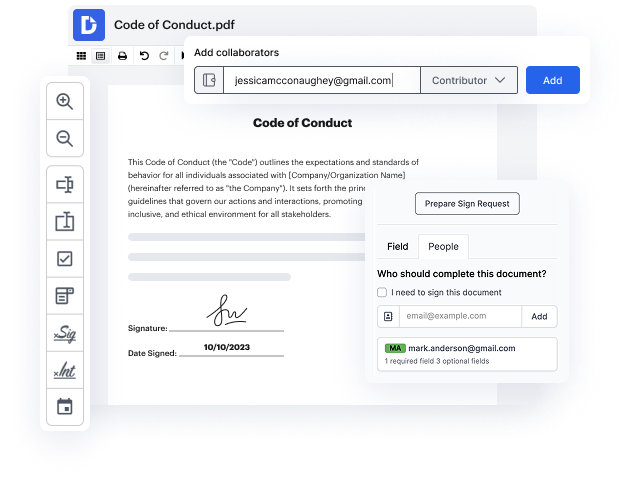
Keep collaboration going from anywhere. Leave comments in Dropbox documents and set permissions to let others view or make edits.

card decoration

Ensure document security

Use DocHub to securely work on documents stored in Dropbox. Protect your documents with a password or two-factor user authentication.

card decoration

Run your business from anywhere

Say goodbye to printing and scanning. Get your documents signed in minutes and keep track of every change with a detailed audit trail.
card decoration

DocHub users are making their document workflows a breeze right from Dropbox

"Best Free eSign Option" Can easily upload and sign documents without needing to pay for expensive options. This is the go-to web software for free eSigning. I can integrate this software with other storage platforms to upload files from anywhere.
Ted Tabaka
"Simple and Straight Forward" The simplicity of the product and ease of use with new individuals on a daily basis. The ability to sign documents on any device, especially mobile, when one is out of the office. The ability to review used templates is also great.
Ian A., Director
"Great PDF editor" DocHub is easy to use, easy to learn, has great functionality (edit, add text, erase text, assign signing, dates, initials, etc.). The price is lower than other comparable programs. It is easy to share documents and templates with other team members. It integrates with G-drive.
Jamie Palmer, President

Industry-leading security and compliance

DocHub complies with industry-leading standards, regulations, and certifications to ensure the most effective and secure workflows.

GDPR compliance
Regulates the collection, use, and holding of personal data for EU residents.
PCI DSS certification
Ensures the security of credit and debit card transactions made by a customer.
CPRA compliance
Enhances the privacy rights of California residents while protecting their personal data.
SOC 2 certification
Ensures the security of your data and the privacy of your clients.
HIPAA compliance
Protects privacy, security, and integrity of sensitive healthcare information.

Why choose DocHub?

icon

Powerful features in the free version

DocHub offers free access to premium tools without any time limits or hidden costs. Test out DocHub's advanced functionality with a free 30-day trial.

icon

Google integrations

DocHub is deeply integrated with the Google ecosystem, making it super easy to edit, sign, and manage documents without leaving your favorite Google Apps.

icon

Security

DocHub ensures the security of your data with 256-bit SSL encryption, OAuth 2.0 authentication, and encrypted storage.

Get started for free
decoration image

Got questions?

Here are some common questions from our customers that may provide you with the answer you're looking for. If you can't find an answer to your question, please don't hesitate to reach out to us.
Contact us
In order to integrate the two platforms, simply sign in to your DocHub account. From your Dashboard, hit New Document, then pick Dropbox from the Import from options. Select the document you need after signing into your Dropbox account and hit Choose. As soon as you’re in the editor, Rasterize PDF pages in DropBox and save your modifications. Export the executed copy back to Dropbox or select another export method. With these simple steps, you can take advantage of DocHub’s functionalities within DropBox while enhancing document-driven workflows for any field, including Financial Services.
Yes, the option to Rasterize PDF pages in DropBox via DocHub is available to all users, no matter the subscription plan you choose. Nevertheless, each plan entails specific restrictions concerning the number of documents, signature requests, and other features you can take advantage of. To find out more, please head to our Pricing page.
You can frictionlessly Rasterize PDF pages in DropBox for Financial Services with DocHub integration, but also annotate, edit, endorse, and transfer any document from Dropbox. You can also transform these documents into dynamic forms or templates that can be reused. After making these modifications, you can seamlessly sync the files back to Dropbox.
Every time you Rasterize PDF pages in DropBox for Financial Services online, rest assured that the whole process is shielded from prying eyes. Our program has a powerful end-to-end encryption mechanism in place, safeguarding your information between your gadget all the way to our servers. Your files are safely housed in Amazon Web Services within encrypted S3 storage. DocHub also complies with CCPA, GDPR, PCI DSS, and HIPAA requirements, making it the number one option for users across different sectors.
Yes, you can easily get a detailed log of every action in your paperwork with the Audit Trail. Simply choose the ability to get your file audited - the system will automatically create a detailed report along with the finalized PDF. So when you want to Rasterize PDF pages in DropBox for Financial Services through DocHub, rest assured any alterations you make to the paperwork are reflected down to the smallest detail.