Type text, add images, blackout confidential details, add comments, highlights and more.

02. Sign it in a few clicks
Draw your signature, type it, upload its image, or use your mobile device as a signature pad.

03. Share your form with others
Send cms100 via email, link, or fax. You can also download it, export it or print it out.

How to use or fill out cms 100 application form with our platform
Ease of Setup
DocHub User Ratings on G2
Ease of Use
DocHub User Ratings on G2
Click ‘Get Form’ to open the cms 100 application form in the editor.
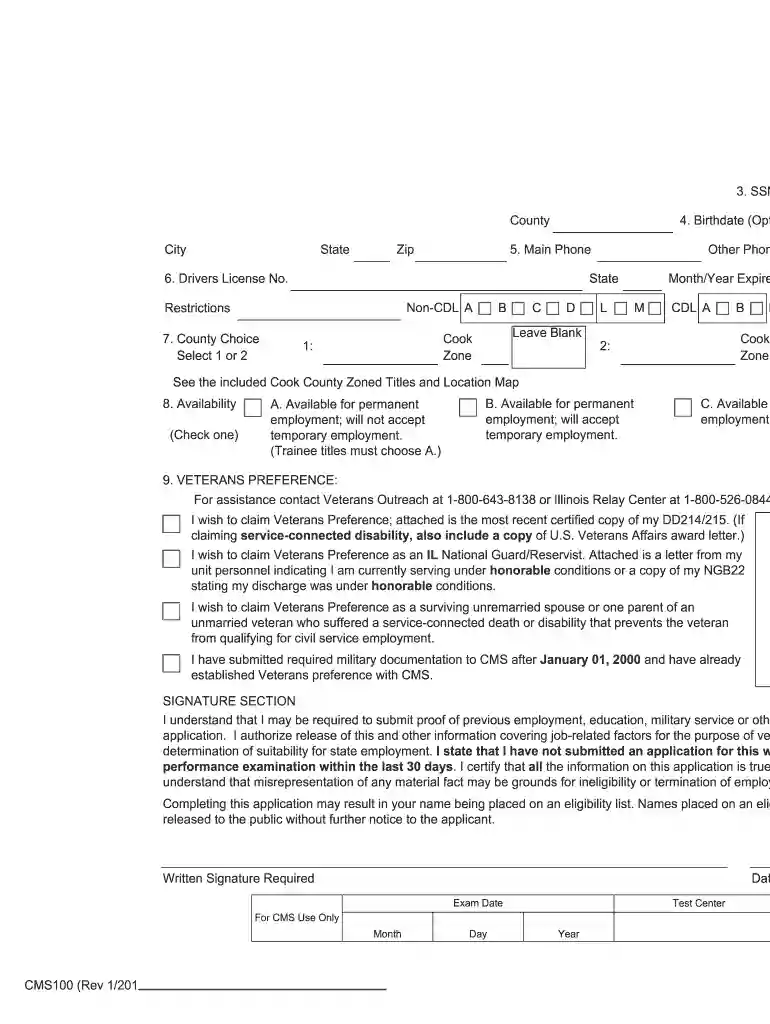
Begin by filling out your personal information, including your Social Security Number, county, city, state, and zip code. Ensure accuracy as this information is crucial for identification.
Proceed to the birthdate and contact details section. Enter your birthdate (optional), main phone number, and driver's license number along with the issuing state.
Select your county choice from the provided options. This is important for determining your eligibility based on location.
Indicate your availability for employment by checking one of the options provided. This helps employers understand your job preferences.
If applicable, claim Veterans Preference by providing necessary documentation as outlined in the form. Attach any required documents directly within the editor.
Complete the signature section by signing and dating the application. This confirms that all information provided is accurate and complete.
Start using our platform today to fill out your cms 100 application form online for free!
Fill out cms 100 application form online It's free
Dec 8, 2021 CANDIDATES MUST SUBMIT A SEPARATE BID FORM (as applicable) AND CMS-100/B FOR EACH POSTED VACANCY APPLIED FOR. APPLICATION INSTRUCTIONS. DO NOTRead more
Information provided on the CMS100 application is used to determine your eligibility for appointment to a State of Illinois position title. It is critical thatRead more
Jun 11, 2012 This application note describes the use of background operation (BGO) on the SH7216. BGO allows the CPU to perform other operations while the onRead more
Cookie consent notice
This site uses cookies to enhance site navigation and personalize your experience.
By using this site you agree to our use of cookies as described in our Privacy Notice.
You can modify your selections by visiting our Cookie and Advertising Notice.