



Here's how it works



How to use or fill out pathfinder club application with our platform

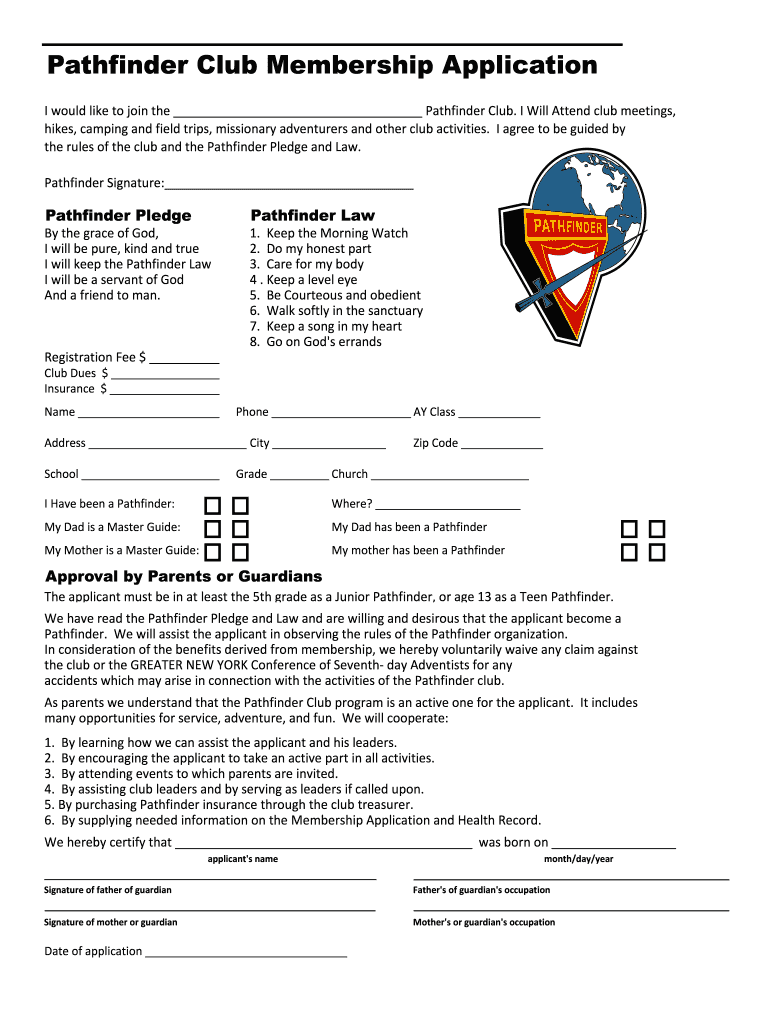
- Click ‘Get Form’ to open the Pathfinder Club Membership Application in the editor.
- Begin by filling in the name of the Pathfinder Club you wish to join in the designated field. This personalizes your application and shows your commitment.
- In the section for personal information, enter your name, phone number, address, city, zip code, school, and grade. Ensure all details are accurate for effective communication.
- Complete the health record section by providing your birth date, social security number, and any allergies or special medications. This information is crucial for your safety during club activities.
- Obtain signatures from parents or guardians in the approval section. They must acknowledge their understanding of the Pathfinder Pledge and Law.
- Finally, review all entries for accuracy before submitting. Use our platform’s features to save and share your completed application easily.
Start using our platform today to fill out your Pathfinder Club application effortlessly!
It's free
See more pathfinder club application versions
Got questions?
How do I sign my pathfinder application form without printing?
Electronic signatures are a perfect replacement for traditional signing, as they save time, effort, and money people spend on printing, scanning, and paper delivery. You can electronically sign your pathfinder application form using a reliable and powerful online document processing tool like DocHub. It complies with primary eSignature regulations (ESIGN and UETA), so all documents approved there are legally binding and have the same validity as manually signed ones.
Can I sign my pathfinder club membership application while I edit it?
If you edit your pathfinder club membership application with DocHub, you will not need to look for other applications or solutions to eSign it. An electronic signature is part of DocHub’s extensive editing toolset, which enables you to implement changes in your form without switching between platforms. Just complete your form, double-check the correctness of the data and place your electronic signature at the end to make it submission-ready in minutes.
Who started Pathfinder?
How many Pathfinders are there in the world?
What is the age range for Pathfinders?
Security and compliance
At DocHub, your data security is our priority. We follow HIPAA, SOC2, GDPR, and other standards, so you can work on your documents with confidence.
Learn more