Change form philadelphia 2008-2026

Get Form
change form philadelphia 2008 Preview on Page 1

Here's how it works

01. Edit your form online
Type text, add images, blackout confidential details, add comments, highlights and more.
02. Sign it in a few clicks
Draw your signature, type it, upload its image, or use your mobile device as a signature pad.
03. Share your form with others
Send it via email, link, or fax. You can also download it, export it or print it out.

How to use or fill out change form philadelphia 2008 with DocHub

Form edit decoration
9.5
Ease of Setup
DocHub User Ratings on G2
9.0
Ease of Use
DocHub User Ratings on G2
  1. Click ‘Get Form’ to open it in the editor.
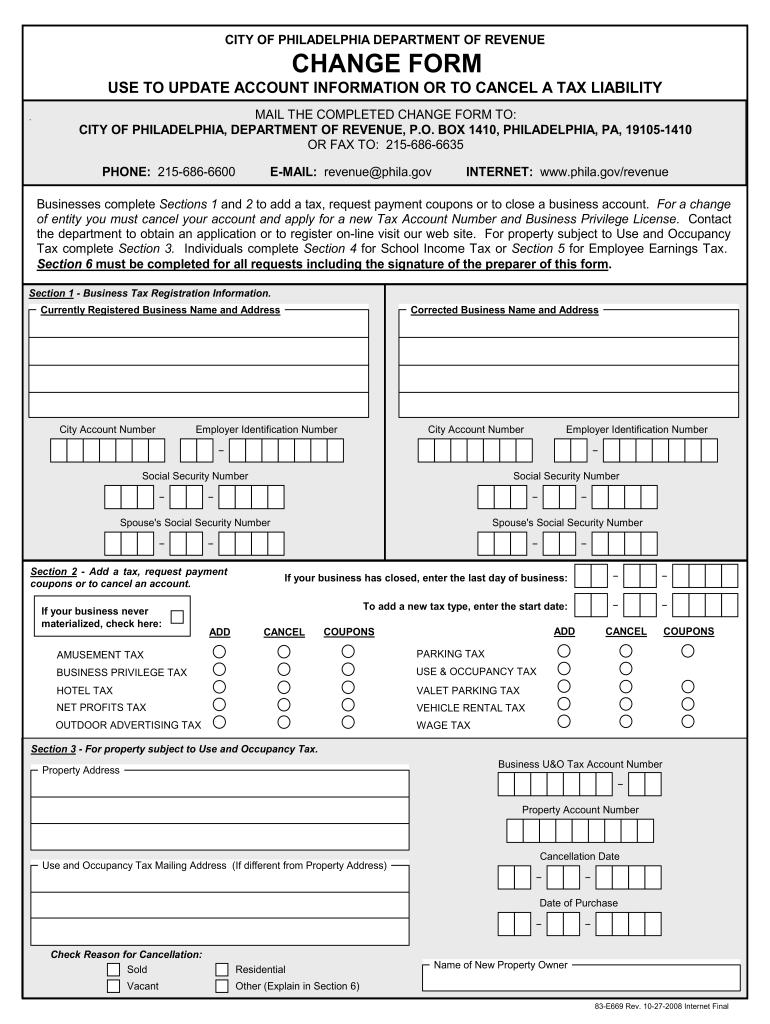
  2. Begin with Section 1, where you will enter your currently registered business name and address. If there are corrections, provide the corrected information along with your Employer Identification Number and City Account Number.
  3. In Section 2, indicate if you wish to add a tax or request payment coupons. Enter the start date for any new tax types you are adding. If closing your business, specify the last day of operation.
  4. For properties subject to Use and Occupancy Tax, complete Section 3 by providing the Business U&O Tax Account Number and property details. Include the cancellation date and reason for cancellation.
  5. Sections 4 and 5 are for School Income Tax and Employee Earnings Tax respectively. Fill in any necessary corrections to taxpayer names, addresses, and Social Security Numbers.
  6. Finally, complete Section 6 with your contact information, including your name, signature, telephone number, email address, and fax number.

Start using our platform today to easily fill out the change form philadelphia 2008 for free!

See more change form philadelphia 2008 versions

We've got more versions of the change form philadelphia 2008 form. Select the right change form philadelphia 2008 version from the list and start editing it straight away!
Versions Form popularity Fillable & printable
2020 4.9 Satisfied (57 Votes)
2017 4.1 Satisfied (63 Votes)
2008 4.3 Satisfied (71 Votes)
2006 4.3 Satisfied (30 Votes)
be ready to get more

Complete this form in 5 minutes or less

Get form

Got questions?

We have answers to the most popular questions from our customers. If you can't find an answer to your question, please contact us.
Contact us

Many software applications are available on the market for document modifying and signing. DocHub is one of the most widely used online solutions that comply with all data protection and compliance standards and ensures your eSigned documentation is legally enforceable. All you need to give it a try is to create an account, upload your change form philadelphia 2008, provide the necessary details, and click Sign. Create your electronic signature by typing, drawing it, uploading its picture to your template, or scanning a unique QR code.

You can easily edit and complete your change form philadelphia 2008 on any iOS device. Open an internet browser of your liking, go to the DocHub site, authorize or create a new account, add your file for editing, and make your desired adjustments. Our service is mobile-friendly, so using its functions on your phone will be a no-brainer, even on the first try.

Security and compliance

At DocHub, your data security is our priority. We follow HIPAA, SOC2, GDPR, and other standards, so you can work on your documents with confidence.

Learn more
ccpa2
pci-dss
gdpr-compliance
hipaa
soc-compliance