




Here's how it works



How to use or fill out the ECERS evaluation form with our platform

- Click ‘Get Form’ to open the ECERS evaluation form in the editor.
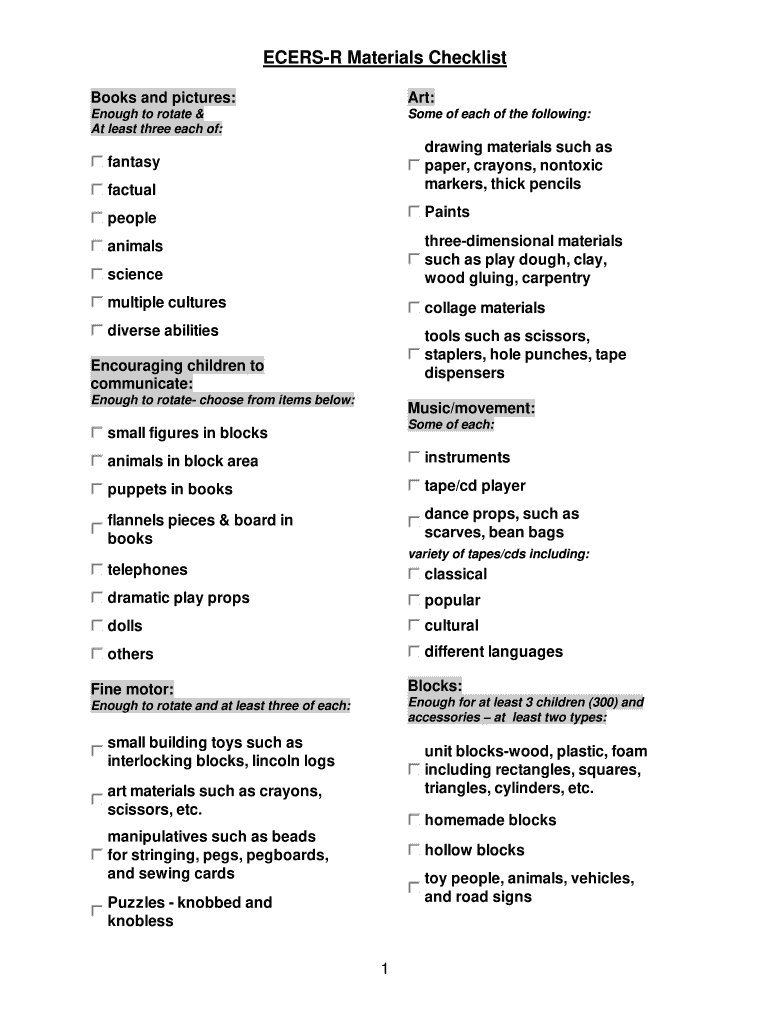
- Begin by reviewing the 'Books and Pictures' section. Ensure you have a variety of books that represent different cultures and abilities. Use our platform to easily check off items as you confirm their availability.
- Move on to the 'Art' section. Here, list all art materials available, such as paints and drawing tools. Make sure you have enough for rotation, which can be marked directly in the form.
- In the 'Music/Movement' section, ensure you have instruments and props for dance activities. Utilize our editor's features to add notes or comments about each item.
- Continue through sections like 'Blocks', 'Fine Motor', and 'Dramatic Play', checking off items as you go. Our platform allows for easy navigation between sections.
- Finally, review your entries for accuracy before saving or sharing your completed form with stakeholders.
Start using our platform today to streamline your ECERS evaluation process for free!
It's free
Got questions?
How can I eSign my ecers checklist 2024 from Gmail?
With DocHub, it’s quite simple. The platform offers users an add-on called DocHub for Gmail, which you can locate in the Google Workspace Marketplace without being charged. Set it up and grant it access to your Google account. Open your email with your ecers checklist 2024 attached and click on the add-on button in the right-side panel. Log in to your DocHub account, and upload the file to our editor, where you can fill it out and sign.
How do you create an e-signature for the ecers checklist 2023 printable on iOS?
Apart from a comprehensive toolset for editing PDFs on mobile phones, DocHub enables you to sign your ecers checklist 2023 printable along the way. Open our editor in your internet browser, make changes using DocHub’s toolset, and complete your editing by eSigning the finished form.
What is ECERS assessment tool?
What is the purpose of Ecers 3?
How many subscales are there in the Ecers 3?
Security and compliance
At DocHub, your data security is our priority. We follow HIPAA, SOC2, GDPR, and other standards, so you can work on your documents with confidence.
Learn more




