Type text, add images, blackout confidential details, add comments, highlights and more.
02. Sign it in a few clicks
Draw your signature, type it, upload its image, or use your mobile device as a signature pad.
03. Share your form with others
Send it via email, link, or fax. You can also download it, export it or print it out.
How to use or fill out provisions plan virginia get with our platform
Ease of Setup
DocHub User Ratings on G2
Ease of Use
DocHub User Ratings on G2
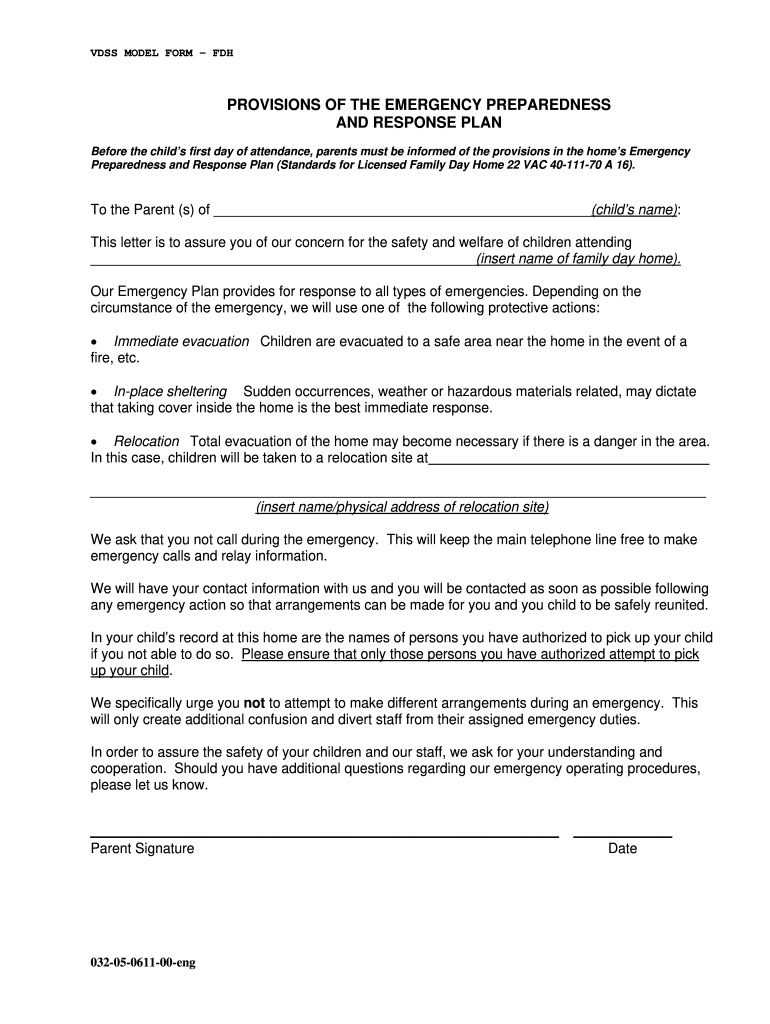
Click ‘Get Form’ to open the provisions plan in the editor.
Begin by entering your child's name in the designated field. This personalizes the document and ensures clarity.
Next, fill in the name of the family day home where your child will attend. This is crucial for identifying the specific emergency plan applicable.
Review the protective actions outlined in the document. Familiarize yourself with immediate evacuation, in-place sheltering, and relocation procedures.
Provide the name and physical address of the relocation site if total evacuation becomes necessary. Ensure this information is accurate for safety.
Sign and date the form at the bottom to acknowledge your understanding of these emergency procedures.
Start using our platform today to complete your provisions plan easily and for free!
Fill out provisions plan virginia get online It's free
Virginia public procurement act pdfWhich plan favored large statesVa Plan vs nj PlanWhat plan was supported by the small states whyPrompt payment Act 30 daysVppa procurementVirginia retainage lawWhich constitutional plan advocated for legislative representation to be equal for all states
Security and compliance
At DocHub, your data security is our priority. We follow HIPAA, SOC2, GDPR, and other standards, so you can work on your documents with confidence.
EPA Coal Plant Settlements - Global Energy Monitor
The enforcement initiative targeted 17 coal-fired power plants in Alabama, Florida, Georgia, Illinois, Indiana, Kentucky, Mississippi, Ohio, Tennessee, and WestRead more
A local planning commission recommends a comprehensive plan or part thereof for the locality and such plan has been approved and adopted by the governing body.Read more
Cookie consent notice
This site uses cookies to enhance site navigation and personalize your experience.
By using this site you agree to our use of cookies as described in our Privacy Notice.
You can modify your selections by visiting our Cookie and Advertising Notice.