How to cancel acn ibo membership 2026

Get Form
how to cancel acn ibo membership Preview on Page 1

Here's how it works

01. Edit your how to cancel acn ibo membership online
Type text, add images, blackout confidential details, add comments, highlights and more.

02. Sign it in a few clicks
Draw your signature, type it, upload its image, or use your mobile device as a signature pad.

03. Share your form with others
Send how to cancel acn membership via email, link, or fax. You can also download it, export it or print it out.

How to use or fill out how to cancel acn ibo membership with DocHub

Form edit decoration
9.5
Ease of Setup
DocHub User Ratings on G2
9.0
Ease of Use
DocHub User Ratings on G2
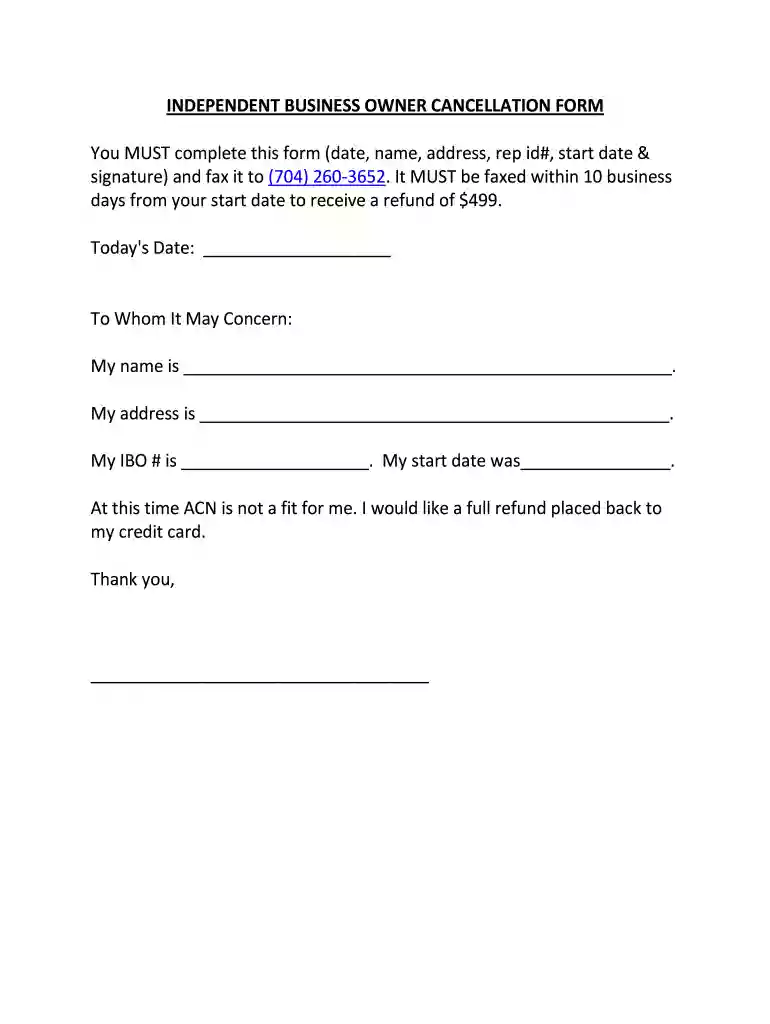
  1. Click ‘Get Form’ to open the Independent Business Owner Cancellation Form in our editor.
  2. Begin by entering today's date in the designated field at the top of the form.
  3. In the 'To Whom It May Concern' section, fill in your full name and address accurately.
  4. Provide your IBO number and start date in their respective fields to ensure proper identification.
  5. Clearly state your intention to cancel by writing a brief note indicating that ACN is not a fit for you and request a full refund.
  6. Finally, sign the form at the bottom to validate your request before submitting it.
  7. Once completed, fax the form to (704) 260-3652 within 10 business days from your start date for a refund of $499.

Start using our platform today for free to easily complete your cancellation form!

be ready to get more

Complete this form in 5 minutes or less

Get form

Got questions?

We have answers to the most popular questions from our customers. If you can't find an answer to your question, please contact us.
Contact us
You can cancel your membership by contacting the Membership Team via phone 1800 061 660 or email membership@acn.edu.au.
To cancel, you must call ACN Customer Care at 877-226-1010 or give notice of cancellation at the address below. You must give notice of cancellation by a method that will allow you to prove that you gave notice, including registered mail, fax, or by personal delivery.
To cancel, you MUST call ACN Customer Care at 877-226-1010. After the Cancellation Period, no Device may be returned by you for any reason without prior approval by ACN pursuant to Section 2.7.
How do I cancel my ACN subscription? CANCELLATION RIGHTS AND RESPONSIBILITIES You may cancel the Services at any time by calling ACN Customer Care at 1-877-226-1010.
To cancel subscriptions, check your devices app store (Apple/Google Play) or the services website/app for Manage Subscriptions or Account Settings, where youll find a direct cancellation option, but remember that deleting the app usually doesnt cancel the subscription; you must do it through the platform or provider to stop charges. On iPhone/iPad (Apple) Open the Settings app, tap your name, then tap Subscriptions. Select the subscription you want to end. Tap Cancel Subscription (you may need to scroll down). If you dont see a cancel button, its already canceled. On Android (Google Play) Open the Google Play Store, tap your profile icon. Go to Payments subscriptions, then Subscriptions. Choose the subscription and tap Cancel subscription, then follow the prompts. For Other Services (Web/App) Log in: to the services website or app. Navigate to your Account Settings, Profile, or Billing section. Look for a link like Manage Subscription, Cancel, or Change Plan. Follow the steps to confirm cancellation. If You Have Trouble Check bank statements: for the exact company name. Contact the company: directly if the app/website method fails. Contact your card issuer: or PayPal to dispute charges if the company wont help. AI can make mistakes, so double-check responsesIf you want to cancel a subscription from Apple - Apple SupportDec 15, 2025 iPhone. iPad. Mac. Vision Pro. Windows PC. Android Choose your device. Cancel a subscription on your iPhone. Open the Apple SupportCancel, pause, or change a subscription on Google Play - AndroidOn your Android device, go to subscriptions in Google Play. Select the subscription you want to cancel. Tap Cancel subscription. FGoogle Help

Security and compliance

At DocHub, your data security is our priority. We follow HIPAA, SOC2, GDPR, and other standards, so you can work on your documents with confidence.

Learn more
ccpa2
pci-dss
gdpr-compliance
hipaa
soc-compliance
be ready to get more

Complete this form in 5 minutes or less

Get form

People also ask

To cancel an Instantly.ai subscription, log into your account, go to Settings Billing, and cancel each subscription type (Email OutDocHub, Credits, etc.) separately; for immediate cancellation, especially for apps, you might need to contact support or the app store, as turning off auto-renew stops future payments, but you usually keep access until the paid period ends. For Instantly.ai Log in: Access your Instantly account. Go to Billing: Navigate to Settings Billing. Cancel Each Type: Youll see different tabs for each service (e.g., Email OutDocHub, CRM, Credits) you must cancel each one individually. Confirm: Follow the prompts to confirm the cancellation. This video shows you how to cancel an app subscription on an Android device: 36sGuideRealmYouTube Feb 6, 2026For other app/platform subscriptions Apple/iOS: Go to Settings [Your Name] Subscriptions, select the subscription, and tap Cancel. Google Play: Open the Play Store Profile Icon Payments subscriptions Subscriptions, then find and cancel. Important notes Immediate vs. Future: Canceling usually stops future renewals (auto-renew), but you retain access until the current billing cycle ends (e.g., end of the month/year). No Refunds: Subscriptions are generally non-refundable once paid for the current period. App Store vs. Directly: If you subscribed through Apple or Google, you must cancel via their platforms, not directly with the app. AI can make mistakes, so double-check responseshow do I cancel? - Feedback - InstantlySrishti. @Alison Eyring Should I proceed with cancellation from my end? 1. Srishti. @Wyrlo Aguila In order to cancel the subscriptInstantly.aiHow to Cancel Your Subscription | Instantly Help CenterInstantly Help Center

acn cancel membership