




Here's how it works

01. Edit your uk car sale invoice online
Type text, add images, blackout confidential details, add comments, highlights and more.

02. Sign it in a few clicks
Draw your signature, type it, upload its image, or use your mobile device as a signature pad.

03. Share your form with others
Send car sale invoice pdf via email, link, or fax. You can also download it, export it or print it out.
How to use or fill out auto sale invoice fillable form with our platform

- Click ‘Get Form’ to open the auto sale invoice fillable form in the editor.
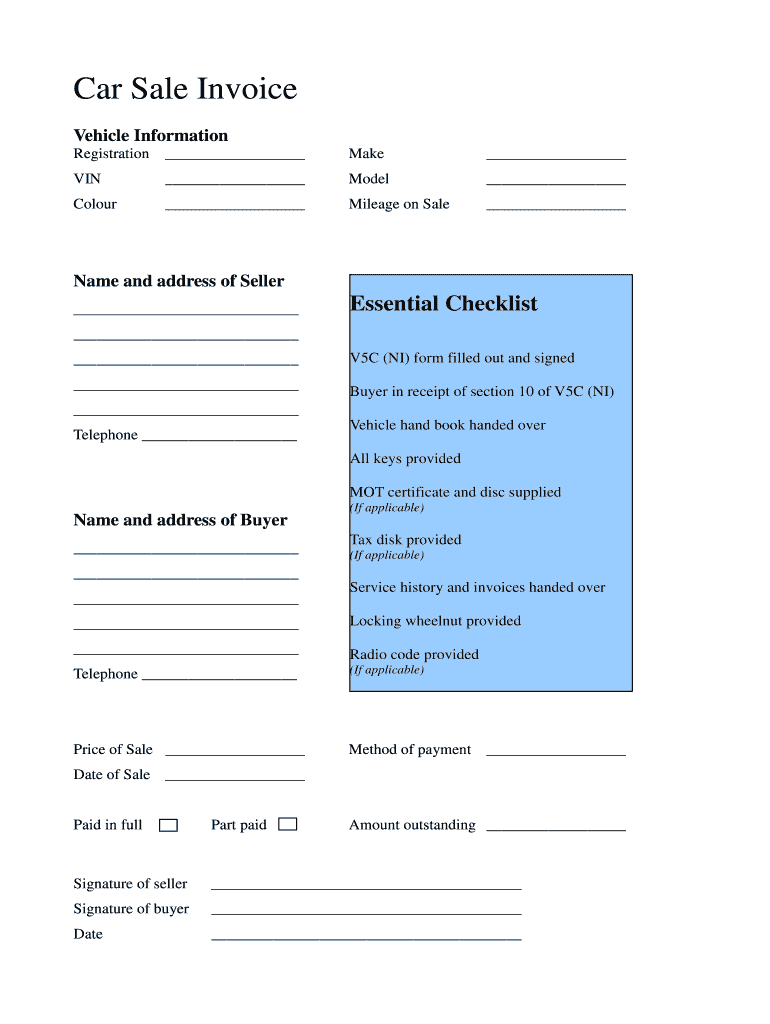
- Begin by entering the vehicle information. Fill in the registration, make, VIN, model, colour, and mileage on sale in their respective fields.
- Next, provide the name and address of the seller. Ensure all details are accurate for a smooth transaction.
- Review the essential checklist section. Confirm that you have filled out and signed the V5C (NI) form and that the buyer has received section 10 of it.
- Complete the buyer's information by entering their name, address, and telephone number if applicable.
- Fill in any additional items provided such as tax disk, service history, locking wheelnut, and radio code.
- Specify the price of sale, method of payment, date of sale, and whether it is paid in full or part paid. Include any outstanding amounts if necessary.
- Finally, both seller and buyer should sign and date the document to finalize the transaction.
Start using our platform today to easily complete your auto sale invoice for free!
Fill out auto sale invoice filliable form online
It's free
It's free
See more auto sale invoice filliable form versions
We've got more versions of the auto sale invoice filliable form form. Select the right auto sale invoice filliable form version from the list and start editing it straight away!
| Versions | Form popularity | Fillable & printable |
|---|---|---|
| 2012 | 4.2 Satisfied (29 Votes) |
Got questions?
We have answers to the most popular questions from our customers. If you can't find an answer to your question, please contact us.
Contact us
Can I make my own sales invoice?
Yes, you can create your own invoice by including essential details: business name, client information, itemized charges, and payment terms. Free sales invoice templates simplify the process.
Can I generate an invoice from myself?
In such cases, you are essentially your own business entity, and you can create invoices for your services or products to keep track of your earnings and expenses. Invoicing yourself can help you maintain organized financial records, demonstrate income for tax purposes, and document transactions.
How to create an automotive invoice?
An effective invoice should clearly list your business information, including: Your address. Contact information. Business number (if applicable) Customer details. Detailed description of services rendered. Parts used. Pricing. Payment terms.
How to create a car invoice?
Here are some guidelines that can help you in creating a car invoice. Include Invoice Number, Invoice Date, and Due Date. Provide your Business Information and your Clients Information. Put the Vehicles Information and Product Description. Terms of Payment. Signature.
How do I make a fillable invoice?
First create your document in your application of preference Word, Excel, you name it and then follow these steps in Adobe Acrobat: Click Tools and select Prepare Form. Select your file. Add new form fields with the top toolbar. Save your fillable PDF. Share with your client for secure completion and signing.
Security and compliance
At DocHub, your data security is our priority. We follow HIPAA, SOC2, GDPR, and other standards, so you can work on your documents with confidence.
Learn more


People also ask
How to make a car invoice?
To create a car sales invoice template, include sections for dealership information, buyer details, vehicle information (make, model, VIN), sale price, taxes, and total amount due. What key information should be on a car sales invoice template?
Can I create my own invoice?
The invoice maker from Adobe Express lets you create an invoice for free, no editing experience required. When planning your invoice design, keep it clear and concise. Include important details like your business name, contact information, and due date.