Type text, add images, blackout confidential details, add comments, highlights and more.
02. Sign it in a few clicks
Draw your signature, type it, upload its image, or use your mobile device as a signature pad.
03. Share your form with others
Send va form 21 8951 2 via email, link, or fax. You can also download it, export it or print it out.
How to use or fill out VA Form 21-8951-2 with our platform
Ease of Setup
DocHub User Ratings on G2
Ease of Use
DocHub User Ratings on G2
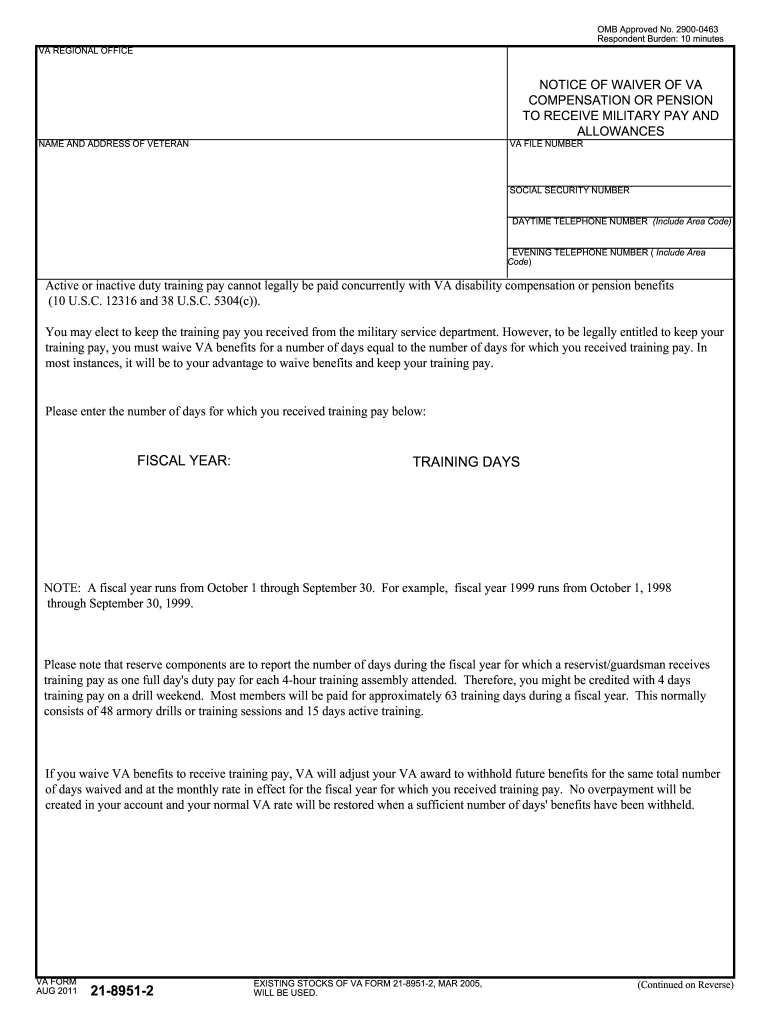
Click ‘Get Form’ to open VA Form 21-8951-2 in the editor.
Begin by entering your VA file number, name, and address in the designated fields. Ensure that all information is accurate to avoid processing delays.
Fill in your Social Security number and daytime/evening telephone numbers. This information is crucial for the VA to contact you regarding your benefits.
Indicate the fiscal year and the number of training days you received pay for. Remember, a fiscal year runs from October 1 through September 30.
Select one of the options regarding waiving VA benefits or military pay. Make sure to read each option carefully before making your choice.
Sign and date the form at the bottom. You will also need a signature from your unit commander or designee, along with their contact information.
Once completed, save your form and return it to the appropriate VA regional office. Keep a photocopy for your records.
Start using our platform today to fill out VA Form 21-8951-2 easily and for free!
How to fill out VA form 21-8951-2VA form 21-8951 explainedVA Form 21-8951-2 exampleVA form 21 8951 onlineVA Form 21-8951 redditVA waiver formVA disability and drill pay calculatorVA Form 21-4138
Security and compliance
At DocHub, your data security is our priority. We follow HIPAA, SOC2, GDPR, and other standards, so you can work on your documents with confidence.
Using VA Form 23-8800, Request for VA Fonns and Publications, directed to the 21-8951-2. Notice of Waiver of VA Compensation or. 03/05. Pension to ReceiveRead more
Usually, its to your advantage to waive benefits and keep your training pay. Please enter the number of days for which you received training pay below.Read more
Cookie consent notice
This site uses cookies to enhance site navigation and personalize your experience.
By using this site you agree to our use of cookies as described in our Privacy Notice.
You can modify your selections by visiting our Cookie and Advertising Notice.