2013 wi form pa 003-2026

Get Form
2013 wi form pa 003 Preview on Page 1

Here's how it works

01. Edit your form online
Type text, add images, blackout confidential details, add comments, highlights and more.

02. Sign it in a few clicks
Draw your signature, type it, upload its image, or use your mobile device as a signature pad.

03. Share your form with others
Send it via email, link, or fax. You can also download it, export it or print it out.

How to use or fill out 2013 wi form pa 003 with our platform

Form edit decoration
9.5
Ease of Setup
DocHub User Ratings on G2
9.0
Ease of Use
DocHub User Ratings on G2
  1. Click ‘Get Form’ to open the 2013 WI Form PA-003 in the editor.
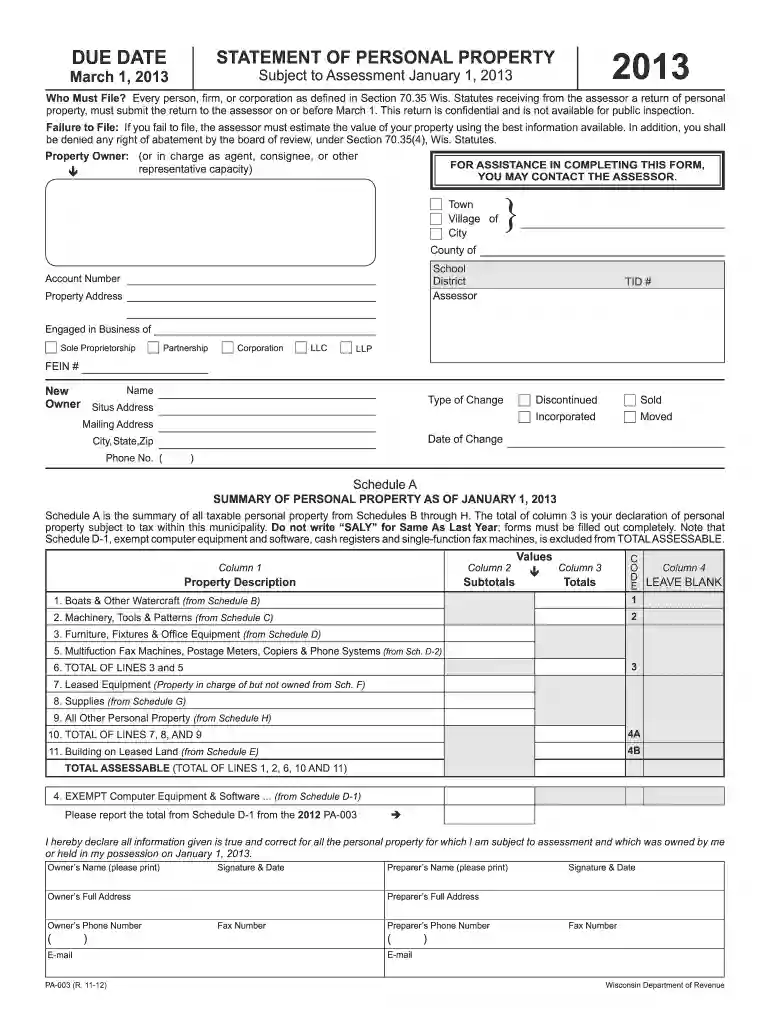
  2. Begin by filling out your personal information, including your name, mailing address, and phone number. Ensure accuracy as this information is crucial for the assessor.
  3. In Schedule A, summarize all taxable personal property. Carefully enter values from Schedules B through H into the appropriate columns, ensuring no fields are left blank.
  4. For each asset type listed in Schedules B through H, provide details such as year acquired, cost when acquired, and any additions or disposals since January 1, 2012.
  5. Review all entries for completeness and accuracy. Once satisfied, sign and date the form at the bottom to certify that all information is true and correct.

Start using our platform today to fill out your forms online for free!

See more 2013 wi form pa 003 versions

We've got more versions of the 2013 wi form pa 003 form. Select the right 2013 wi form pa 003 version from the list and start editing it straight away!
Versions Form popularity Fillable & printable
2023 4.9 Satisfied (49 Votes)
2022 4.8 Satisfied (189 Votes)
2021 4.4 Satisfied (305 Votes)
2020 4.3 Satisfied (209 Votes)
2019 4.2 Satisfied (113 Votes)
2018 4.3 Satisfied (109 Votes)
2017 4 Satisfied (58 Votes)
2016 4.4 Satisfied (809 Votes)
2015 4.3 Satisfied (40 Votes)
2013 4.2 Satisfied (42 Votes)
be ready to get more

Complete this form in 5 minutes or less

Get form

Got questions?

We have answers to the most popular questions from our customers. If you can't find an answer to your question, please contact us.
Contact us
A homeowner 65 years of age or older with total household income of no more than $20,000 may annually apply to the Wisconsin Housing and Economic Development Authority (WHEDA) for a loan equal to the amount of property taxes and special assessments levied on the home.
Wisconsin eliminates personal property tax effective January 1, 2024.
For those who do not have internet access or the ability to print, paper forms and instructions are available upon request. Call or visit any of the Department of Revenue offices located throughout the state. Call (608) 266-2486. Email DORFormsRequests@wisconsin.gov.
The term personal property as defined in sec. 70.04, Wis. Stats., includes all goods, wares, merchandise, chattels, and effects, of any nature or description, having any real marketable value, and not included in the term real property.
Are there any states without property tax? Sadly for investors, the answer is no, there are no states without property tax. This is because property tax is a useful way for local governments to fund public services such as schools, fire and police departments, infrastructure and libraries.

Security and compliance

At DocHub, your data security is our priority. We follow HIPAA, SOC2, GDPR, and other standards, so you can work on your documents with confidence.

Learn more
ccpa2
pci-dss
gdpr-compliance
hipaa
soc-compliance
be ready to get more

Complete this form in 5 minutes or less

Get form