How to fill tsgli refund form 2012-2026

Get Form
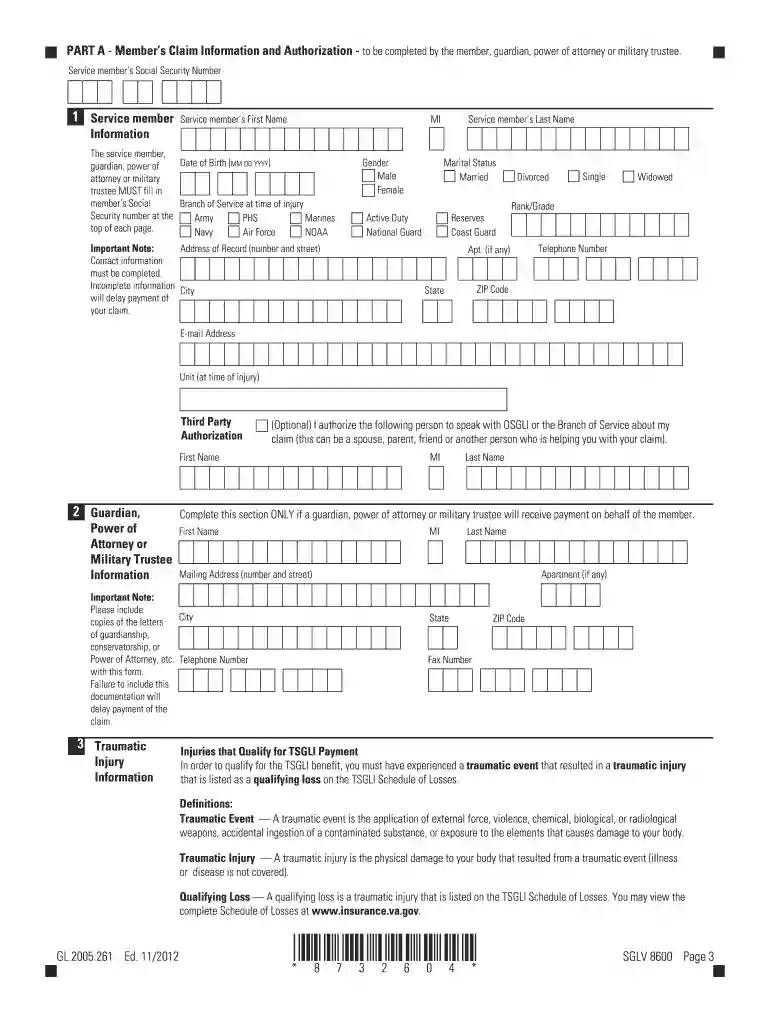
tsgli refund form Preview on Page 1

Here's how it works

01. Edit your tsgli refund form online
Type text, add images, blackout confidential details, add comments, highlights and more.

02. Sign it in a few clicks
Draw your signature, type it, upload its image, or use your mobile device as a signature pad.

03. Share your form with others
Send tsgli claim form 12 via email, link, or fax. You can also download it, export it or print it out.

How to fill out the TSGLI Refund Form 2012 with Our Platform

Form edit decoration
9.5
Ease of Setup
DocHub User Ratings on G2
9.0
Ease of Use
DocHub User Ratings on G2
  1. Click ‘Get Form’ to open the TSGLI Refund Form 2012 in the editor.
  2. Begin by filling out Part A, which requires the service member's personal information, including their Social Security number, name, date of birth, and contact details. Ensure all fields are completed accurately to avoid delays.
  3. In Part B, a medical professional must provide their statement regarding the traumatic injury. This section is crucial for validating the claim and should include detailed descriptions of the injuries sustained.
  4. Select your preferred payment option in Part A. You can choose between Prudential’s Alliance Account, Electronic Funds Transfer (EFT), or a check. Fill in all necessary banking information if opting for EFT.
  5. Review all sections for completeness and accuracy before submitting. Use our platform's features to save your progress and make any necessary edits easily.

Start using our platform today to fill out your TSGLI Refund Form efficiently and for free!

See more how to fill tsgli refund form 2012 versions

We've got more versions of the how to fill tsgli refund form 2012 form. Select the right how to fill tsgli refund form 2012 version from the list and start editing it straight away!
Versions Form popularity Fillable & printable
2023 4.2 Satisfied (45 Votes)
2018 4.8 Satisfied (117 Votes)
2014 4.4 Satisfied (524 Votes)
2013 4 Satisfied (23 Votes)
2012 4.1 Satisfied (59 Votes)
2010 4.3 Satisfied (36 Votes)
2008 4.1 Satisfied (52 Votes)
be ready to get more

Complete this form in 5 minutes or less

Get form

Got questions?

We have answers to the most popular questions from our customers. If you can't find an answer to your question, please contact us.
Contact us
To get paymentsincluding retroactive TSGLI paymentsyoull need to apply. To file a claim, fill out the Application for TSGLI Benefits (SGLV 8600), and fax, email, or mail it to us. Look for the address of your service branch on the front page of the form.
Follow the below steps to file a refund application in RFD-01: Step 1: Log in to the GST portal and go to the Services tab, click on Refunds and select the Application of refund option. Step 2: In the page that appears, select the reason for refund or the type of refund and click on Create refund application.
Follow the common format for best results. Senders address and date. Recipients address (Principal, Head, Registrar) Subject line (Application for Refund of Fees) Salutation (Respected Sir/Madam) Body (State reason, details, request) List enclosed documents. Polite closing (Thank you, Yours sincerely)
State Your Request: Clearly mention that you are requesting a full refund. Provide Details: Include relevant information such as order number, purchase date, and reason for the refund. Keep Records: Save receipts, emails, and any correspondence related to the purchase and refund request.
How to handle refund requests from customers to maintain customer trust Make sure you have a clear refund policy. Respond to refund requests quickly. Keep your cool and stay professional. Explain your decision. Offer an alternative solution. Ask for some feedback.

Security and compliance

At DocHub, your data security is our priority. We follow HIPAA, SOC2, GDPR, and other standards, so you can work on your documents with confidence.

Learn more
ccpa2
pci-dss
gdpr-compliance
hipaa
soc-compliance
be ready to get more

Complete this form in 5 minutes or less

Get form