Type text, add images, blackout confidential details, add comments, highlights and more.
02. Sign it in a few clicks
Draw your signature, type it, upload its image, or use your mobile device as a signature pad.
03. Share your form with others
Send it via email, link, or fax. You can also download it, export it or print it out.
How to use or fill out claimant data recordstd204 form with our platform
Ease of Setup
DocHub User Ratings on G2
Ease of Use
DocHub User Ratings on G2
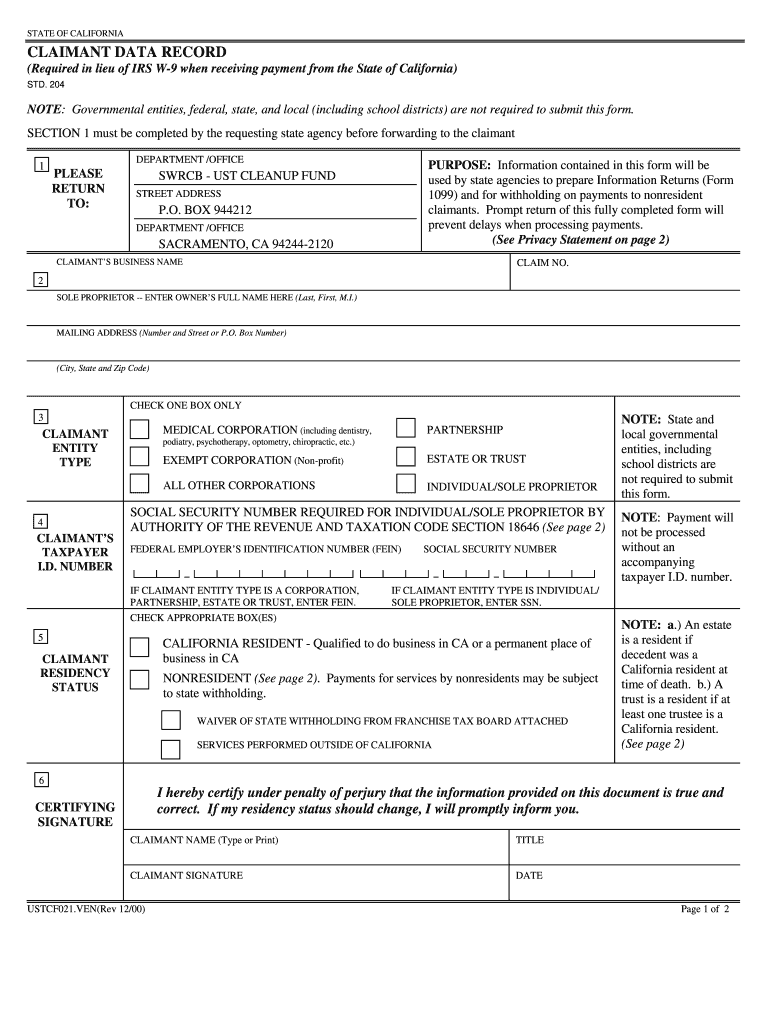
Click ‘Get Form’ to open the claimant data recordstd204 form in the editor.
Begin with Section 1, where the requesting state agency must complete their information before sending it to you. Ensure that the department/office details are accurate.
In Section 2, enter your business name and claim number. If you are a sole proprietor, provide your full name as required.
Fill out your mailing address in Section 3, ensuring all fields are completed accurately for prompt communication.
Select your entity type from the options provided in Section 4. Make sure to check only one box that applies to your situation.
Input your taxpayer identification number in Section 5. Remember, this is mandatory for processing payments.
In Section 6, certify the information by signing and dating the form. This confirms that all details provided are true and correct.
Start filling out your claimant data recordstd204 form online for free today!
Fill out claimant data recordstd204 form online It's free
Claimant data record std 204 form pdfPayee Data Record, STD 204 formSTD 204 fillable formClaimant data record std 204 form 2021Claimant data record std 204 form californiaPayee Data Record formSTD 205 Payee Data RecordPayee Data Record form medi cal
Security and compliance
At DocHub, your data security is our priority. We follow HIPAA, SOC2, GDPR, and other standards, so you can work on your documents with confidence.
STD. 204. NOTE: Governmental entities, federal, state, and local (including school districts) are not required to submit this form. SECTION 1 must beRead more
Cookie consent notice
This site uses cookies to enhance site navigation and personalize your experience.
By using this site you agree to our use of cookies as described in our Privacy Notice.
You can modify your selections by visiting our Cookie and Advertising Notice.