N y tr 2011 form-2026

Get Form
tr 570 form pdf Preview on Page 1

Here's how it works

01. Edit your tr 570 form pdf online
Type text, add images, blackout confidential details, add comments, highlights and more.
02. Sign it in a few clicks
Draw your signature, type it, upload its image, or use your mobile device as a signature pad.
03. Share your form with others
Send form tr 570 via email, link, or fax. You can also download it, export it or print it out.

How to use or fill out n y tr 2011 form with our platform

Form edit decoration
9.5
Ease of Setup
DocHub User Ratings on G2
9.0
Ease of Use
DocHub User Ratings on G2
  1. Click ‘Get Form’ to open the n y tr 2011 form in the editor.
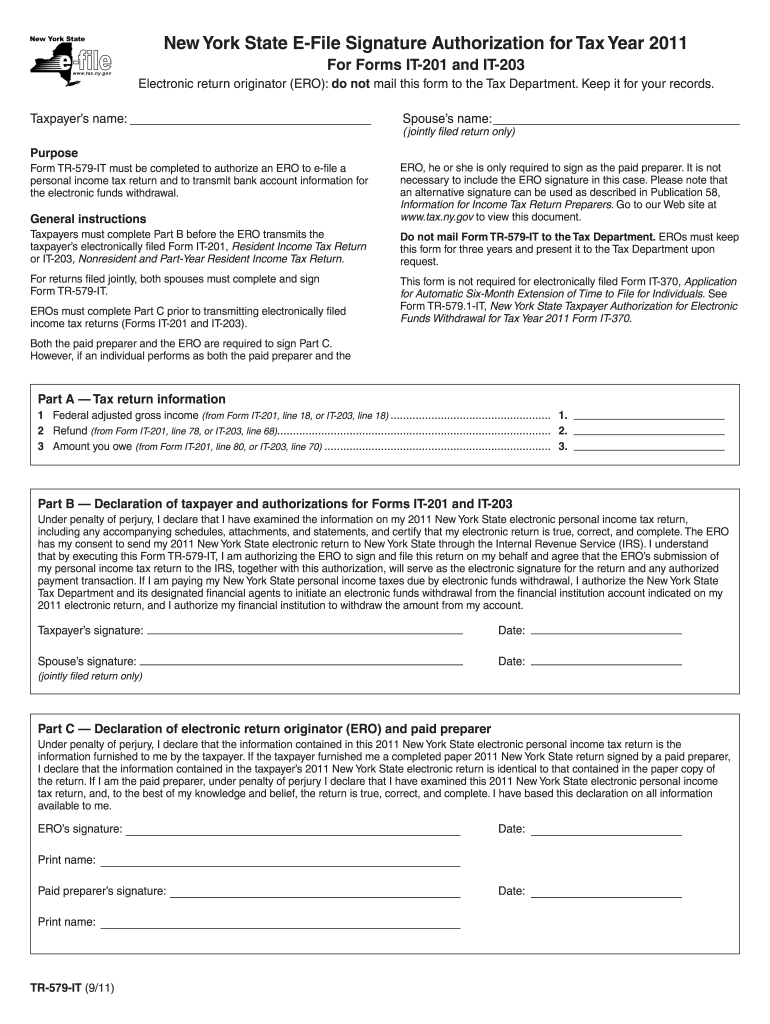
  2. Begin with Part A, where you will enter your Federal adjusted gross income, refund amount, and any amount owed. Ensure that these figures are accurate as they are derived from Forms IT-201 or IT-203.
  3. Proceed to Part B. Here, both taxpayers must declare the accuracy of their information under penalty of perjury. Sign and date the form in the designated fields.
  4. In Part C, if applicable, the Electronic Return Originator (ERO) and paid preparer must also sign and date. This confirms that all information is correct and complete.
  5. Review all entries for accuracy before saving your completed form. Utilize our platform’s features to easily edit any mistakes.

Start filling out your n y tr 2011 form for free today using our platform!

See more n y tr 2011 form versions

We've got more versions of the n y tr 2011 form form. Select the right n y tr 2011 form version from the list and start editing it straight away!
Versions Form popularity Fillable & printable
2023 4.4 Satisfied (41 Votes)
2022 4.4 Satisfied (60 Votes)
2021 4.8 Satisfied (81 Votes)
2020 4.3 Satisfied (92 Votes)
2019 4.2 Satisfied (82 Votes)
2018 4.1 Satisfied (32 Votes)
2016 4.1 Satisfied (60 Votes)
2015 4.4 Satisfied (529 Votes)
2014 4 Satisfied (30 Votes)
2012 4.3 Satisfied (35 Votes)
2011 3.8 Satisfied (39 Votes)
be ready to get more

Complete this form in 5 minutes or less

Get form

Got questions?

We have answers to the most popular questions from our customers. If you can't find an answer to your question, please contact us.
Contact us
File for free anytime, anywhere with Direct File! You can access IRS Direct File and New York State Direct File from your smartphone, laptop, tablet, or desktop computer.
NY Form IT-203 is a New York State income tax return for nonresidents and part-year residents. It is used to report income earned in New York State by individuals who are not considered to be full-year residents of the state.
If you are trying to locate, download, or print state of New York state tax forms, you can do so on the New York Department of Taxation website.
How do I determine if I need to file Form IT-201 or IT-203? It depends on your residency status. If you were a full-year resident of New York, youd file IT-201. If you moved during the year, IT-203 is more likely applicable.
State tax forms are also available at some public libraries. Visit the Department of Taxation and Finance website. Download State tax forms.

Security and compliance

At DocHub, your data security is our priority. We follow HIPAA, SOC2, GDPR, and other standards, so you can work on your documents with confidence.

Learn more
ccpa2
pci-dss
gdpr-compliance
hipaa
soc-compliance
be ready to get more

Complete this form in 5 minutes or less

Get form

People also ask

Form AU-11, Application for Credit or Refund of Sales or Use Tax, is the most commonly used refund form. You may submit this form using Sales Tax Web File if you have an Online Services account for your business.
Visit IRS.gov and go to Get Answers to Your Tax questions, then select Contact My Local Office followed by Find a Taxpayer Assistance Center Office to find the IRS walk-in office nearest you, as well as a list of services available at specific offices.

tr 570