Type text, add images, blackout confidential details, add comments, highlights and more.
02. Sign it in a few clicks
Draw your signature, type it, upload its image, or use your mobile device as a signature pad.
03. Share your form with others
Send lump sum payment example via email, link, or fax. You can also download it, export it or print it out.
How to use or fill out lump sum promissory note with our platform
Ease of Setup
DocHub User Ratings on G2
Ease of Use
DocHub User Ratings on G2
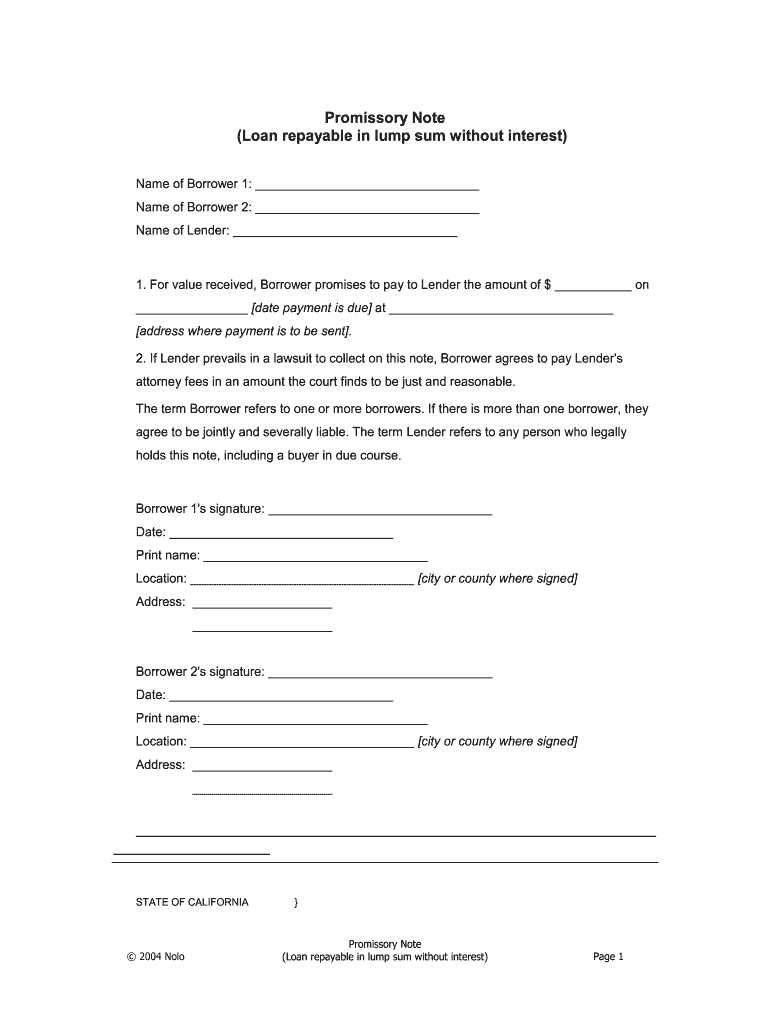
Click ‘Get Form’ to open the lump sum promissory note in the editor.
Begin by entering the names of the borrowers in the designated fields for 'Name of Borrower 1' and 'Name of Borrower 2'. If there is only one borrower, leave the second field blank.
Next, input the name of the lender in the 'Name of Lender' field.
In the section stating 'For value received', specify the loan amount in dollars and enter the due date for payment. Also, provide the address where payment should be sent.
Ensure that both borrowers sign and date their respective signature fields. They should also print their names and indicate their location (city or county) along with their addresses.
If applicable, complete any additional notarization requirements as indicated on the form.
Start using our platform today to easily fill out your lump sum promissory note for free!
Fill out lump sum promissory note online It's free
Lump sum promissory note templateLump sum promissory note template wordLump sum promissory note sampleLump sum promissory note exampleLump sum promissory note template freeLump sum promissory note template pdfLump sum promissory note pdfPromissory note template
Security and compliance
At DocHub, your data security is our priority. We follow HIPAA, SOC2, GDPR, and other standards, so you can work on your documents with confidence.
Receipts must be kept for all expenditures and submitted monthly with the voucher form. 43. 44, 7, Expenditures against any lump sum advance must be actual andRead more
Feb 29, 2016 Cables outstanding subordinated promissory note $36.75 per share approximating 27.2109 shares per $1,000 principal amount of notes.Read more
Cookie consent notice
This site uses cookies to enhance site navigation and personalize your experience.
By using this site you agree to our use of cookies as described in our Privacy Notice.
You can modify your selections by visiting our Cookie and Advertising Notice.