




Here's how it works

01. Edit your new mexico nttc online
Type text, add images, blackout confidential details, add comments, highlights and more.

02. Sign it in a few clicks
Draw your signature, type it, upload its image, or use your mobile device as a signature pad.

03. Share your form with others
Send nm nttc form online via email, link, or fax. You can also download it, export it or print it out.
How to use or fill out New Mexico NTTC with our platform

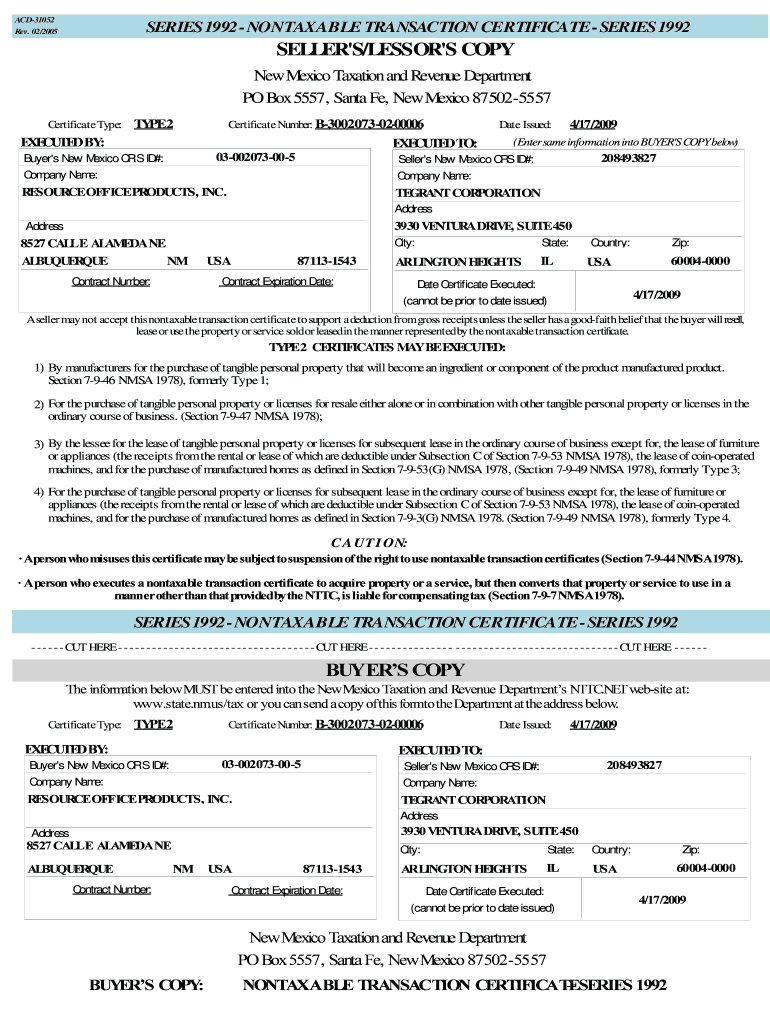
- Click ‘Get Form’ to open the New Mexico Nontaxable Transaction Certificate (NTTC) in the editor.
- Begin by entering the 'Certificate Type' and 'Certificate Number' at the top of the form. Ensure these details match your records.
- Fill in the 'Date Issued' field with the date you are completing the certificate. This date cannot be prior to when you issue it.
- Input both the 'Buyer's New Mexico CRS ID #' and 'Seller's New Mexico CRS ID #' accurately to avoid any processing issues.
- Complete the company names and addresses for both buyer and seller, ensuring all information is correct and legible.
- Review all entries for accuracy before finalizing. Once satisfied, save your document or send it directly through our platform for submission.
Start using our platform today to streamline your document editing and form completion for free!
Fill out new mexico nttc online
It's free
It's free
Security and compliance
At DocHub, your data security is our priority. We follow HIPAA, SOC2, GDPR, and other standards, so you can work on your documents with confidence.
Learn more


Related forms

Transamerica life insurance beneficiary change form
The document is a Beneficiary Change Form for Transamerica Financial Life Insurance Company and its affiliates. It outli ...

The Rossetti Infant-Toddler Language Scale : a Measure of
The Rossetti Infant-Toddler Language Scale is a tool used to evaluate the communication skills of children aged 0-36 mon ...

Consumer Complaint form - Florida Attorney General
The document is a consumer complaint form from the Office of the Attorney General of Florida, designed for individuals t ...

Practicum log examples
The document is a Practicum Weekly Log Report for the Winter 2016 term, detailing the structure and requirements for rec ...

VERIFICATION OF MEDICAL TRANSPORTATION
The document is Form MT-3, a verification form for medical transportation under the Medicaid program. It requires inform ...