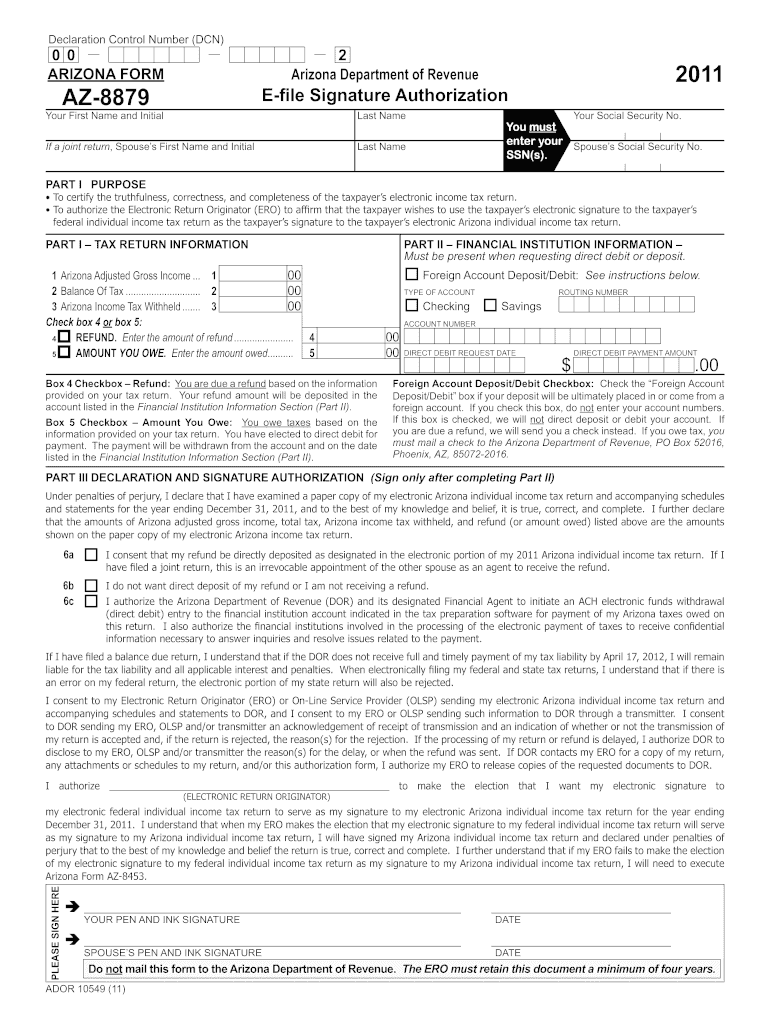
Arizona form az 8879 2011-2026

Get Form
az 8879 Preview on Page 1

Here's how it works

01. Edit your az 8879 online
Type text, add images, blackout confidential details, add comments, highlights and more.
02. Sign it in a few clicks
Draw your signature, type it, upload its image, or use your mobile device as a signature pad.
03. Share your form with others
Send it via email, link, or fax. You can also download it, export it or print it out.

How to use or fill out Arizona Form AZ 8879 2011 with DocHub

Form edit decoration
9.5
Ease of Setup
DocHub User Ratings on G2
9.0
Ease of Use
DocHub User Ratings on G2
  1. Click ‘Get Form’ to open Arizona Form AZ 8879 2011 in the editor.
  2. Begin by entering your first name, middle initial, and last name in the designated fields. If filing jointly, include your spouse's information as well.
  3. Input your Social Security Number (SSN) and your spouse’s SSN if applicable. Ensure accuracy as this is crucial for tax processing.
  4. In Part I, provide details about your Arizona Adjusted Gross Income, Balance of Tax, and Arizona Income Tax Withheld in the respective fields.
  5. Select either box 4 for a refund or box 5 for an amount owed. Enter the corresponding amounts as required.
  6. Complete Part II by filling in your financial institution information if you are requesting direct deposit or debit. Include account type, routing number, and account number.
  7. In Part III, read through the declaration carefully before signing. Ensure all information is correct before providing your signature and date.

Start using our platform today to easily complete Arizona Form AZ 8879 2011 online for free!

See more arizona form az 8879 2011 versions

We've got more versions of the arizona form az 8879 2011 form. Select the right arizona form az 8879 2011 version from the list and start editing it straight away!
Versions Form popularity Fillable & printable
2015 4.8 Satisfied (229 Votes)
2011 4.4 Satisfied (527 Votes)
2006 4.4 Satisfied (304 Votes)
be ready to get more

Complete this form in 5 minutes or less

Get form

Got questions?

We have answers to the most popular questions from our customers. If you can't find an answer to your question, please contact us.
Contact us
Because TurboTax is a Do-It-Yourself Tax Software, there is no way to include or generate a Form 8879.
Your tax professional will typically prepare the form for you as part of their tax preparation services. Once your tax return is ready for review, your tax preparer will present you with Form 8879 to capture your authorization to e-file.
If you are trying to locate, download, or print Arizona state tax forms, you can do so on the state of Arizona Department of Revenue, at . Commonly used Arizona state tax forms are also available at offices, public libraries, post offices, and other county offices.
Arizona Form 8879 - Electronic Signature Authorization This form is to docHub the truthfulness, correctness and completeness of the taxpayers electronic income tax return.
Taxpayers and the ERO representative must always complete and sign Form 8879 or Form 8878 for the Practitioner PIN method of electronic signature. EROs must also sign with a PIN.

Security and compliance

At DocHub, your data security is our priority. We follow HIPAA, SOC2, GDPR, and other standards, so you can work on your documents with confidence.

Learn more

People also ask

Form 8879 is used to authorize the electronic filing (e-file) of original and amended returns. Use this Form 8879 (Rev. January 2021) to authorize e-file of your Form 1040, 1040-SR, 1040-NR, 1040-SS, or 1040- X, for tax years beginning with 2019.
field in the PIN screen of the Electronic Filing folder. on the PIN screen indicates the Electronic Return Originator (ERO) entered the PINs on behalf of the taxpayers, Form 8879 (or Form 8878) will print.

Related links