Understanding your paycheck 1131l1 form 2026

Get Form
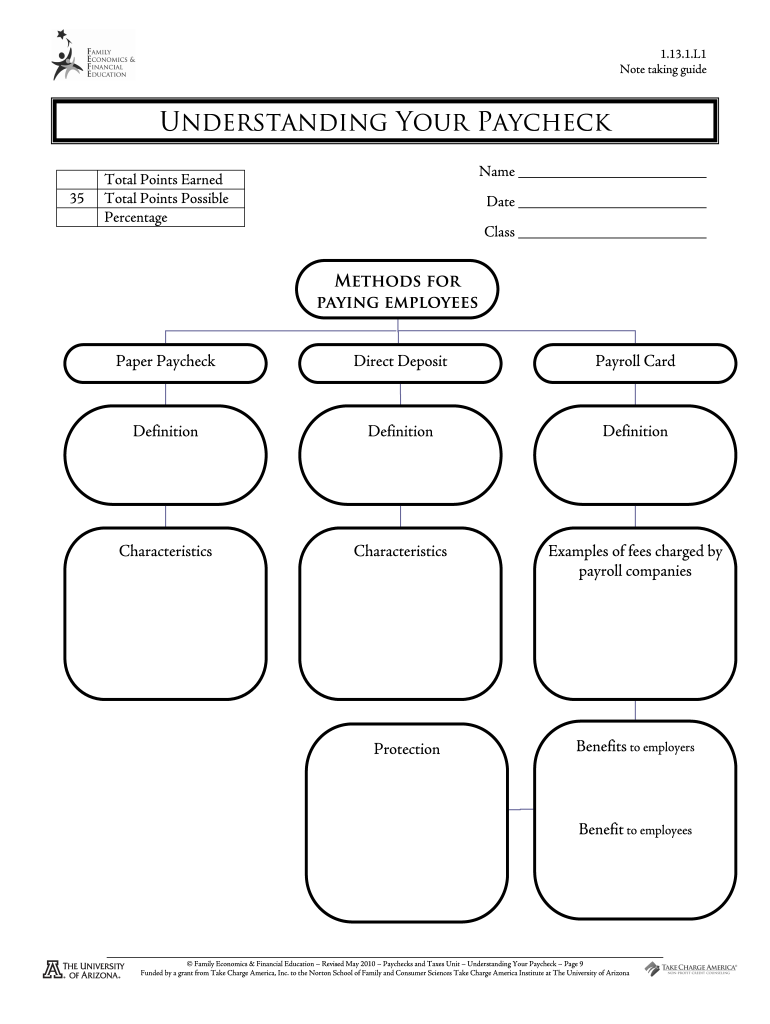
understanding your paycheck 1131l1 form Preview on Page 1

Here's how it works

01. Edit your form online
Type text, add images, blackout confidential details, add comments, highlights and more.
02. Sign it in a few clicks
Draw your signature, type it, upload its image, or use your mobile device as a signature pad.
03. Share your form with others
Send it via email, link, or fax. You can also download it, export it or print it out.

How to use or fill out understanding your paycheck 1131l1 form with our platform

Form edit decoration
9.5
Ease of Setup
DocHub User Ratings on G2
9.0
Ease of Use
DocHub User Ratings on G2
  1. Click ‘Get Form’ to open the understanding your paycheck 1131l1 form in the editor.
  2. Begin by entering your name and date at the top of the form. This personal information is essential for identification.
  3. In the 'Total Points Earned' section, input your points based on the worksheet questions provided.
  4. Fill out the 'Methods for Paying Employees' section by selecting from options like Paper Paycheck, Direct Deposit, or Payroll Card. Provide definitions and characteristics for each method.
  5. Complete the 'Reading A Paycheck Stub' section by entering gross pay, net pay, and deductions as per your calculations.
  6. Review all entries for accuracy before saving or exporting your completed form. Utilize our platform's features to ensure everything is correct.

Start using our platform today to easily fill out and manage your understanding your paycheck 1131l1 form online for free!

be ready to get more

Complete this form in 5 minutes or less

Get form

Got questions?

We have answers to the most popular questions from our customers. If you can't find an answer to your question, please contact us.
Contact us
Below are the most common paycheck stub abbreviations that deal with before-tax deductions: 401k/Ret 401k or retirement withholdings. DCR Dependent care reimbursement. Den/Dental Dental premium. INS/MED Insurance or medical insurance.
Understanding Your Paper Pay Stub Box 1: Employee Information. Box 2: Employer/Department Information. Box 3: Employee Federal and State Withholding Tax Status. Box 4: Hours and Earnings. Box 5: Taxes. Box 6: Before Tax Deductions. Box 7: After Tax Deductions. Box 8: Employer Paid Benefits.
What you earn (based on your wages or salary) is called your gross income. Employers withhold (or deduct) some of their employees pay in order to cover payroll taxes and income tax. Money may also be deducted, or subtracted, from a paycheck to pay for retirement or health benefits.
Many budgets begin with the 50/30/20 rule. With this method, youll set aside 50% of your monthly income to cover essential expenses (your needs), 30% for nonessential expenses (your wants) and 20% for savings.
If you question the amounts shown, you can go back and compare your paycheck statements to the W-2 totals. Contact your employer if you dont understand your statement or if your records dont agree with the W-2.

Security and compliance

At DocHub, your data security is our priority. We follow HIPAA, SOC2, GDPR, and other standards, so you can work on your documents with confidence.

Learn more
ccpa2
pci-dss
gdpr-compliance
hipaa
soc-compliance
be ready to get more

Complete this form in 5 minutes or less

Get form