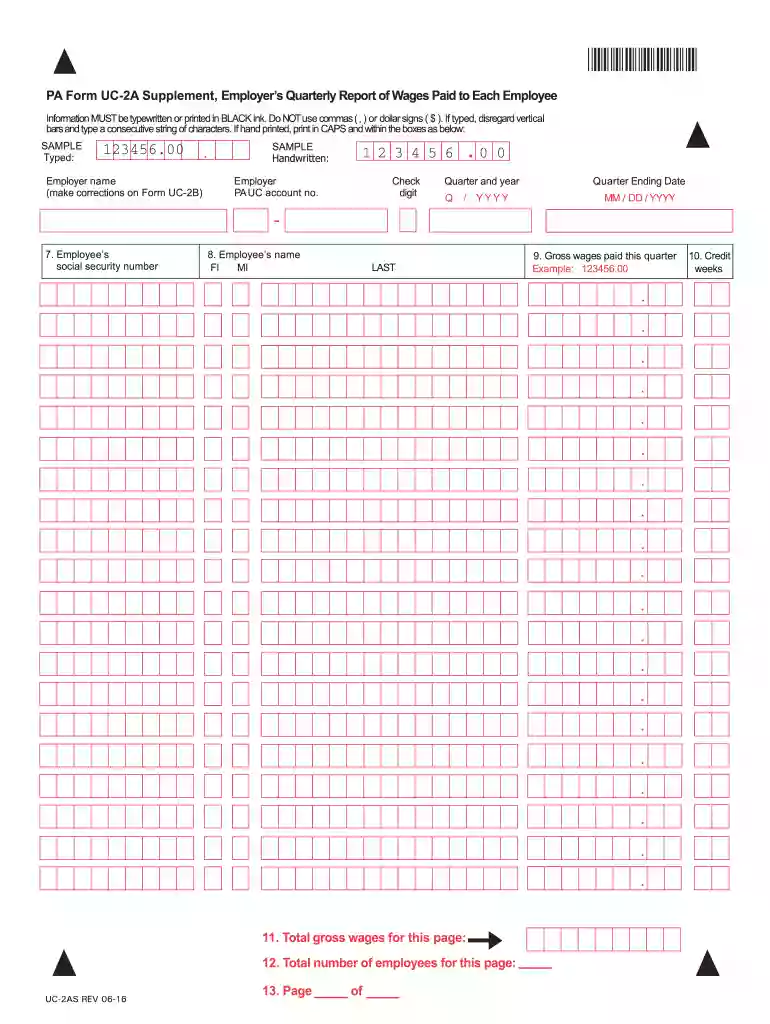
PA Form UC-2A Supplement Employers Quarterly Report - PA gov 2026

Get Form
uc2 report Preview on Page 1

Here's how it works

01. Edit your uc2 report online
Type text, add images, blackout confidential details, add comments, highlights and more.

02. Sign it in a few clicks
Draw your signature, type it, upload its image, or use your mobile device as a signature pad.

03. Share your form with others
Send uc 2 form via email, link, or fax. You can also download it, export it or print it out.

How to use or fill out PA Form UC-2A Supplement Employers Quarterly Report - PA gov with DocHub

Form edit decoration
9.5
Ease of Setup
DocHub User Ratings on G2
9.0
Ease of Use
DocHub User Ratings on G2
  1. Click ‘Get Form’ to open the PA Form UC-2A Supplement in our editor.
  2. Begin by entering your employer name and PA UC account number at the top of the form. Ensure that all information is typed in black ink or printed clearly in capital letters.
  3. In section 7, input each employee's social security number without using commas or dollar signs. If typing, disregard vertical bars and type a consecutive string of characters.
  4. Next, fill in the employee’s name in section 8, ensuring it is clear and legible. Follow this by indicating the quarter and year for which you are reporting.
  5. For section 9, enter the total gross wages paid during this quarter. Remember to format it correctly as shown in the sample (e.g., 123456.00).
  6. Complete section 10 by noting any credit weeks applicable to your report, followed by filling out section 11 with the total gross wages for that page.
  7. Finally, review all entries for accuracy before saving or exporting your completed form directly from our platform.

Start using our platform today to easily complete your PA Form UC-2A Supplement for free!

See more PA Form UC-2A Supplement Employers Quarterly Report - PA gov versions

We've got more versions of the PA Form UC-2A Supplement Employers Quarterly Report - PA gov form. Select the right PA Form UC-2A Supplement Employers Quarterly Report - PA gov version from the list and start editing it straight away!
Versions Form popularity Fillable & printable
2016 4.8 Satisfied (258 Votes)
2011 4.4 Satisfied (294 Votes)
be ready to get more

Complete this form in 5 minutes or less

Get form

Got questions?

We have answers to the most popular questions from our customers. If you can't find an answer to your question, please contact us.
Contact us
Pennsylvania New Hire Paperwork I-9 form for employee eligibility requirements. W-4 form for federal tax reporting. Pennsylvania New Hire Reporting form. Disability Self-Identification (required for companies doing business with the government)
A quarterly form that reports SUTA taxes for the state in which a business operates. State Unemployment Quarterly Return Extended Definition. Employers must fill out state unemployment tax returns to report SUTA (SUI) taxes. The return varies by state.
UC-2A: Employers Quarterly Report Of Wages Paid To Each Employee. UC-2A Supplement: To Employers Quarterly Report Of Wages Paid To Each Employee This form is used to list employees social security numbers, names, gross wages earned, and credit weeks for a particular quarter.
My spouses W-2 form has the following abbreviations in Box 14: LST-710501 and PA UC. Through research, I found that LST stands for Local Services Tax and PA UC stands for PA Unemployment Compensation.
PA UC Tax Online Services. Unemployment Compensation. Pennsylvania.

Security and compliance

At DocHub, your data security is our priority. We follow HIPAA, SOC2, GDPR, and other standards, so you can work on your documents with confidence.

Learn more
ccpa2
pci-dss
gdpr-compliance
hipaa
soc-compliance

People also ask

Mail report. Use the enclosed return envelope. If the envelope is missing, mail report to the PA Department of Labor Industry, Office of Unemployment Compensation Tax Services, PO Box 68568, Harrisburg, PA 17106-8568.

pa form uc 2