




Here's how it works

01. Edit your champs fall risk assessment online
Type text, add images, blackout confidential details, add comments, highlights and more.

02. Sign it in a few clicks
Draw your signature, type it, upload its image, or use your mobile device as a signature pad.

03. Share your form with others
Send champs fall risk assessment tool via email, link, or fax. You can also download it, export it or print it out.
How to use or fill out Hospitalization Risk Assessment - CHAMP with our platform

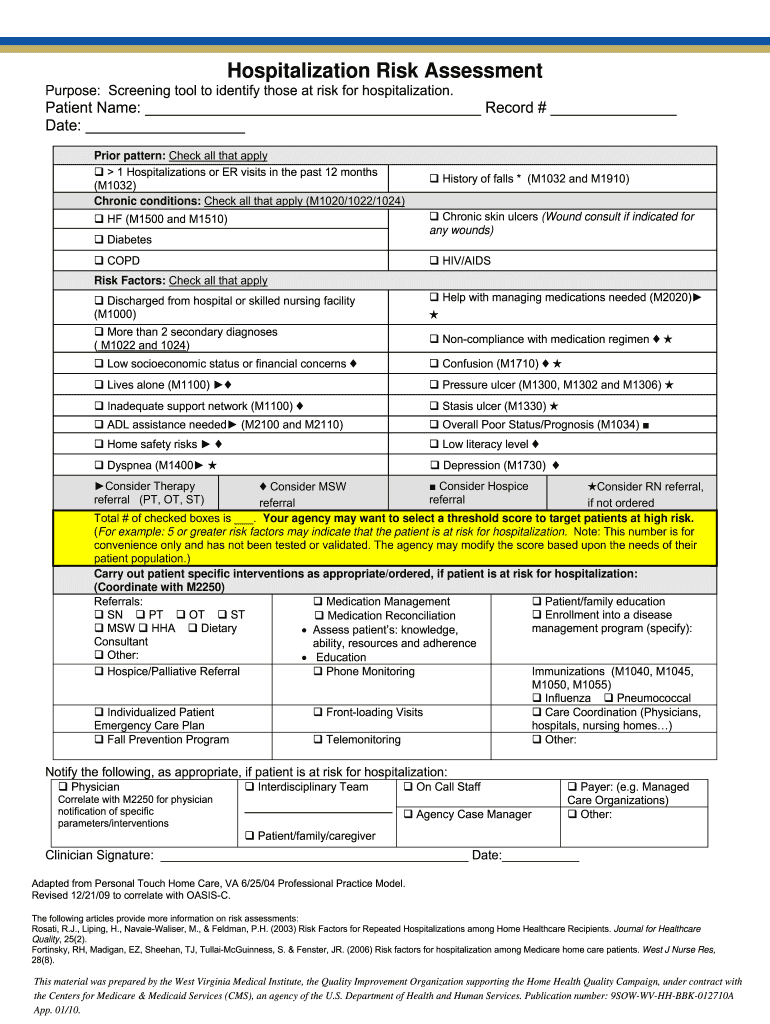
- Click ‘Get Form’ to open the Hospitalization Risk Assessment - CHAMP in the editor.
- Begin by entering the Patient Name and Record Number at the top of the form. Ensure accuracy as this information is crucial for tracking.
- In the 'Prior pattern' section, check all applicable boxes indicating any hospitalizations or ER visits within the past year.
- Move to the 'Chronic conditions' section. Check all relevant conditions that apply to the patient, such as diabetes or COPD.
- Next, review the 'Risk Factors' section. Carefully check all factors that may contribute to hospitalization risk, ensuring a comprehensive assessment.
- Calculate and note the total number of checked boxes at the end of this section. This score can help identify patients at high risk.
- Proceed to document any patient-specific interventions required based on identified risks, including referrals and education needs.
- Finally, ensure that all necessary notifications are documented before signing and dating the form at the bottom.
Start using our platform today for free to streamline your form completion process!
Fill out Hospitalization Risk Assessment - CHAMP online
It's free
It's free
Security and compliance
At DocHub, your data security is our priority. We follow HIPAA, SOC2, GDPR, and other standards, so you can work on your documents with confidence.
Learn more


