Type text, add images, blackout confidential details, add comments, highlights and more.
02. Sign it in a few clicks
Draw your signature, type it, upload its image, or use your mobile device as a signature pad.
03. Share your form with others
Send guardianship papers for adults via email, link, or fax. You can also download it, export it or print it out.
How to Use or Fill Out Guardianship Paper with Our Platform
Ease of Setup
DocHub User Ratings on G2
Ease of Use
DocHub User Ratings on G2
Click ‘Get Form’ to open the guardianship paper in the editor.
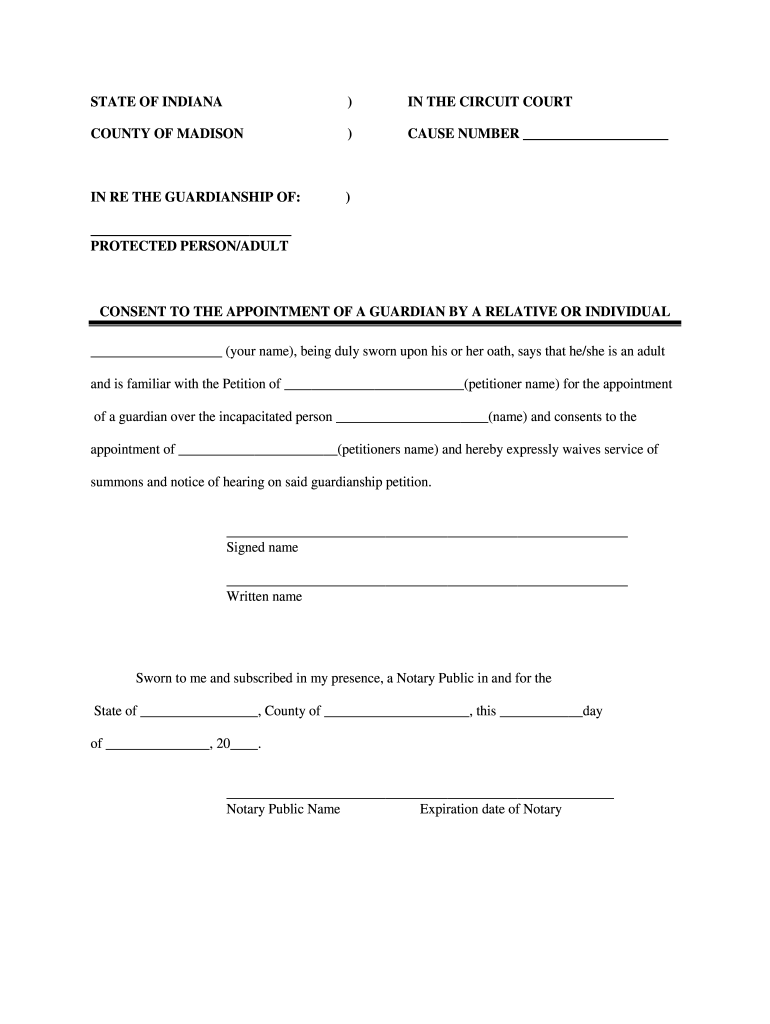
Begin by filling in the 'Cause Number' section at the top of the form. This number is essential for identifying your case within the court system.
In the 'Protected Person/Adult' field, enter the name of the individual for whom guardianship is being sought. Ensure accuracy as this is a legal document.
Next, provide your name in the consent section where it states 'your name.' This indicates that you are consenting to the appointment of a guardian.
Fill in the petitioner's name in both instances where it appears, confirming who will be appointed as guardian.
Sign and print your name at the designated areas to validate your consent. Make sure to follow any additional instructions regarding notarization.
Finally, review all entries for accuracy before saving or exporting your completed document for submission.
Start using our platform today to easily complete your guardianship paper online for free!
Legal Guardianship forms PDFGuardianship papers californiaGuardianship papers in case of deathTemporary guardianship papersGuardianship papers for disabled adultsTemporary guardianship form California PDFGuardianship papers onlineGuardianship papers for child
Security and compliance
At DocHub, your data security is our priority. We follow HIPAA, SOC2, GDPR, and other standards, so you can work on your documents with confidence.
Vienna Convention on Relations and Optional Protocol on
The private residence of a diplomatic agent shall enjoy the same invio- lability and protection as the premises of the mission. 2. His papers, correspondenceRead more
Cookie consent notice
This site uses cookies to enhance site navigation and personalize your experience.
By using this site you agree to our use of cookies as described in our Privacy Notice.
You can modify your selections by visiting our Cookie and Advertising Notice.