Type text, add images, blackout confidential details, add comments, highlights and more.
02. Sign it in a few clicks
Draw your signature, type it, upload its image, or use your mobile device as a signature pad.
03. Share your form with others
Send it via email, link, or fax. You can also download it, export it or print it out.
How to use or fill out incometaxfill 2012 form with DocHub
Ease of Setup
DocHub User Ratings on G2
Ease of Use
DocHub User Ratings on G2
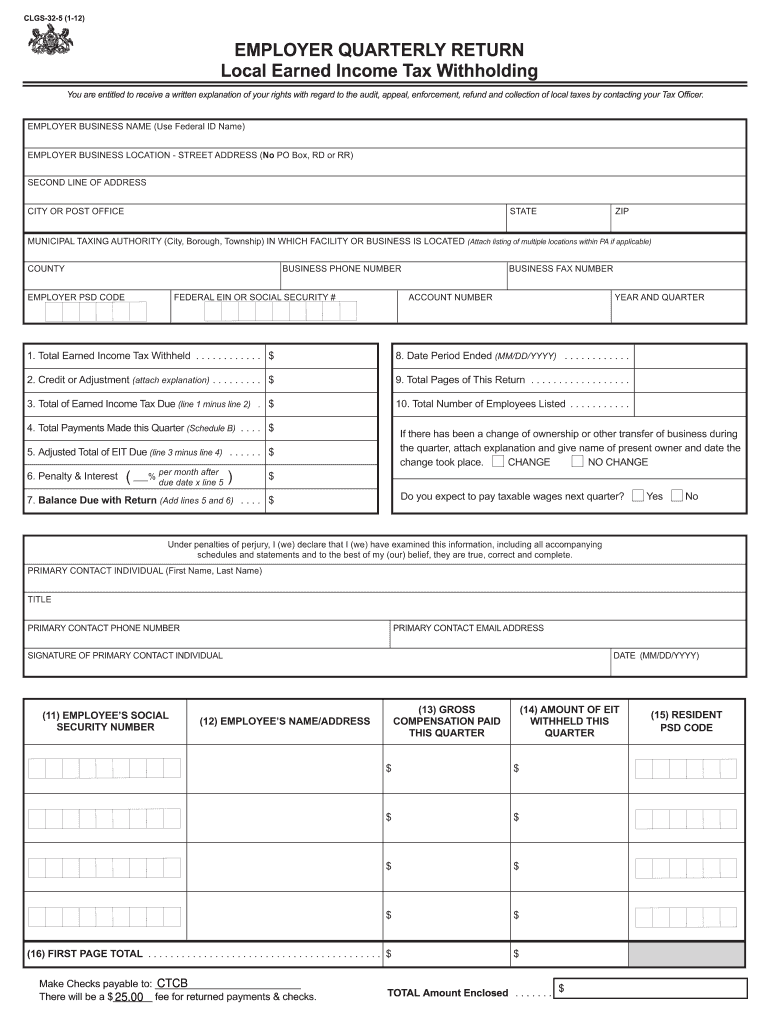
Click ‘Get Form’ to open the incometaxfill 2012 form in our editor.
Begin by entering your Employer Business Name and Location. Ensure you provide a complete street address without using PO Box, RD, or RR.
Fill in the Municipal Taxing Authority and County where your business is located. This information is crucial for local tax compliance.
Input your Federal EIN or Social Security Number, along with your Business Phone and Fax Numbers. This helps in identifying your business accurately.
Complete the financial sections: Total Earned Income Tax Withheld, Credit or Adjustment, and Total Payments Made this Quarter. Be precise to avoid discrepancies.
Indicate if there has been any change of ownership during the quarter and provide necessary explanations if applicable.
Finally, review all entries for accuracy before signing as the Primary Contact Individual. Ensure that all required fields are filled out correctly.
Start filling out your incometaxfill 2012 form today for free using our platform!
We've got more versions of the incometaxfill 2012 form form. Select the right incometaxfill 2012 form version from the list and start editing it straight away!
Generally, the IRS can include returns filed within the last three years in an audit. If we identify a substantial error, we may add additional years. We usually dont go back more than the last six years.
Does IRS debt go away after 7 years?
The IRS generally has 10 years from the assessment date to collect unpaid taxes. The IRS cant extend this 10-year period unless the taxpayer agrees to extend the period as part of an installment agreement to pay tax debt or a court judgment allows the IRS to collect unpaid tax after the 10-year period.
How far back can the IRS go to get back taxes?
Generally, under IRC 6502, the IRS can collect back taxes for 10 years from the date of assessment. The IRS cannot chase you forever and, due to the 1998 IRS Reform and Restructuring Act, taxpayers have a little relief from the IRS collections divisions pursuit of an IRS balance due.
How can I get my tax return from 10 years ago?
Prior year tax returns are available from the IRS for a fee. Taxpayers can request a copy of a tax return by completing and mailing Form 4506, Request for Copy of Tax Return, to the IRS address listed on the form.
Can I still file my 2012 tax return?
You can still file your late 2012 taxes! Prepare them online with PriorTax today. * The IRS does not allow electronic filing of prior year tax returns, and the deadline for 2012 electronic filing has passed on October 15, 2013. You may still prepare your 2012 taxes using our website.
Related Searches
2012 Form 1040 instructions1040 Form 20132013 Form 1040 instructions2009 Form 10402011 Form 10402012 schedule c2010 Form 1040 InstructionsWwwxx 2018 tax login 1040 pdf
Security and compliance
At DocHub, your data security is our priority. We follow HIPAA, SOC2, GDPR, and other standards, so you can work on your documents with confidence.
Does the IRS destroy tax records after 7 years? No, the IRS destroys most individual returns after 6 years, unless the timeline is extended because they are associated with an open balance due. For example, returns filed in 2019 will likely be destroyed in 2026.
What documents must be kept for 7 years?
Keep for 7 Years Income tax returns. Any forms that support income or a deduction on your tax return (e.g., receipts, canceled checks, W-2 forms) Records of selling a house or stock (documentation for capital gains tax) Records of paid-out loans. Records of sold investments. Mortgage documents.
What is the IRS 7 year rule?
Keep records for 7 years if you file a claim for a loss from worthless securities or bad debt deduction. Keep records for 6 years if you do not report income that you should report, and it is more than 25% of the gross income shown on your return. Keep records indefinitely if you do not file a return.
Related links
Forms and Publications | Department of Revenue
Note: Please know that all fill-in PDF forms should be downloaded and saved to your computer or device before you start entering
Cookie consent notice
This site uses cookies to enhance site navigation and personalize your experience.
By using this site you agree to our use of cookies as described in our Privacy Notice.
You can modify your selections by visiting our Cookie and Advertising Notice.