Type text, add images, blackout confidential details, add comments, highlights and more.
02. Sign it in a few clicks
Draw your signature, type it, upload its image, or use your mobile device as a signature pad.
03. Share your form with others
Send form 168 via email, link, or fax. You can also download it, export it or print it out.
How to use or fill out omers form 168 with our platform
Ease of Setup
DocHub User Ratings on G2
Ease of Use
DocHub User Ratings on G2
Click ‘Get Form’ to open it in the editor.
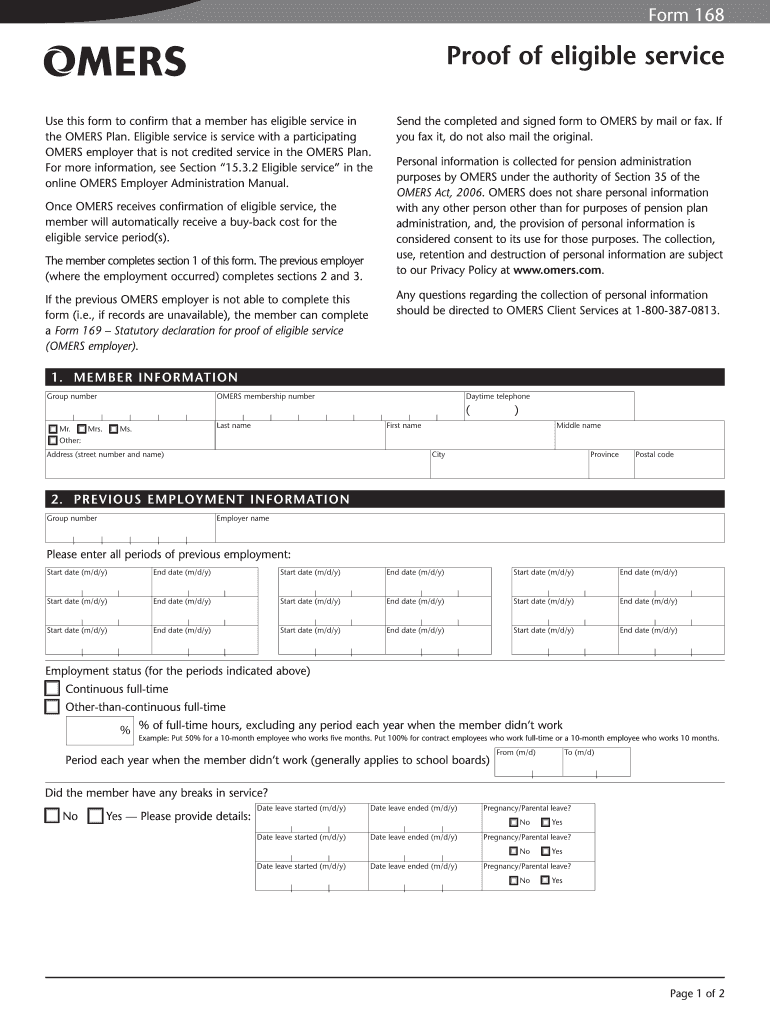
Begin by filling out Section 1, 'MEMBER INFORMATION'. Enter your group number, OMERS membership number, and personal details including your name and contact information.
Proceed to Section 2, 'PREVIOUS EMPLOYMENT INFORMATION'. List all periods of previous employment by entering the start and end dates for each period. Indicate your employment status and any breaks in service.
In Section 3, answer whether you were a member of another registered pension plan during the service period. If yes, provide the required details about that plan.
Finally, complete Section 4, 'EMPLOYER AUTHORIZATION'. Ensure an authorized signing officer provides their signature and contact information before submitting the form.
Start using our platform today to fill out your omers form 168 easily and for free!
Taking your pension: your options take some or all of your pension pot as a cash lump sum, no matter what size it is. buy an annuity - you can take a cash lump sum too. take money directly from the pension fund, and leave the rest invested (income drawdown) - there wont be any restrictions for how much you can take.
How to cash out OMERS pension?
You may withdraw all or some of the funds in your AVC account at any time within the first six months after retirement, or upon leaving your OMERS employer if you keep your pension with OMERS*. After that, you can withdraw all or some of the funds during the March/April window.
Is OMERS taxable?
A common-law spouse who wishes to apply for a survivor benefit must submit to OMERS Form 159 Statutory Declaration of Common-Law Relationship , plus supporting documents to prove the common-law relationship with the member continued for at least three consecutive years before the relevant date (a shorter time period
What does OMERS stand for?
Your employer also contributes an equal amount to the OMERS Plan. These contributions are not a taxable benefit; you do not count them as income. Once you retire and begin collecting your OMERS pension, your pension may be taxable and withholding taxes may be deducted from your payments.
Can I cash out my entire pension?
Cashing out a pension after leaving a job is an option in some cases, but the process can vary depending on plan rules, vesting status and tax implications. Some pensions allow a lump-sum cash-out, offering immediate access to funds but at the cost of potential taxes and penalties.
omers form 102
Omers form 168 pdfOmers form 168 pdf downloadOMERS form 169Omers form 168 downloadOMERS form 147Omers form 159OMERS form 143OMERS form 158
Security and compliance
At DocHub, your data security is our priority. We follow HIPAA, SOC2, GDPR, and other standards, so you can work on your documents with confidence.
Your options as a working member of the OMERS Plan You can only withdraw funds during the annual withdrawal window, which is March 1 to April 30.
omers form 143
A/UX Text Processing Tools
The same proprietary and copyright notices must be afftxed to any permitted copies as were afftxed to the original. Under the law, copying includes translatingRead more
Cookie consent notice
This site uses cookies to enhance site navigation and personalize your experience.
By using this site you agree to our use of cookies as described in our Privacy Notice.
You can modify your selections by visiting our Cookie and Advertising Notice.